Loading
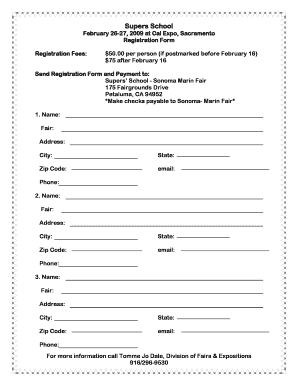
Get 2007 Supers School
How it works
-

Open form follow the instructions
-

Easily sign the form with your finger
-

Send filled & signed form or save
How to fill out the 2007 Supers School online
The 2007 Supers School registration form is essential for those wishing to participate in this informative event. Filling it out online can streamline the process and ensure that your information is submitted accurately.
Follow the steps to complete the registration form seamlessly.
- Click ‘Get Form’ button to obtain the registration form and open it in your preferred editor.
- Begin by entering the first participant's name in the designated field. Make sure to use their full legal name.
- Fill in the 'Fair' field with the name of the fair associated with the participant.
- Input the address of the participant, ensuring to include street number and name.
- Provide the city where the participant resides.
- Select the participant's state from the dropdown options available.
- Enter the participant's zip code, which helps in accurately identifying their location.
- Include the participant's email address for future correspondence.
- Enter the participant's phone number, making sure to include the area code.
- If there are additional participants, repeat steps 2 to 9 for each individual.
- Review all entered information for accuracy and completeness.
- After confirming that all details are correct, save your changes, download the form, print it, or prepare to share it as needed.
Complete your registration online today to secure your spot!
Industry-leading security and compliance
US Legal Forms protects your data by complying with industry-specific security standards.
-
In businnes since 199725+ years providing professional legal documents.
-
Accredited businessGuarantees that a business meets BBB accreditation standards in the US and Canada.
-
Secured by BraintreeValidated Level 1 PCI DSS compliant payment gateway that accepts most major credit and debit card brands from across the globe.