Loading
Get 10-11-24.pdf. Letterhead For Dss With Seal
How it works
-

Open form follow the instructions
-

Easily sign the form with your finger
-

Send filled & signed form or save
How to use or fill out the 10-11-24.pdf. Letterhead For DSS With Seal online
This guide provides users with a comprehensive overview of how to accurately fill out the 10-11-24.pdf. Letterhead For DSS With Seal. Following these detailed steps will ensure that the form is completed correctly, efficiently, and in compliance with necessary regulations.
Follow the steps to complete the form seamlessly.
- Use the 'Get Form' button to access the document. This will allow you to obtain the form and open it in your preferred document editor.
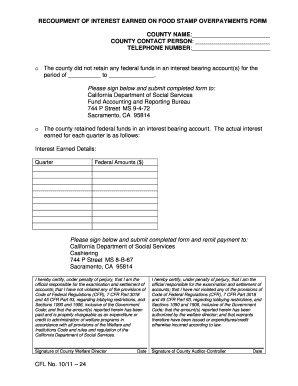
- Begin by filling in the 'County Name' field. Enter the official name of your county exactly as it is recognized.
- Next, provide the 'County Contact Person.' This should be the individual designated to handle inquiries related to this form.
- Include a 'Telephone Number' for the contact person. Ensure it is a valid number where the contact can be reached.
- Indicate whether your county did not retain any federal funds in an interest-bearing account by checking the appropriate box. If applicable, mark the dates for the retention period.
- If your county retained federal funds, provide the details of the interest earned for each quarter in the designated section.
- Before submitting, certify the accuracy of the information by signing in the designated area for the County Welfare Director and the County Auditor-Controller.
- Lastly, submit the completed form. If payment is required, ensure to remit it to the appropriate address for fund accounting or cashiering.
- You can then save the changes, download the document, print it for records, or share it as necessary.
Complete your forms online today for a streamlined process.
Industry-leading security and compliance
US Legal Forms protects your data by complying with industry-specific security standards.
-
In businnes since 199725+ years providing professional legal documents.
-
Accredited businessGuarantees that a business meets BBB accreditation standards in the US and Canada.
-
Secured by BraintreeValidated Level 1 PCI DSS compliant payment gateway that accepts most major credit and debit card brands from across the globe.