Phone: +49 69 99 99 20 79 Fax: +49 69 99 99 20 81 service timematters.comZollvollmacht Export Bitte fllen Sie dieses Dokument vollstndig aus uns senden Sie es schnellstmglich zurck. Ohne die oben.
Loading

Open form follow the instructions

Easily sign the form with your finger

Send filled & signed form or save
How to fill out the DE Time:matters Zollvollmacht Export online
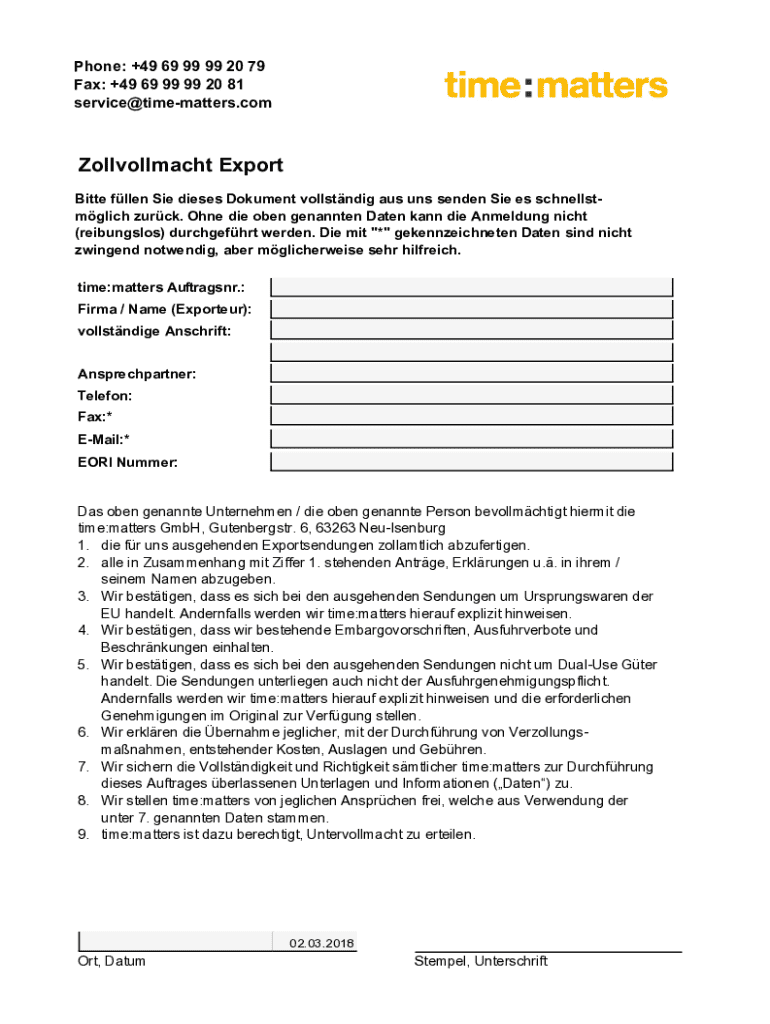
The DE Time:matters Zollvollmacht Export is an important document for authorizing the customs clearance of export shipments. This guide provides clear instructions to help users fill out the form accurately and efficiently, ensuring a smooth process.
Follow the steps to complete the Zollvollmacht Export form effectively.
- Press the ‘Get Form’ button to retrieve the Zollvollmacht Export document and access it in the online editor.
- Enter the time:matters order number. This helps identify your specific request within the time:matters system.
- Fill in the company or name of the exporter. Ensure this is the entity authorized to export goods.
- Provide the complete address of the exporting entity. This should include the street address, city, postal code, and country.
- Indicate a contact person who will be responsible for communication regarding the export. Include their name.
- Add the phone number for the contact person. This ensures timely communication if required.
- Optionally, include a fax number, as this field is marked with an asterisk and is not mandatory.
- Optionally, you may provide an email address for electronic correspondence, also denoted with an asterisk.
- Fill in the EORI number, which is necessary for customs clearance. This ensures compliance with EU regulations.
- Review the confirmations regarding the origin of goods, compliance with embargo regulations, and costs associated with customs clearance. Make sure to read each statement carefully.
- Include the date and location where the document is being signed. This confirms the submission details.
- Finally, ensure that the authorized signatory provides a signature and stamp if required. This finalizes the document.
- After completing all fields, you can save changes, download, print, or share the form as necessary.
Complete your Zollvollmacht Export document online today for a seamless export experience.
Experience a faster way to fill out and sign forms on the web. Access the most extensive library of templates available.
Use professional pre-built templates to fill in and sign documents online faster. Get access to thousands of forms.
If you believe that this page should be taken down, please follow our DMCA take down process here.