Loading
Get Canada Dnd 497-e 2013-2026
How it works
-

Open form follow the instructions
-

Easily sign the form with your finger
-

Send filled & signed form or save
How to fill out the Canada DND 497-E online
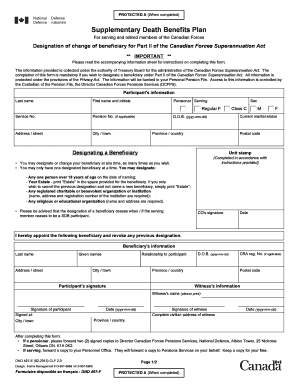
The Canada DND 497-E form is essential for serving and retired members of the Canadian Forces to designate a beneficiary for the Supplementary Death Benefits Plan. This guide will provide clear, step-by-step instructions on how to complete this important document online.
Follow the steps to successfully complete the Canada DND 497-E online.
- Press the ‘Get Form’ button to obtain the form and open it in your preferred editor.
- Provide the participant's information in the designated fields. This includes last name, first name and initials, service number, pension number (if applicable), address, city, province or country, postal code, and current marital status. Ensure that all entries are accurate and clear.
- Designate a beneficiary by selecting one appropriate option. Remember, you may only have one designated beneficiary at a time. If selecting a person, ensure they are over 18. If choosing an estate or organization, fill in the required name and address. It is crucial that no vague terms like 'all my children' are used.
- Ensure the commander's signature (CO's signature) is included, along with the date. This signifies verification of the completed form.
- Collect the details for the beneficiary's information, including their last name, given names, address, relationship to the participant, and date of birth.
- Gather witness information, which includes the witness's printed name, their signature, date, and complete civilian address. A beneficiary should not act as a witness.
- Complete the participant's signature field, including the date and the city/town and province or country where the form is signed.
- Review the entire form for any errors. Once verified, save your changes, and consider downloading, printing, or sharing the completed form as necessary.
Complete your Canada DND 497-E online today to ensure your beneficiary designation is up-to-date and accurate.
Related links form
To obtain voluntary release before the expiry of your obligatory service period, you must submit a written request through your chain of command. This request will include the reasons that justify your release. While your request is under consideration, you may raise any questions with your chain of command.