Open form follow the instructions
Easily sign the form with your finger
Send filled & signed form or save
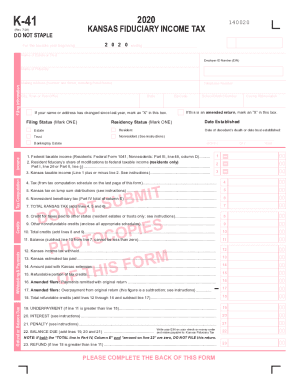
How to fill out the KS DoR K-41 online
The KS DoR K-41 is a vital document used for reporting fiduciary income tax in Kansas. This guide provides a step-by-step approach to filling out the form online, ensuring users can complete it accurately and efficiently.
Follow the steps to complete the KS DoR K-41 online.
- Click the ‘Get Form’ button to obtain the KS DoR K-41 form and open it in the online editor.
- Begin by entering the tax year and the ending date at the top of the form. This is crucial for ensuring that the return is filed correctly for the right period.
- Provide the name of the estate or trust and the Employer ID Number (EIN) in the designated fields. Ensure that all information is accurate to avoid processing delays.
- Fill in the name of the fiduciary, including the mailing address and telephone number. It is important to keep this information current to receive any correspondence.
- Indicate whether there has been a change in name or address by marking the appropriate box. This helps in maintaining accurate records.
- Select the residency status by marking either 'Resident' or 'Nonresident.' This determines the tax obligations applicable to the estate or trust.
- Choose the filing status by marking one of the options: 'Estate' or 'Trust.' This is essential for categorizing the type of entity you are filing for.
- Proceed to the income section where you will report federal taxable income and any modifications applicable. Enter values from the relevant federal forms as required.
- Calculate and record the total Kansas tax based on the provided instructions, ensuring that you account for any credits or withholdings.
- On completion, review all entered information for accuracy and completeness. Once verified, you can save changes, download, print, or share the KS DoR K-41 form as needed.
Complete your KS DoR K-41 form online today for a smooth filing experience.
Experience a faster way to fill out and sign forms on the web. Access the most extensive library of templates available.
Related content
DO-41, Request for Copy of Kansas Tax Records, KDOR. DO-5, Name or ... K-130, Privilege...
Jump to Model-Dependent Dalitz Plot Analysis of B ? D*K* with D ? K ... - The Belle...
02/23/2018 0051 Updated the definition for surcharge in the table of. Section 4.3.2...
Get answers to your most pressing questions about US Legal Forms API.
Is Social Security taxed in CT?
All types of retirement income are subject to Connecticut's income tax, although Social Security is exempted for some seniors. The state has a sales tax near the national average and some of the highest property taxes in the U.S.
Which states do not tax Social Security benefits?
Nine of the 13 states in the West don't have income taxes on Social Security. Alaska, Nevada, Washington, and Wyoming don't have state income taxes at all, and Arizona, California, Hawaii, Idaho, and Oregon have special provisions exempting Social Security benefits from state taxation.
How is Social Security taxed in 2019?
For the 2019 tax year, single filers with a combined income of $25,000 to $34,000 must pay income taxes on up to 50% of their Social Security benefits. If your combined income was more than $34,000, you will pay taxes on up to 85% of your Social Security benefits. ... Your total annual benefits would be $16,920.
Is Social Security taxable in Kansas?
Kansas is moderately tax-friendly for retirees. It exempts all Social Security income for seniors with Adjusted Gross Income (AGI) of $75,000 or less. Public pension income is also exempt but other forms of retirement income are not. ... The state does not have an estate or inheritance tax.
Do I have to file Kansas state income tax?
If you were a Kansas resident for the entire year, you must file a Kansas Individual Income Tax return if: ... A married couple filing jointly would not be required to file a Kansas return unless their gross income is over $10,500.
Does the state of Kansas tax Social Security benefits?
Kansas is moderately tax-friendly for retirees. It exempts all Social Security income for seniors with Adjusted Gross Income (AGI) of $75,000 or less. Public pension income is also exempt but other forms of retirement income are not. ... The state does not have an estate or inheritance tax.
What is Kansas standard deduction?
Kansas standard deductions If you took a standard deduction on your federal income tax return, you must also take the Kansas standard deduction. Here are the Kansas standard deductions for 2018. $3,000 for single filers. $7,500 for those married filing jointly. $5,500 for head of household.
How do I check the status of my Kansas State Tax Refund?
To check your current year tax refund go to our website or call 1-785-368-8222 for automated refund information. You will need your Social Security number(s) and the expected amount of your refund.
How long are Kansas State tax refunds taking?
Check the status of your Kansas refund using these resources. Note: Please wait at least 21 days before checking the status of your refund on returns electronically filed. It can take up to 20 weeks to receive your refund if you filed a paper return.
Does my teenager have to file taxes 2018?
For tax years after 2017, a minor who may be claimed as a dependent has to file a return once their income exceeds their standard deduction. For tax year 2018 this is the greater of $1,050 or the amount of earned income plus $350.
Use professional pre-built templates to fill in and sign documents online faster. Get access to thousands of forms.
If you believe that this page should be taken down, please follow our DMCA take down process here.
This form is available in several versions. Select the version you need from the drop-down list below.