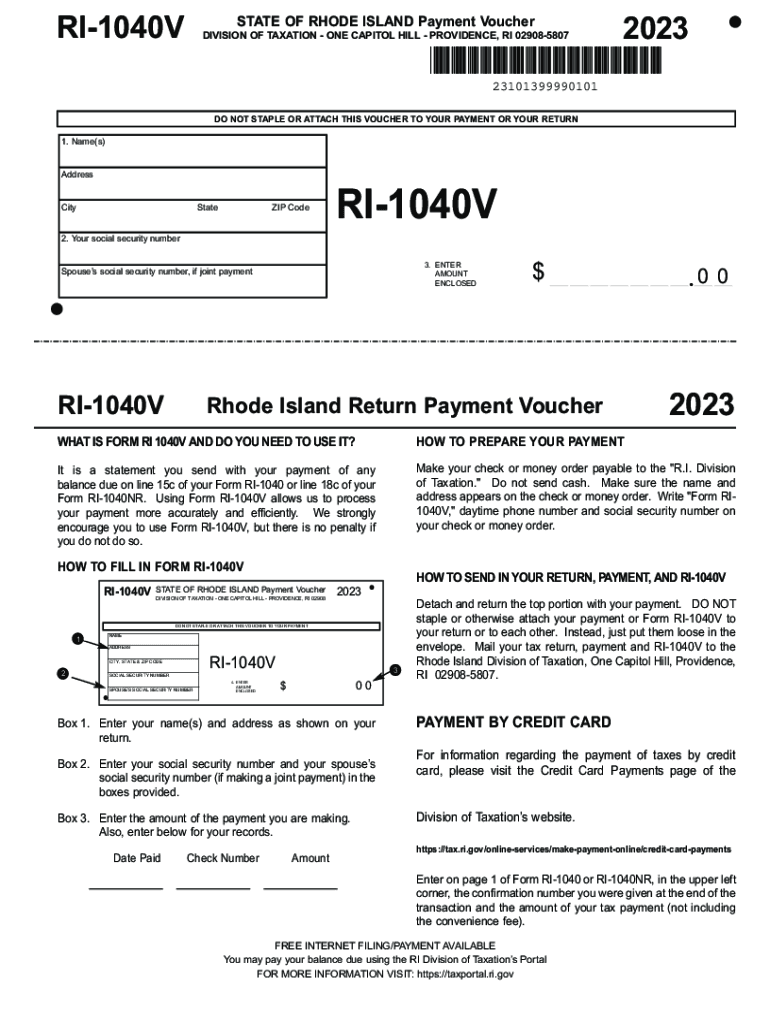
YOUR RETURN 1. Name(s) Address City State ZIP Code RI-1040V 2. Your social security number 3. ENTER AMOUNT ENCLOSED Spouse s social security number, if joint payment RI-1040V $ Rhode Island Return Payment Voucher 00 2023 WHAT IS FORM RI 1040V AND DO YOU NEED TO USE IT? HOW TO PREPARE YOUR PAYMENT It is a statement you send with your payment of any balance due on line 15c of your Form RI-1040 or line 18c of your Form RI-1040NR. Using Form RI-1040V allows us to process your paymen.
Loading

Open form follow the instructions

Easily sign the form with your finger

Send filled & signed form or save
How to fill out the efile Rhode Island state tax returns online
Completing your Rhode Island state tax return online can streamline the process and ensure accuracy. This step-by-step guide will help you fill out the efile Rhode Island state tax returns efficiently and correctly.
Follow the steps to fill out your efile Rhode Island state tax returns online:
- Click ‘Get Form’ button to obtain the form and open it in the editor.
- Enter your name(s) and address in the designated fields, ensuring the information matches what is shown on your tax return.
- Input your social security number in the provided box. If you are making a joint payment, also enter your spouse’s social security number.
- Specify the amount of payment you are submitting in the appropriate field, making sure to double-check the figure for accuracy.
- Record the date paid and check number for your records in the spaces provided on the form.
- Detach the top portion of the form along the dotted line and prepare to send it with payment.
- Place the detached portion, your payment, and your completed tax return into an envelope. Ensure none of these documents are stapled or attached to each other.
- Mail the envelope to the Rhode Island Division of Taxation at One Capitol Hill, Providence, RI 02908-5807, using appropriate postage.
Complete your documents online today to ensure timely and accurate submissions.
Experience a faster way to fill out and sign forms on the web. Access the most extensive library of templates available.
Related content
Modernized e-file (MeF). You may elect to use software preparation programs to easily file...
A larger business registrant will be required to use electronic means to file returns and...
Provide America's taxpayers top quality service by helping them understand and meet their...
Get answers to your most pressing questions about US Legal Forms API.
Can tax returns be sent electronically?
The IRS receives your return almost instantly, unlike a mailed paper return. E-filed returns contain fewer errors. The IRS doesn't need to re-enter your tax information in its system. If you expect a tax refund, you'll typically receive your refund check within three weeks.
Is it OK to send tax return via email?
You may not use email for communications that do not satisfy the criteria described under “When you may use email.” Unless you're involved in an ongoing interaction with an IRS employee and they request a document by email, do not use email to respond to an IRS notice or to submit your original tax return to the IRS.
Can you eFile state taxes with TurboTax?
Re-create your federal return in the TurboTax software or TurboTax Online without filing it so you can prepare and file your state return using TurboTax. You'll need to print and mail your state return, as state returns can't be e-filed on their own.
Is the IRS currently accepting electronic returns?
by Intuit• 87• Updated about 22 hours ago This article will help you determine whether you can e-file current federal tax returns for individuals, corporations, partnerships, and other businesses. You can currently e-file business returns for tax year 2023, 2022, and 2021 returns but all 1040 filings are now shut down.
Where do I send my RI state tax return?
DO NOT staple or otherwise attach your payment or Form RI-1040V to your return or to each other. Instead, just put them loose in the envelope. Mail your tax return, payment and RI-1040V to the Rhode Island Division of Taxation, One Capitol Hill, Providence, RI 02908- 5807.
Can I send my tax return electronically?
Yes, you can file an original Form 1040 series tax return electronically using any filing status. Filing your return electronically is faster, safer, and more accurate than mailing your tax return because it's transmitted electronically to the IRS computer systems.
Is it better to file your taxes electronically or by mail?
E-file is the best way to file an accurate and complete tax return. The tax software does the math for you, and it helps you avoid mistakes. technology. The IRS has safely and securely processed more than 1.2 billion e-filed individual tax returns since the program began.
Do I have to file a state tax return in Rhode Island?
If you are a Rhode Island resident and you are required to file a federal return, you must also file a Rhode Island return. Even if you are not required to file a federal return, you may still have to file a Rhode Island return if your income exceeds the amount of your personal exemption.
Use professional pre-built templates to fill in and sign documents online faster. Get access to thousands of forms.
If you believe that this page should be taken down, please follow our DMCA take down process here.