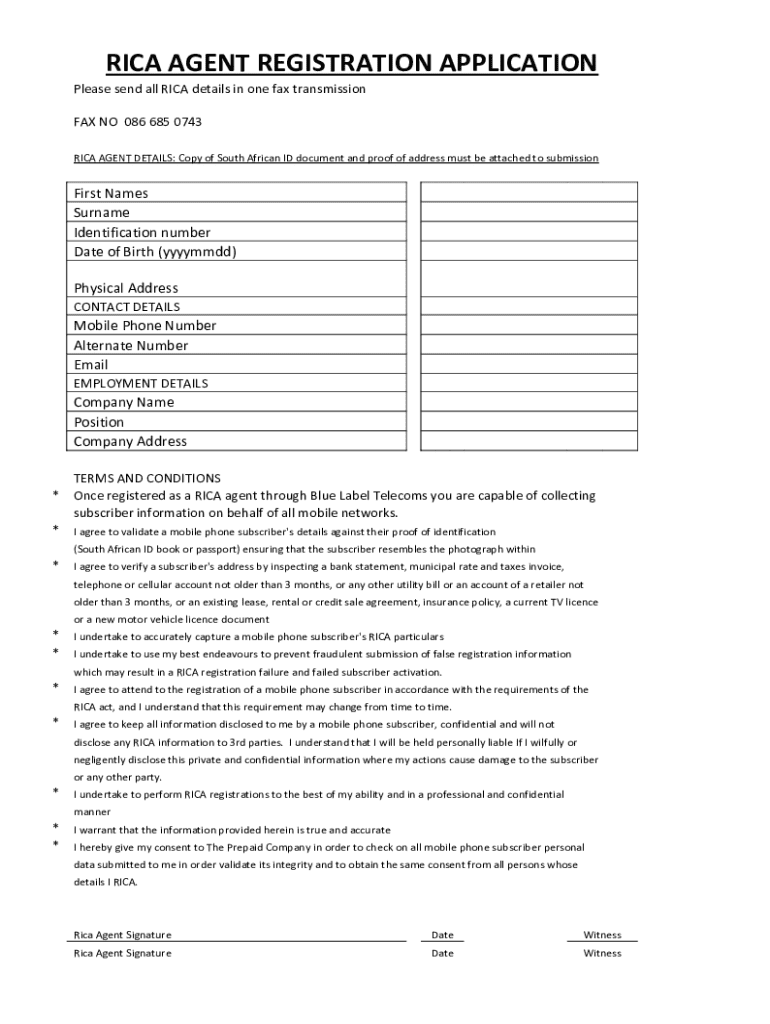
RICA AGENT REGISTRATION APPLICATION Please send all RICA details in one fax transmission FAX NO 086 685 0743 RICA AGENT DETAILS: Copy of South African ID document and proof of address must be attached.
Loading

Open form follow the instructions

Easily sign the form with your finger

Send filled & signed form or save
How to fill out the ZA Blue Label Telecoms RICA Agent Registration Application online
The ZA Blue Label Telecoms RICA Agent Registration Application is a crucial document for individuals wishing to register as RICA agents. This guide provides clear, step-by-step instructions for completing the application online, helping users navigate the process with ease.
Follow the steps to successfully complete your application.
- Click ‘Get Form’ button to obtain the application form and access it in the editor.
- Fill in the RICA agent details section. You will need to enter your first names, surname, identification number, and date of birth in the format yyyymmdd. Additionally, provide your physical address.
- Next, provide your contact details. Enter your mobile phone number, an alternate number, and your email address to ensure you can be reached easily.
- Complete the employment details. Enter your company name, position, and company address to establish your professional credentials as a RICA agent.
- Review the terms and conditions carefully. Ensure you understand your responsibilities as a RICA agent, including the need for confidentiality and accurate data capture.
- Sign and date the form where indicated to confirm that the information you have provided is true and complete.
- After completing the registration application, you can save your changes, download a copy for your records, print the form, or share it as required.
Complete your ZA Blue Label Telecoms RICA Agent Registration Application online today and ensure you meet all requirements.
Experience a faster way to fill out and sign forms on the web. Access the most extensive library of templates available.
Related content
Apr 1, 2021 — The FEDERAL REGISTER (ISSN 0097–6326) is published daily,. Monday...
Feb 1, 2012 — ... 2016, CISCO forecast. 108. 7.4. Mobile applications as a driver of...
For further advice or support, please contact Campbell Scientific Ltd, or your local...
Get answers to your most pressing questions about US Legal Forms API.
What is the strategy of Blue Label Telecoms?
Blue Label's strategy to create and preserve value for all its stakeholders over the short, medium or long term is based on four key pillars (Reach, Innovation, Trust and Efficiency), all of which are deeply embedded in our operations and corporate culture.
How do I register as a Rica agent?
Registering as a RICA agent requires a proof of registration. In order to register, you must fill out all your details on SmartRICA USSD (*130*7422#), SmartRICAApp, as well as sign up with Smartcall Online (a selfie must be uploaded as part of the registration process).
How do I contact Blue Label Johannesburg?
Blue Label Telecoms Limited Physical address. Postal address. Tel: +27 11 523 3000. Fax: +27 11 523 3001. For Blue Label Connect queries relating to cellphone contracts, sim swaps, etc. Blue Label Connect Contracts contact centre: 087 550 1733. To contact Blue Label Telecoms electronically, please use the form below:
What is Blue Label Telecoms?
Blue Label is a digital distribution company, specialising in prepaid products and the electronic distribution of virtual merchandise and value-added services. Our diverse product and service offering enables us to bring mainstream products and services to the mass market.
Does Blue Label Telecom own Cell C?
Blue Label wants a controlling stake in Cell C. Cell C's majority shareholder Blue Label Telecoms expects to start seeing returns on its multibillion-rand investments in the mobile operator in 2025.
How do I become a MTN Rica agent?
How do I become an MTN RICA agent? Become an agent Download the TSPC RICA app from the Google Play Store or the App Store Register your profile - with your cellphone number and your Valid ID number. Contact your regional office to get sim card stock and training from one of our representatives. Can you Rica from home?
What does Blue Label Telecoms do?
Blue Label is a digital distribution company, specialising in prepaid products and the electronic distribution of virtual merchandise and value-added services. Our diverse product and service offering enables us to bring mainstream products and services to the mass market.
Who is Blue Label Connect service provider?
ABOUT US. Blue Label Connect is the leading supplier of post-paid airtime, content and value-added services to the public at affordable rates. We partner with retailers, credit providers, cellular dealers and large corporate customers to extend their offerings and maximise the convenience for their end-users.
Use professional pre-built templates to fill in and sign documents online faster. Get access to thousands of forms.
If you believe that this page should be taken down, please follow our DMCA take down process here.