We use cookies to improve security, personalize the user experience, enhance our marketing activities (including cooperating with our marketing partners) and for other business use.
Click "here" to read our Cookie Policy. By clicking "Accept" you agree to the use of cookies. Read less
Read more
Accept
Loading
Form preview
  • US Legal Forms
  • Form Library
  • Industry Forms
  • Industry Academic Forms
  • Csn Sa-011 2016

Get Csn Sa-011 2016

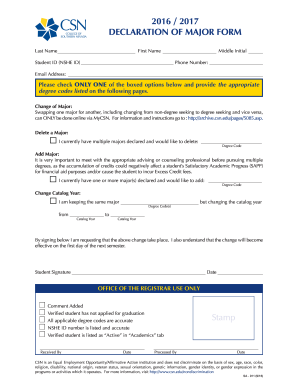
Phone Number: Email Address: Please check ONLY ONE of the boxed options below and provide the appropriate degree codes listed on the following pages. Change of Major: Swapping one major for another, including changing from non-degree seeking to degree seeking and vice versa, can ONLY be done online via MyCSN. For information and instructions go to : http://archive.csn.edu/pages/50.

How it works

  1. Open form

    Open form follow the instructions

  2. Easily sign form

    Easily sign the form with your finger

  3. Share form

    Send filled & signed form or save

How to fill out the CSN SA-011 online

The CSN SA-011 form is essential for students wishing to manage their academic major status effectively. This guide provides detailed, step-by-step instructions for completing the form online, ensuring accuracy and ease of use for all students.

Follow the steps to successfully complete the form.

  1. Click ‘Get Form’ button to obtain the form and open it in the editor.
  2. Enter your last name, first name, and middle initial in the specified fields to identify yourself clearly.
  3. Fill in your Student ID (NSHE ID) and phone number. Ensure that you double-check these details for accuracy.
  4. Provide your email address to facilitate communication regarding your major change.
  5. Select only one of the options below the email field: Change of Major, Delete a Major, Add Major, or Change Catalog Year. Be sure to read the instructions associated with each option.
  6. If changing a major, indicate the new major and its degree code from the provided list. If deleting a major, specify which major you wish to delete by entering its name.
  7. For adding a major, consult with the appropriate advising or counseling professional first, then enter the new major and its degree code.
  8. To change the catalog year, specify the existing catalog year and the new catalog year along with the respective degree codes.
  9. Review all entries for accuracy, ensuring all required fields are completed. Your last step is to sign and date the form to confirm your request for changes.
  10. After completing the form, save your changes. You may then download, print, or share the form as needed.

Complete your documents online today to manage your academic journey effectively.

Get form

Experience a faster way to fill out and sign forms on the web. Access the most extensive library of templates available.

Related content

Chemical Speciation Network (CSN) Annual Quality...
Jan 1, 2018 — 1.1 Introduction. The University of California—Davis (UC Davis) Air...
Learn more
Request for Multiple Majors Form
Changing one major to another, including from non-degree seeking to degree seeking and...
Learn more
Serra Cement Plant - Global Energy Monitor
Jul 15, 2025 — Serra Cement Plant (Moagem Vitória) is a grinding cement plant operating...
Learn more

Related links form

Ecf Cand Quexf Ta 2 Form Bsaefiling Form

Questions & Answers

Get answers to your most pressing questions about US Legal Forms API.

Contact support

At CSN, a wide range of activities takes place, including steel manufacturing, logistics management, and mineral extraction. The focus is on delivering high-quality products while fostering sustainable practices. Innovations, such as the CSN SA-011, illustrate the ongoing efforts to integrate technology and improve operational efficiency across all sectors.

CSN stands for Companhia Siderúrgica Nacional, one of Brazil's leading steel producers. Established in 1941, CSN has grown to encompass several sectors, including mining and logistics. The CSN SA-011 model represents a key innovation, highlighting the company's commitment to quality and technology.

Locating your CSN student email is simple. After you have registered for classes, your email account is typically created automatically. You can find it by logging into your student portal, where you will also discover resources to assist with CSN SA-011 related inquiries.

To get a CSN student ID, start by enrolling in your desired courses. Once enrolled, visit the registrar’s office where they can assist you in issuing your student ID. This ID is essential for accessing campus services and participating in programs related to CSN SA-011.

Finding your SCU student ID number is straightforward. You can check your enrollment confirmation email if you are a new student. Alternatively, you can log in to your student portal to view your student ID, which is crucial for your future transactions at CSN SA-011.

The PCIN number, or Product Classification Identification number, serves as a reference for categorizing goods within the shipping industry. It ensures that products are handled according to the correct classifications. For businesses engaged in shipping related to CSN SA-011, utilizing the PCIN number becomes essential for efficient and compliant operations.

A cargo manifest number is a unique identifier for a shipment that summarizes cargo details on transportation documents. It assists customs and shipping companies in tracking and verifying shipments. Understanding the cargo manifest number can be particularly beneficial for those working with CSN SA-011.

The PCin number represents the Product Classification Identification number that facilitates the adherence to shipping regulations. It is vital for accurately categorizing products during transport. Using the PCin number in conjunction with CSN SA-011 can enhance shipping efficiency and regulatory compliance.

The CCN number, or Cargo Control Number, is essential for tracking shipments within the supply chain. It helps in identifying specific cargo batches and facilitates communication between stakeholders. Understanding the CCN number can improve logistics efficiency, especially for businesses involved with CSN SA-011.

To find your CSN student email, log into your student portal or visit the IT help desk on campus. Your email address will typically be listed under your account profile. If you encounter challenges or need help accessing your email, the support staff is ready to assist you. Having your CSN SA-011 will help streamline any inquiries you have about your account.

Get This Form Now!

Use professional pre-built templates to fill in and sign documents online faster. Get access to thousands of forms.
If you believe that this page should be taken down, please follow our DMCA take down processhere.

Industry-leading security and compliance

US Legal Forms protects your data by complying with industry-specific security standards.
  • In businnes since 1997
    25+ years providing professional legal documents.
  • Accredited business
    Guarantees that a business meets BBB accreditation standards in the US and Canada.
  • Secured by Braintree
    Validated Level 1 PCI DSS compliant payment gateway that accepts most major credit and debit card brands from across the globe.
Get CSN SA-011
Form Packages
Adoption
Bankruptcy
Contractors
Divorce
Home Sales
Employment
Identity Theft
Incorporation
Landlord Tenant
Living Trust
Name Change
Personal Planning
Small Business
Wills & Estates
Packages A-Z
Form Categories
Affidavits
Bankruptcy
Bill of Sale
Corporate - LLC
Divorce
Employment
Identity Theft
Internet Technology
Landlord Tenant
Living Wills
Name Change
Power of Attorney
Real Estate
Small Estates
Wills
All Forms
Forms A-Z
Form Library
Customer Service
Terms of Service
Privacy Notice
Legal Hub
Content Takedown Policy
Bug Bounty Program
About Us
Help Portal
Legal Resources
Blog
Affiliates
Contact Us
Delete My Account
Site Map
Industries
Forms in Spanish
Localized Forms
State-specific Forms
Forms Kit
Legal Guides
Real Estate Handbook
All Guides
Prepared for You
Notarize
Incorporation services
Our Customers
For Consumers
For Small Business
For Attorneys
Our Sites
US Legal Forms
USLegal
FormsPass
pdfFiller
signNow
airSlate WorkFlow
DocHub
Instapage
Social Media
Call us now toll free:
+1 833 426 79 33
As seen in:
  • USA Today logo picture
  • CBC News logo picture
  • LA Times logo picture
  • The Washington Post logo picture
  • AP logo picture
  • Forbes logo picture
© Copyright 1997-2025
airSlate Legal Forms, Inc.
3720 Flowood Dr, Flowood, Mississippi 39232
Form Packages
Adoption
Bankruptcy
Contractors
Divorce
Home Sales
Employment
Identity Theft
Incorporation
Landlord Tenant
Living Trust
Name Change
Personal Planning
Small Business
Wills & Estates
Packages A-Z
Form Categories
Affidavits
Bankruptcy
Bill of Sale
Corporate - LLC
Divorce
Employment
Identity Theft
Internet Technology
Landlord Tenant
Living Wills
Name Change
Power of Attorney
Real Estate
Small Estates
Wills
All Forms
Forms A-Z
Form Library
Customer Service
Terms of Service
Privacy Notice
Legal Hub
Content Takedown Policy
Bug Bounty Program
About Us
Help Portal
Legal Resources
Blog
Affiliates
Contact Us
Delete My Account
Site Map
Industries
Forms in Spanish
Localized Forms
State-specific Forms
Forms Kit
Legal Guides
Real Estate Handbook
All Guides
Prepared for You
Notarize
Incorporation services
Our Customers
For Consumers
For Small Business
For Attorneys
Our Sites
US Legal Forms
USLegal
FormsPass
pdfFiller
signNow
airSlate WorkFlow
DocHub
Instapage
Social Media
Call us now toll free:
+1 833 426 79 33
As seen in:
  • USA Today logo picture
  • CBC News logo picture
  • LA Times logo picture
  • The Washington Post logo picture
  • AP logo picture
  • Forbes logo picture
© Copyright 1997-2025
airSlate Legal Forms, Inc.
3720 Flowood Dr, Flowood, Mississippi 39232
CSN SA-011
This form is available in several versions.
Select the version you need from the drop-down list below.
2018 CSN SA-011
Select form
  • 2018 CSN SA-011
  • 2016 CSN SA-011
Select form