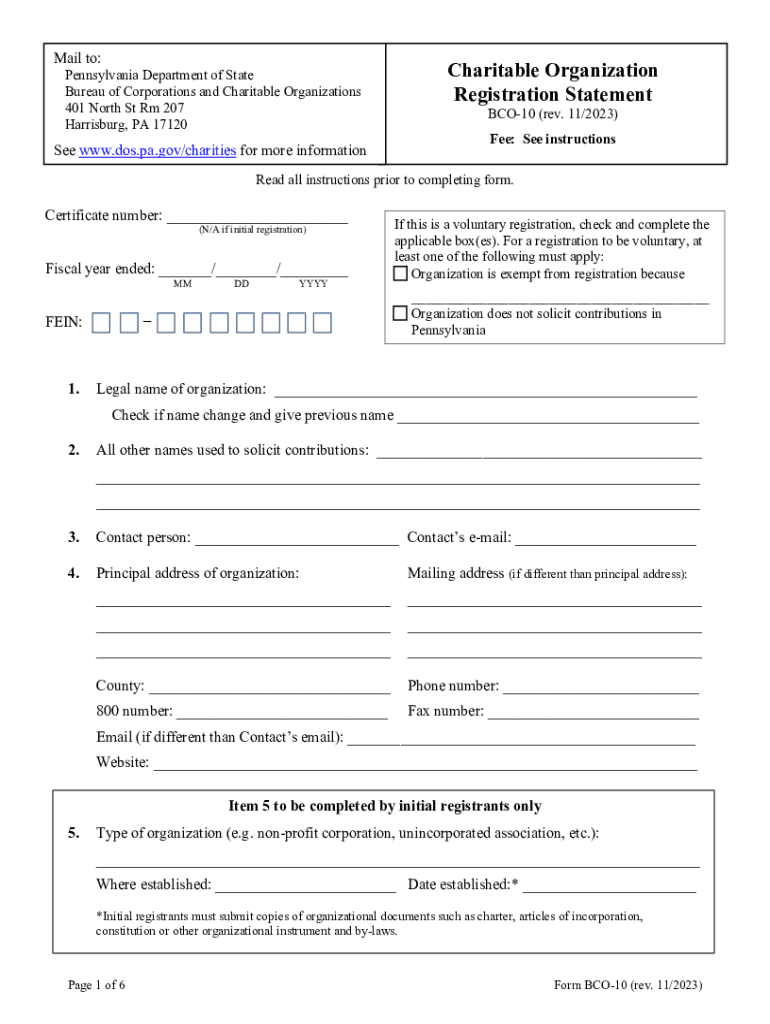
Zation Registration Statement BCO-10 (rev. 11/2023) Fee: See instructions Read all instructions prior to completing form. Certificate number: (N/A if initial registration) Fiscal year ended: / / MM FEIN: 1. DD YYYY If this is a voluntary registration, check and complete the applicable box(es). For a registration to be voluntary, at least one of the following must apply: Organization is exempt from registration because.

Open form follow the instructions

Easily sign the form with your finger

Send filled & signed form or save
How to fill out the PA BCO-10 online
The PA BCO-10 form is a crucial registration document for charitable organizations in Pennsylvania. Properly completing this online form is essential for compliance with state regulations and to ensure your organization can solicit contributions legally.
Follow the steps to complete the PA BCO-10 registration form online.
- Click ‘Get Form’ button to obtain the PA BCO-10 form and open it in the editor.
- Enter the certificate number in the designated field. If this is your initial registration, mark 'N/A'.
- Fill in the fiscal year end date in the format MM/DD/YYYY.
- Provide your organization's Federal Employer Identification Number (FEIN) in the specified area.
- Indicate whether this registration is voluntary by checking the applicable box and completing the required details.
- Input the legal name of the organization and check the box if there has been a name change, providing the previous name.
- List all other names used to solicit contributions in the appropriate fields.
- Provide the contact person's information, including name and email address.
- Complete the principal address section, including mailing address if it differs.
- Fill in the county, phone number, and any additional contact information as required.
- If you are an initial registrant, specify the type of organization and provide the date established.
- List any offices or subordinate units in Pennsylvania, marking 'Not Applicable' if this does not apply.
- Review the categories for short form registration and check the relevant boxes, or mark 'Not Applicable' if none apply.
- Provide the date when the organization first solicited contributions from Pennsylvania residents.
- Indicate if your organization has been granted IRS tax-exempt status and provide the applicable IRS code section.
- Attach necessary documentation if your tax-exempt status has been denied, revoked, or modified.
- Complete the sections regarding solicitation methods, description of programs, and any other state registrations.
- Provide information regarding compensated persons soliciting contributions and complete all associated sections.
- Check any previous legal issues affecting your organization and provide documentation if applicable.
- Ensure the registration statement is signed and dated by two authorized officers, including the chief fiscal officer.
- Finally, review the checklist to confirm all required documents and fees are prepared for submission.
- Once everything is filled out, save your changes, download, print, or share the form as needed.
Get started on completing your PA BCO-10 registration form online today!
Experience a faster way to fill out and sign forms on the web. Access the most extensive library of templates available.
Related content
Currently the Bureau's online system is only accepting the BCO-10 Form. In the future...
Emergency repair if a permit application is submitted to the BCO within 3 days ... of the...
The Nyingma tradition is the oldest of the four major schools of Tibetan Buddhism. The...
Get answers to your most pressing questions about US Legal Forms API.
Who needs to file a PA BCO 10?
If your organization is soliciting contributions from Pennsylvania residents and is not excluded or exempt, it must file a BCO-10 registration statement for its most recently completed fiscal year; a copy of its IRS 990 return; and the appropriate financial statements within 30 days of receiving more than $25,000 in ...
What is the BCCO?
Through the Bureau of Corporations and Charitable Organizations (BCCO), the department assists Pennsylvania business owners and entrepreneurs with starting, sustaining and expanding their companies.
How do I verify a company in PA?
Record searches will provide a complete filing history of an entity. You may request a written search by submitting a letter to the bureau at: Department of State, Bureau of Corporations and Charitable Organizations, PO Box 8722, Harrisburg, PA 17105-8722.
What is the PA Charitable Solicitation Act?
The Solicitation of Funds for Charitable Purposes Act 10 P.S. § 162.1 et seq. Relating to charitable organizations; requiring the registration of such organizations; and regulating the solicitation of money and property by or on behalf of charitable organizations.
What is the PA Bureau of Corporations and Charitable Organizations?
The Bureau of Corporations and Charitable Organizations maintains the records repository of more than 3 million companies that do business in the Commonwealth and serves as the centralized filing office for Uniform Commercial Code financing statements.
Who must file BCO 23?
An organization which is not required to file an IRS 990 Return must file a BCO-23 Form. This includes an organization that files a 990N, 990EZ, or 990PF, or an affiliate whose parent organization files a 990 group return must file a BCO-23 Form in addition to filing a copy of the organization's IRS 990 Return.
Use professional pre-built templates to fill in and sign documents online faster. Get access to thousands of forms.
If you believe that this page should be taken down, please follow our DMCA take down process here.