Loading
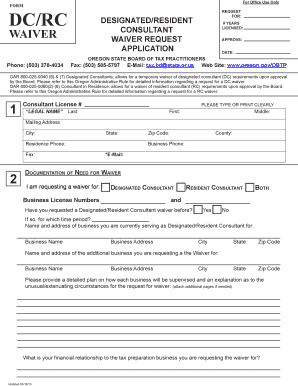
Get Auction_or_raffle_application.indd - Oregon
How it works
-

Open form follow the instructions
-

Easily sign the form with your finger
-

Send filled & signed form or save
How to use or fill out the Auction_or_raffle_application.indd - Oregon online
Filling out the Auction_or_raffle_application.indd form for Oregon can seem like a daunting task, but with the right guidance, it can be a straightforward process. This guide provides a comprehensive, step-by-step approach to ensure you complete the form accurately and efficiently.
Follow the steps to complete your application with ease.
- Click ‘Get Form’ button to obtain the form and open it in the online editor.
- Begin filling out the top section of the form with your legal name. Make sure to enter your last name followed by your first and middle name, ensuring clarity by typing or printing clearly.
- Provide your mailing address, including the city, state, and zip code. This information is vital for correspondence regarding your application.
- Next, fill in your contact numbers, including your residence phone and business phone. If applicable, include your fax number as well.
- Input your email address in the designated field. This may be used for further communication about your waiver request.
- In the section for documentation of the need for the waiver, indicate which type of waiver you are requesting: Designated Consultant, Resident Consultant, or Both by checking the appropriate box.
- Answer the question regarding previous waiver requests by selecting 'Yes' or 'No.' If you selected 'Yes,' specify the time period of that request.
- Fill in the name and address of the business you are currently serving as Designated or Resident Consultant, including the city, state, and zip code.
- Provide the name and address of any additional business for which you are requesting a waiver, following the same format as in the previous step.
- Next, draft a detailed plan describing how you will supervise each business, as well as an explanation of any unusual or extenuating circumstances for your waiver request. Attach additional pages if necessary.
- Finally, describe your financial relationship with the tax preparation business connected to the waiver request. Ensure you provide comprehensive information.
- Once you have filled out all the fields accurately, save your changes, download a copy of the form, print it if necessary, or share it as needed.
Complete your Auction_or_raffle_application.indd form online today for a smooth submission process.
Industry-leading security and compliance
US Legal Forms protects your data by complying with industry-specific security standards.
-
In businnes since 199725+ years providing professional legal documents.
-
Accredited businessGuarantees that a business meets BBB accreditation standards in the US and Canada.
-
Secured by BraintreeValidated Level 1 PCI DSS compliant payment gateway that accepts most major credit and debit card brands from across the globe.