Loading
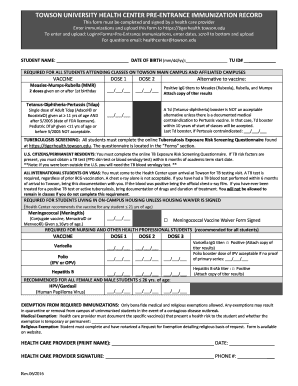
Get Towson University Health Center Pre-entrance Immunization Record
How it works
-

Open form follow the instructions
-

Easily sign the form with your finger
-

Send filled & signed form or save
How to fill out the Towson University Health Center Pre-entrance Immunization Record online
Completing the Towson University Health Center Pre-entrance Immunization Record is an essential step for students preparing to attend classes. This guide provides clear instructions to help you accurately fill out the necessary information online.
Follow the steps to successfully complete your immunization record.
- Press the ‘Get Form’ button to obtain the Towson University Health Center Pre-entrance Immunization Record and open it in the editor.
- Fill in your personal information at the top of the form, including your name, date of birth (in mm/dd/yy format), and TU ID number.
- In the vaccination section, enter the required vaccinations and their respective doses. For each vaccine, provide the date of administration for Dose 1 and Dose 2.
- If you have alternative proof of immunity, such as positive IgG titers for Measles, Mumps, or Rubella, ensure to attach a copy of the titer results as instructed.
- For Tetanus-Diphtheria-Pertussis (Tdap), ensure the date of the last booster is noted, especially if a contraindication exists.
- Complete the Tuberculosis (TB) screening information as per your residency status, ensuring to follow the required procedure for TB testing.
- If applicable, fill out the section for Meningococcal vaccination, and note if you have signed a waiver.
- For additional required vaccinations for nursing or health professional students, such as Varicella and Hepatitis B, fill out each corresponding date.
- Complete the health care provider section with their printed name, signature, and phone number.
- Once all sections are filled, save your changes, and follow the instructions to upload the completed form securely.
Complete your immunization record online today to ensure a smooth transition to your studies.
Related links form
Immunization forms must be submitted to the University Health Center before orientation. Forms may be uploaded to .myuhc.umd.edu. You will be prompted for a Directory ID and Password, then you will enter your UID number.
Industry-leading security and compliance
US Legal Forms protects your data by complying with industry-specific security standards.
-
In businnes since 199725+ years providing professional legal documents.
-
Accredited businessGuarantees that a business meets BBB accreditation standards in the US and Canada.
-
Secured by BraintreeValidated Level 1 PCI DSS compliant payment gateway that accepts most major credit and debit card brands from across the globe.