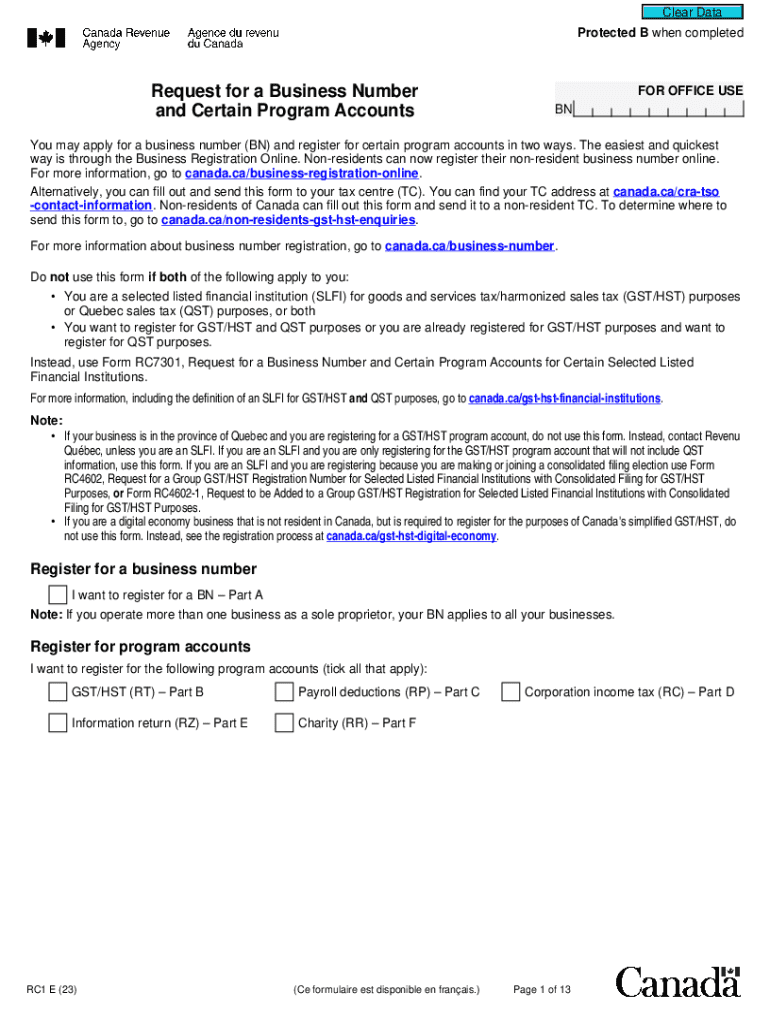
Her Form RC1 and attach it to this form. You do not need to fill in Part D if you incorporated your business federally or with a province which has partnered with the Canada Revenue Agency (CRA). If this is the case, a BN and a corporation income tax program account (RC) will be automatically assigned to you by the CRA. For a list of the provinces that have partnered with the CRA, go to canada.ca/business-number and click on "When you need a business number or Canada Revenue Agency program a.
Loading

Open form follow the instructions

Easily sign the form with your finger

Send filled & signed form or save
How to fill out the Canada RC1 online
The Canada RC1 form is essential for registering a business number and program accounts in Canada. This guide provides a clear, step-by-step approach to assist users in completing the form accurately and efficiently online.
Follow the steps to fill out the Canada RC1 form online.
- Click the 'Get Form' button to obtain the form and open it in the editor.
- Part A - General business information: Fill in basic ownership details such as ownership type, incorporation status, and information about the business operation. Ensure to describe the major business activity and specify the main products or services.
- Part B - Registering for a GST/HST program account: Indicate if the business needs this account and fill in the requested identification information. Specify the filing information and reporting period based on your revenue.
- Part C - Registering for a payroll deductions program account: If applicable, complete this section with details about payment type and payroll frequency. Provide the expected number of employees and their total salaries.
- Part D - Registering for a corporation income tax program account: Complete this section if necessary, and provide the required documentation, such as your certificate of incorporation.
- Part E - Registering for an information return program account: If you need this account, select the appropriate program account type and provide the effective date.
- Part F - Requesting a charity program account: If applicable, fill in information specific to charity registration, keeping in mind that separate registration under the Income Tax Act is required.
- Part G - Certification: Ensure to fill in this part with accurate details of the individual completing the form. The individual must sign and date the form for processing.
- Once you have completed and reviewed the form, you can save changes, download, print, or share the completed form as needed.
Start filling out your documents online today for a smoother business registration process.
Experience a faster way to fill out and sign forms on the web. Access the most extensive library of templates available.
Related content
The DrugBank database is supported by the Canadian Institutes of Research, Alberta...
Apr 28, 2019 - ... Opthalmology (ARVO) meetings in Vancouver, Canada by Jessica C....
CANADIAN DIVISION: 189 Bullock Drive, Markham, Ontario, Canada L3P 1W4. Phone 905.294.9570...
Get answers to your most pressing questions about US Legal Forms API.
Where do I send my rc1?
By mail or by fax To print a form, go to Form RC1, Request for a business number and certain program accounts or, to order a form, go to Forms and publications. Fill in form RC1. Once you have completed the form, mail or fax it to your nearest tax service office or tax centre.
Where do I find my BN number?
The BN is the first nine digits of your company's HST account number. Please ensure that the BN you enter corresponds with your company name at one of the following links: Industry Canada or Canada Revenue Agency (CRA).
What does a Canadian business number look like?
The format of your 15-character account numbers consists of your nine-digit business number followed by a two letter abbreviation denoting the type of account it is, followed by a four digit number. For example, if you have a GST/HST account, your number may look like this: 123456789 RT 0001.
How do I get a GST number in Canada?
You can register by phone for a business number or for CRA accounts (GST, income tax, payroll, etc.) by calling CRA at 1-800-959-5525. To register by phone or by mail, see the CRA Register for a GST/HST account page.
What does a Canadian GST number look like?
The format of your 15-character account numbers consists of your nine-digit business number followed by a two letter abbreviation denoting the type of account it is, followed by a four digit number. For example, if you have a GST/HST account, your number may look like this: 123456789 RT 0001.
Is my CRA account number my sin?
Just add the Canada Revenue Agency (CRA) as a payee, and then add your account number carefully to avoid a lost or misapplied payment (your account number is your social insurance number).
How do I find my CRA account number?
If you can't find the GST/HST account number, contact your supplier. When your supplier does not provide their GST/HST account number, call the Canada Revenue Agency's Business enquiries line at 1-800-959-5525 to confirm it is registered.
Is the GST number the same as the business number?
It's also known as a business number (BN), because, in addition to being used to collect, report and remit GST and harmonized sales tax (HST), it identifies other business dealings your company has with the CRA.
Where can I fax rc1 form?
By mail or by fax To print a form, go to Form RC1, Request for a business number and certain program accounts or, to order a form, go to Forms and publications. Fill in form RC1. Once you have completed the form, mail or fax it to your nearest tax service office or tax centre.
Is My Service Canada Account the same as CRA account?
Is "CRA My Account" the same as "My Service Canada Account"? These are different services from each of two Federal government agencies. CRA provides tax information. Service Canada deals with EI CPP OAS and other services.
Use professional pre-built templates to fill in and sign documents online faster. Get access to thousands of forms.
If you believe that this page should be taken down, please follow our DMCA take down process here.