Loading
Get Canada University Of Ontario Institute Of Technology Competency Assessment Form: Fish Lab 2020-2025
How it works
-

Open form follow the instructions
-

Easily sign the form with your finger
-

Send filled & signed form or save
How to fill out the Canada University Of Ontario Institute Of Technology Competency Assessment Form: Fish Lab online
This guide provides clear and comprehensive instructions for completing the Canada University Of Ontario Institute Of Technology Competency Assessment Form: Fish Lab online. By following the steps outlined below, users can efficiently navigate the form and ensure all necessary information is accurately submitted.
Follow the steps to successfully complete your competency assessment form.
- Press the ‘Get Form’ button to access the form, then open it in your chosen editor.
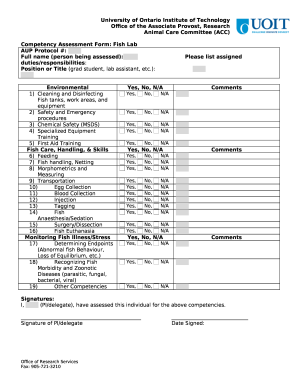
- Begin by filling in the AUP Protocol number at the top of the form. This number is crucial for identifying the specific protocol relevant to the assessment.
- In the section labeled ‘Full name (person being assessed)’, enter the complete name of the individual being assessed. Make sure the spelling is correct to avoid any discrepancies.
- Next, provide details regarding the duties and responsibilities of the person being assessed. This information helps clarify their role in the Fish Lab.
- Indicate the position or title of the individual, such as grad student or lab assistant, in the designated field.
- For the Environmental section, you will need to assess multiple competencies related to cleaning, safety procedures, and specialized training. For each competency listed, select Yes, No, or N/A as appropriate.
- In the Fish Care, Handling, & Skills section, follow the same procedure as in the previous step. Review each skill and mark your assessment appropriately.
- Continue to fill out the Monitoring Fish Illness/Stress section, indicating your assessments similarly. This section is critical for ensuring the health and safety of the fish.
- If there are any comments or additional notes regarding specific competencies, use the comments fields provided next to each section to give further insights.
- Finally, the form requires a signature from the principal investigator (PI) or delegate. Ensure that the relevant individual signs the form. If a digital signature cannot be inserted, print the form, sign it, and fax or email it as instructed.
- After completing the form, you can save any changes made. Options to download, print, or share the completed form will be available as needed.
Take advantage of the convenience of completing your competency assessment form online today.
Industry-leading security and compliance
US Legal Forms protects your data by complying with industry-specific security standards.
-
In businnes since 199725+ years providing professional legal documents.
-
Accredited businessGuarantees that a business meets BBB accreditation standards in the US and Canada.
-
Secured by BraintreeValidated Level 1 PCI DSS compliant payment gateway that accepts most major credit and debit card brands from across the globe.