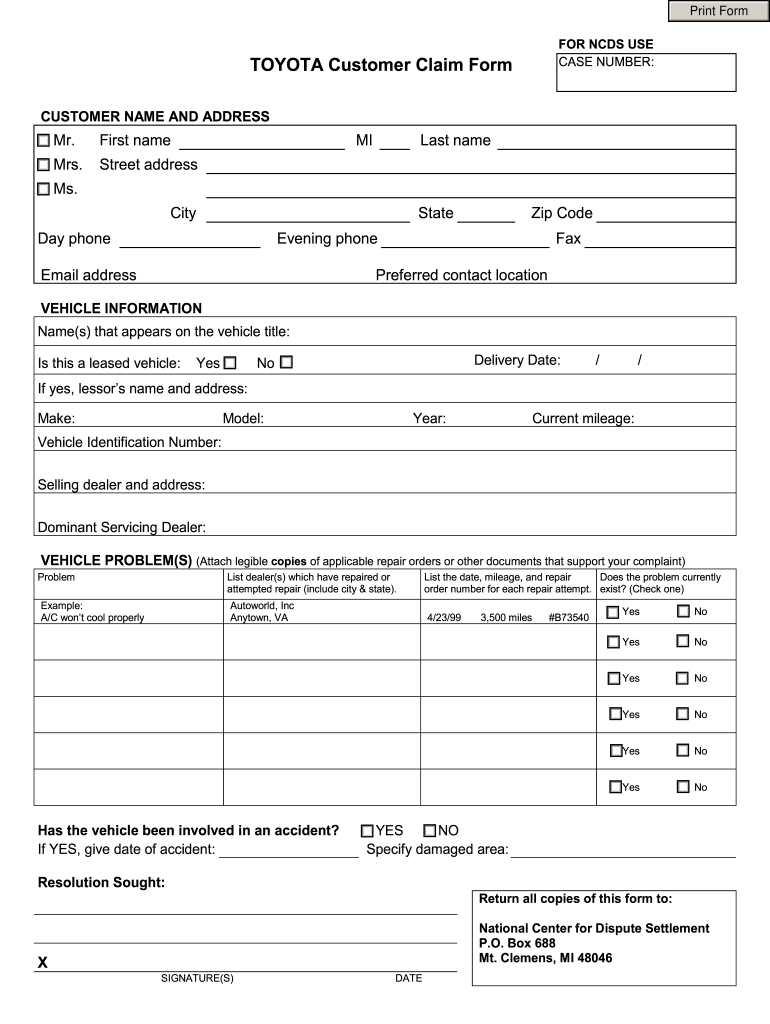
Print Form FOR NCDS USE CASE NUMBER TOYOTA Customer Claim Form CUSTOMER NAME AND ADDRESS Mr. First name MI Last name Street address Ms. City State Day phone Zip Code Evening phone Email address Fax Preferred contact location VEHICLE INFORMATION Name s that appears on the vehicle title Is this a leased vehicle Yes No Delivery Date / If yes lessor s name and address Make Model Year Current mileage Vehicle Identification Number Selling dealer and address Dominant Servicing Dealer VEHICLE PROBLEM S Attach legible copies of applicable repair orders or other documents that support your complaint Problem List dealer s which have repaired or attempted repair include city state. Example A/C won t cool properly Autoworld Inc Anytown VA List the date mileage and repair Does the problem currently order number for each repair attempt. exist Check one Has the vehicle been involved in an accident If YES give date of accident B73540 3 500 miles 4/23/99 YES NO Specify damaged area Resolution Sought Re....
Loading

Open form follow the instructions

Easily sign the form with your finger

Send filled & signed form or save
How to fill out the Toyota Customer Claim Form online
Filling out the Toyota Customer Claim Form online can be a straightforward process when you know the necessary steps. This guide will provide you with clear instructions to help you complete each section accurately and efficiently.
Follow the steps to successfully complete the form.
- Click ‘Get Form’ button to acquire the form and open it in your editor.
- Begin with the customer name and address section. Enter the title (Mr., Mrs., Ms.) followed by the first name, middle initial, and last name. Fill in the street address, city, state, day phone, evening phone, email address, and fax number.
- Move to the vehicle information section. Input the name(s) that appear on the vehicle title and indicate if the vehicle is leased by checking ‘Yes’ or ‘No’. If it is leased, provide the lessor’s name and address. Fill in the delivery date, make, model, year, current mileage, and Vehicle Identification Number (VIN). Also, provide details for the selling dealer and the dominant servicing dealer.
- In the vehicle problem(s) section, clearly list the problems you are experiencing with the vehicle. Attach copies of repair orders or any relevant documents to support your claims. State which dealer(s) have attempted repairs and include their city and state.
- Indicate whether the problem currently exists by checking the appropriate box for 'Yes' or 'No'. Also, mention if the vehicle has been involved in an accident and specify the date and any damaged areas.
- Outline the resolution you are seeking regarding the vehicle issue in the designated area.
- Ensure that you sign and date the form at the bottom to verify your submission.
- Finally, return all copies of the completed form to the National Center for Dispute Settlement at the provided address. You may also have options to save changes, download, print, or share the form as needed.
Start filling out your Toyota Customer Claim Form online today!
Experience a faster way to fill out and sign forms on the web. Access the most extensive library of templates available.
Related content
This form requires customer name, address, vehicle details, problem list, repair attempts...
Dec 28, 2012 — Settlement or submits a Claim Form(s). V. OBJECTIONS. 14. Any Class...
If you would like to request a customer claim form, call the Toyota. Customer Assistance...
Get answers to your most pressing questions about US Legal Forms API.
How do I file a gap claim with Toyota?
To file a gap claim with Toyota, begin by contacting your gap insurance provider or Toyota financial services. You will need to complete the Toyota Customer Claim Form to initiate your claim process. Make sure to include all necessary documentation regarding your vehicle and the incident in question to ensure that your claim is processed promptly and accurately.
How do I complain about a Toyota dealership?
If you have concerns about a Toyota dealership, start by documenting your experience, including dates, conversations, and any relevant details. Next, reach out to Toyota's customer service directly or fill out the Toyota Customer Claim Form to formally express your complaint. This provides Toyota with a complete picture of the issue, allowing them to address it appropriately and help improve dealer practices.
How to claim Toyota gap insurance?
To claim your Toyota gap insurance, start by contacting your insurance provider and obtaining the necessary forms. Completing the Toyota Customer Claim Form is crucial to provide all required information about your vehicle and the incident. By submitting this form alongside supporting documentation, you can initiate the claims process efficiently and track its progress.
How to file a Toyota recall claim?
Filing a Toyota recall claim is straightforward. First, check if your vehicle is affected by a recall on the official Toyota website. If it is, complete the Toyota Customer Claim Form to notify Toyota of your situation. Keep in touch with your dealer to ensure the claim proceeds smoothly and that necessary repairs are completed promptly.
How do I make a claim with Toyota?
To make a claim with Toyota, start by gathering necessary details about your vehicle and the issue you're experiencing. You can then complete the Toyota Customer Claim Form, which helps streamline the process. Submit this form along with any relevant documents online or via your local dealership. This approach ensures that your claim is processed efficiently and effectively.
How do I schedule a Toyota recall repair?
Scheduling a Toyota recall repair is straightforward and can be done online or by calling your local dealership. Simply provide your vehicle's details and the recall information, and they will set up a time that works for you. Utilizing the Toyota Customer Claim Form during this process can help ensure that all necessary repairs are documented, making for a smoother experience.
How to file a complaint with a Toyota dealership?
If you need to file a complaint with a Toyota dealership, start by documenting your concerns and any interactions you’ve had. Contact the dealership directly to express your issues and seek resolution. If that doesn't work, you may file a complaint through Toyota's corporate customer service or complete the Toyota Customer Claim Form, which can formalize your complaint and help escalate the matter.
How do I file a claim with Toyota?
Filing a claim with Toyota involves reaching out to their customer service team, who will guide you through the process. You will need to provide details about your vehicle, the nature of your claim, and any supporting documentation. Don't forget to fill out the Toyota Customer Claim Form, as it includes vital information required for your claim to be processed efficiently.
How does a Toyota recall work?
A Toyota recall occurs when the manufacturer identifies a safety issue with a vehicle model. Once a recall is announced, owners will receive notifications detailing the problem and instructions on the necessary repairs. Completing the Toyota Customer Claim Form will assist you in addressing any related expenses or concerns, ensuring you receive the necessary assistance and repairs promptly.
How to make a claim on Toyota insurance?
To make a claim on Toyota insurance, start by gathering your policy information and relevant details about the incident. You can then contact your insurance provider through their claims hotline or online portal. Don't forget to complete the Toyota Customer Claim Form, as this will streamline the process and help ensure that your claim gets the attention it deserves.
Use professional pre-built templates to fill in and sign documents online faster. Get access to thousands of forms.
If you believe that this page should be taken down, please follow our DMCA take down process here.