Loading
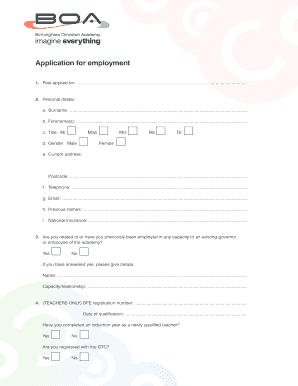
Get Are You Related To Or Have You Previously Been Employed In Any Capacity To An Existing Governor
How it works
-

Open form follow the instructions
-

Easily sign the form with your finger
-

Send filled & signed form or save
How to use or fill out the Are You Related To Or Have You Previously Been Employed In Any Capacity To An Existing Governor online
Filling out the Are You Related To Or Have You Previously Been Employed In Any Capacity To An Existing Governor form online can be straightforward with the right guidance. This guide will walk you through each section of the form, ensuring that you understand what is needed from you to complete it accurately.
Follow the steps to effectively fill out the form.
- Click the ‘Get Form’ button to obtain the form and open it in the designated interface.
- Begin by filling out the 'Post applied for' section. Clearly indicate the position you are applying for to help ensure your application is directed appropriately.
- In the 'Personal details' section, provide your surname, forenames, current address, telephone number, email, and any previous names. Make sure to include your National Insurance number as well.
- Answer the question about your relation to any existing governor or employee by selecting 'Yes' or 'No'. If you answer 'Yes', provide the name and your capacity or relationship.
- If you are a teacher, complete the teacher-specific fields such as DFE registration number, qualification date, and details about the induction year.
- List your employment history since leaving secondary education, starting with the most recent. Include employer details, type of employment (full-time or part-time), age range taught, grade/scale, reason for leaving, and salary information.
- Document any job-related training courses or seminars you have attended in the last five years.
- Fill out the qualifications section, including the examinations you have taken and their corresponding grades.
- Indicate any memberships of professional bodies and provide details about your interests or hobbies.
- Answer the questions regarding absence days taken in the last three years, criminal convictions, and any disciplinary procedures you have faced.
- Provide references from two individuals who can speak to your qualifications, ensuring one is your current or most recent employer.
- Complete the equal opportunities monitoring form if you choose to, answering questions about gender, ethnicity, nationality, and disability.
- Finally, read the declaration carefully, confirming that your information is correct. Print your name, sign, and date the application.
- Once all sections are completed, save your changes, and you may then proceed to download, print, or share the form as needed.
Fill out the form online today to take the next step in your application process.
Formal powers such as the veto and the executive budget, in addition to the presentation of the state of the state address that is required of all governors, assure that the governor is a legitimate player in the legislative arena.
Industry-leading security and compliance
US Legal Forms protects your data by complying with industry-specific security standards.
-
In businnes since 199725+ years providing professional legal documents.
-
Accredited businessGuarantees that a business meets BBB accreditation standards in the US and Canada.
-
Secured by BraintreeValidated Level 1 PCI DSS compliant payment gateway that accepts most major credit and debit card brands from across the globe.