Loading
Get Sales Contract No
How it works
-

Open form follow the instructions
-

Easily sign the form with your finger
-

Send filled & signed form or save
How to fill out the SALES CONTRACT NO online
Filling out the SALES CONTRACT NO is a straightforward process that allows users to formalize agreements related to the sale and purchase of goods. This guide aims to provide clear, step-by-step instructions to help all users complete the form accurately and efficiently.
Follow the steps to complete the SALES CONTRACT NO online.
- Click the ‘Get Form’ button to access the SALES CONTRACT NO and open it in your preferred document editor.
- Begin by entering the date the contract is being filled out in the designated space. Ensure accuracy, as this date is important for the validity of the contract.
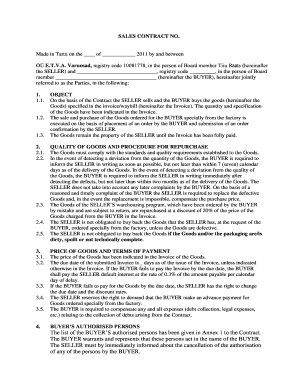
- Fill in the SELLER's information, including the legal name of the company (OÜ E.T.V.A. Varuosad) and the registry code (10081778). Specify the board member's name, Tiiu Rääts.
- Complete the BUYER's section by entering the company's name, registry code, and the name of the board member representing the BUYER. These details are crucial for identifying the parties involved in the agreement.
- Proceed to outline the OBJECT of the contract by detailing the goods involved in the transaction, which must match the specifications provided in the accompanying invoice or waybill.
- Indicate the quality expectations for the goods. Include a clause that the BUYER must notify the SELLER regarding any issues within the specified time frames.
- Fill in the PRICE OF GOODS and TERMS OF PAYMENT section, which includes the invoice price, due date, and any applicable interest rates for late payments.
- List the BUYER's authorized persons in Annex 1. Ensure all individuals with authorization to act on behalf of the BUYER are included.
- Review the procedure for dispute resolution, detailing that any disputes will initially be addressed through negotiations, and if unresolved, referred to Tartu County Court.
- Finalize by signing the contract at the designated areas for both the SELLER and BUYER. Ensure that all contract documents are appropriately completed and acknowledged.
- Once all sections are filled, proceed to save your changes. You may also choose to download, print, or share the completed SALES CONTRACT NO.
Start filling out your SALES CONTRACT NO online today!
(nəʊ seɪl ) noun. business. a situation in which a seller and a potential buyer are unable to agree terms to sell something so that a sale does not take place. $350,000 were offered, but the seller needed $400,000, so it was a no-sale.
Industry-leading security and compliance
US Legal Forms protects your data by complying with industry-specific security standards.
-
In businnes since 199725+ years providing professional legal documents.
-
Accredited businessGuarantees that a business meets BBB accreditation standards in the US and Canada.
-
Secured by BraintreeValidated Level 1 PCI DSS compliant payment gateway that accepts most major credit and debit card brands from across the globe.