Loading
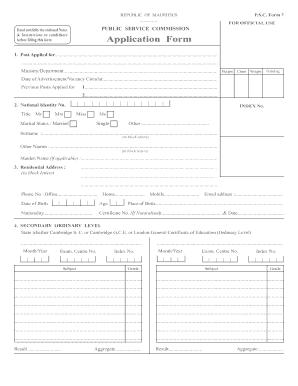
Get Mu P.s.c. 7
How it works
-

Open form follow the instructions
-

Easily sign the form with your finger
-

Send filled & signed form or save
How to fill out the MU P.S.C. 7 online
Filling out the MU P.S.C. 7 form is a crucial step in your application process for public service positions in Mauritius. This guide will provide you with clear, step-by-step instructions to help you accurately complete the form online.
Follow the steps to successfully complete the MU P.S.C. 7 form online.
- Press the ‘Get Form’ button to access the application form and load it in your preferred online editor.
- Begin filling out the form by indicating the post you are applying for, along with the ministry or department. Ensure this section is accurate, as it is essential for processing your application.
- Provide your national identity number and select your title from the options provided. Fill in your surname and other names in block letters, and include your maiden name if applicable.
- Complete the residential address section in block letters. Ensure you include your contact numbers — office, home, and mobile — and your email address.
- Indicate your date of birth, age, place of birth, and nationality. If you are a naturalized citizen, include your certificate number and the date.
- In the secondary ordinary level section, specify your examination details, including the name of the examination body, subjects taken, index numbers, and grades obtained.
- Fill out your secondary advanced level qualifications, providing similar details as in the previous step.
- In the qualifications section, list other secondary qualifications you possess and include details such as the examining body, country, and certificates obtained.
- Detail your technical and vocational qualifications, indicating the name of the examining body, course duration, and qualifications obtained.
- Similar to previous sections, list diploma qualifications and degree/professional qualifications, ensuring to attach photocopies of your marksheets where applicable.
- Document any post-degree qualifications, and provide information about other qualifications mentioned in the job advertisement.
- Detail your employment history, starting with your present employment in government service, and include past government service if applicable.
- Answer questions regarding any investigations or court prosecutions from the last 10 years, ensuring to provide complete and accurate information.
- Complete the acknowledgement slip as instructed, making sure to accurately fill in relevant dates and details.
- Review the entire form for completeness and accuracy. Once finalized, you can save your changes, download a copy, print it if needed, or share the completed form.
Complete your MU P.S.C. 7 application online today to ensure timely submission!
MU P.S.C. 7 and S7 serve different purposes within the automation framework. While S7 typically refers to the Siemens S7 series of programmable logic controllers, MU P.S.C. 7 encompasses a broader range of process control functionalities. This means MU P.S.C. 7 integrates with various systems, providing end-to-end solutions for operations. Users benefit from a streamlined approach when implementing MU P.S.C. 7 in their processes.