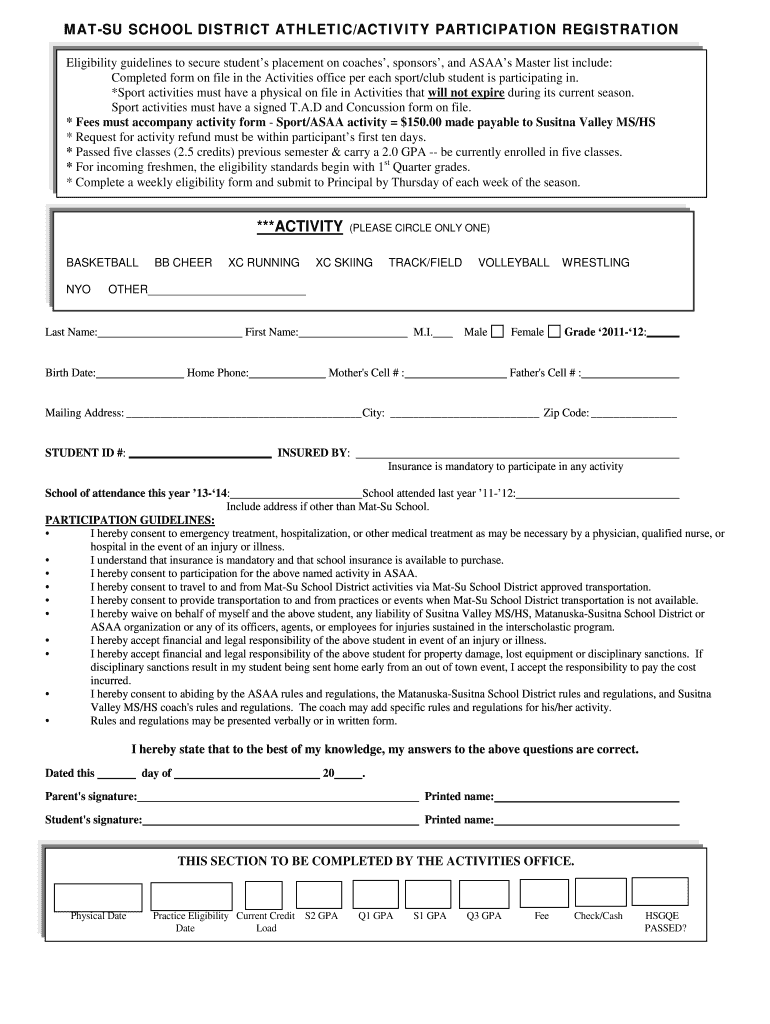
on file in the Activities office per each sport/club student is participating in. *Sport activities must have a physical on file in Activities that will not expire during its current season. Sport activities must have a signed T.A.D and Concussion form on file. * Fees must accompany activity form - Sport/ASAA activity = $150.00 made payable to Susitna Valley MS/HS * Request for activity refund must be within participant’s first ten days. * Passed five classes (2.5 credits) previous semester &.
Loading

Open form follow the instructions

Easily sign the form with your finger

Send filled & signed form or save
How to fill out the Mat-Su School District Athletic/Activity Participation Registration online
Filling out the Mat-Su School District Athletic/Activity Participation Registration is an essential step for students wishing to participate in school sports and activities. This guide provides clear instructions on how to effectively complete the registration form online to ensure a smooth process.
Follow the steps to complete your registration form online.
- Press the ‘Get Form’ button to access the registration form and open it in your editor.
- Begin by selecting the sport or activity in which you are registering by circling only one option from the provided list.
- Fill in the participant's last name, first name, middle initial, birth date, home phone number, and grade for the current academic year.
- Indicate the gender of the participant by selecting either male or female and include the parents' contact numbers.
- Provide the mailing address, including the city and zip code. Ensure that the student ID number is also filled in.
- Insurance information is mandatory. State the insurance provider that covers the participant.
- Make sure to include the school of attendance for the current year and the school attended last year, specifying the address if it differs from Mat-Su School.
- Review the participation guidelines carefully. Consent to emergency treatment and participation in the activity must be acknowledged.
- Ensure that a parent or guardian signs and dates the form, providing their printed name as well as the student's signature.
- Once all fields are completed, save the changes made to the document. You can then download, print, or share the registration form as required.
Complete your Mat-Su School District Athletic/Activity Participation Registration online today!
Experience a faster way to fill out and sign forms on the web. Access the most extensive library of templates available.
Related content
Mar 6, 2025 — Academy K-12's reputation as a strong, successful charter school is...
Be registered or planning to register for classes at Mat‐Su College for the fall...
The aggregate market value of the voting stock held by non-affiliates of the registrant...
Use professional pre-built templates to fill in and sign documents online faster. Get access to thousands of forms.
If you believe that this page should be taken down, please follow our DMCA take down process here.