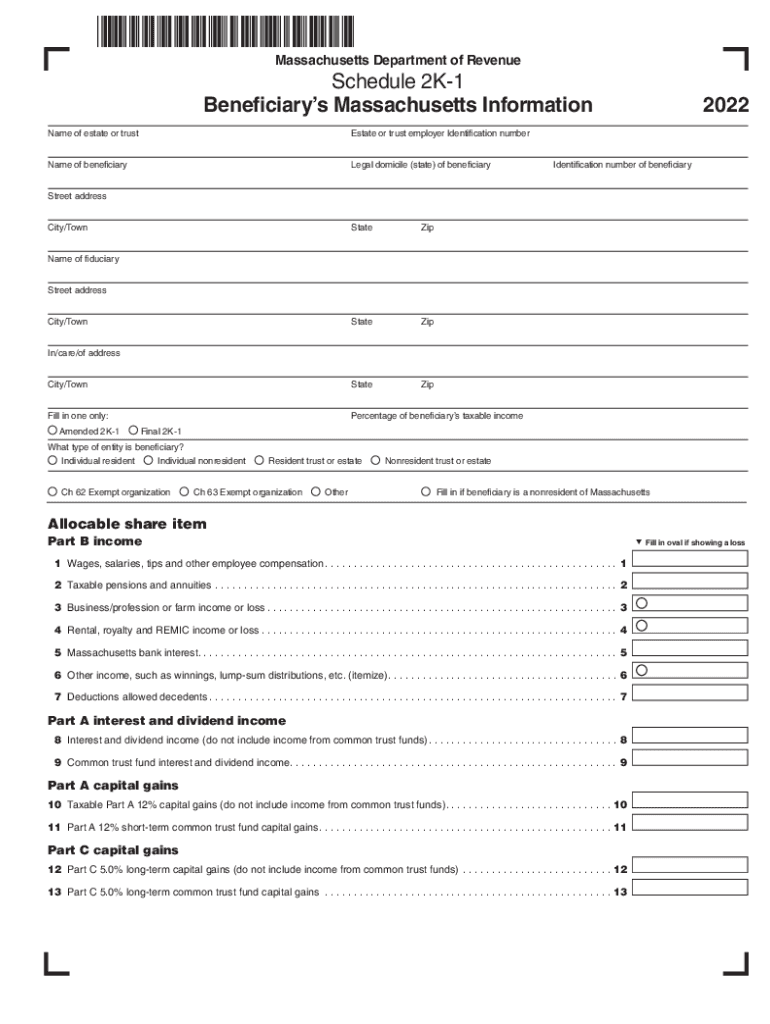
Ile (state) of beneficiary 2022 Identification number of beneficiary Street address City/Town State Zip State Zip City/Town State Zip Fill in one only: Percentage of beneficiary s taxable income Name of fiduciary Street address City/Town In/care/of address Amended 2K-1 Final 2K-1 What type of entity is beneficiary? Individual resident Ch 62 Exempt organization Individual nonresident Resident trust or estate Ch 63 Exempt organization.
Loading

Open form follow the instructions

Easily sign the form with your finger

Send filled & signed form or save
How to fill out the MA Schedule 2K-1 online
Completing the MA Schedule 2K-1 online can seem daunting, but with the right guidance, it becomes manageable. This guide offers clear, step-by-step instructions to ensure you accurately fill out each section of the form.
Follow the steps to successfully complete your MA Schedule 2K-1 online.
- Press the ‘Get Form’ button to access the MA Schedule 2K-1 and open it in your selected editor.
- Enter the name of the estate or trust in the designated field. Ensure that you input the full legal name to avoid any discrepancies.
- Fill in the estate or trust employer identification number accurately to facilitate processing.
- Input the name of the beneficiary. This should be the person or entity that will receive the income or benefit.
- Indicate the legal domicile of the beneficiary by specifying their state of residence.
- Complete the year field, which is prefilled with '2022', confirming it is the correct tax year for the form.
- Provide the identification number of the beneficiary. This could be a social security number or a different taxpayer identification number.
- Fill in the street address, city/town, state, and zip code of the beneficiary to ensure accurate mailing and identification.
- Mark the appropriate oval to indicate the type of entity the beneficiary represents, such as individual resident or non-resident.
- Proceed to enter relevant income details in Part B. Fill in each line carefully, including wages, salaries, pensions, and any other taxable income.
- Continue to fill out Part A for interest and dividend income, ensuring to separate funds from common trust funds accurately.
- Complete any necessary sections related to credits and estimated payments if applicable, ensuring all figures are accurate.
- Once all sections are completed, review your entries for accuracy and completeness.
- Save your changes, and choose to download, print, or share the completed form as required.
Complete your documents online with ease and confidence.
Experience a faster way to fill out and sign forms on the web. Access the most extensive library of templates available.
Related content
Trustees or other fiduciaries must enclose a copy of Schedule 2K-1 for each beneficiary...
Use U.S. Form 4797 and report the amount in. Form 1, Schedule B and/or Schedule D. You...
... 1)Tmax.. When last_epoch=-1, sets initial lr as lr. Notice that because the...
Get answers to your most pressing questions about US Legal Forms API.
How much is $70,000 after taxes in Massachusetts?
If you make $70,000 a year living in the region of Massachusetts, USA, you will be taxed $17,164. That means that your net pay will be $52,836 per year, or $4,403 per month.
What is a Schedule 2k1 in Massachusetts?
Use Schedule 2K-1, Beneficiary's Massachusetts Information, to report a beneficiary's share of income, deductions, and credits from a decedent's estate or trust. Grantor-type trusts do not use Schedule 2K-1 to report the income, deductions or credits of the grantor or other person treated as the owner.
How to avoid capital gains tax in Massachusetts?
Sell appreciated assets in a tax-exempt trust: You can minimize your taxable capital gains by moving appreciated assets into a tax-exempt trust – a Charitable Remainder Trust, for example – before you sell.
What is schedule D in Massachusetts?
Schedule D-IS - Long-Term Capital Gains and Losses Excluding Collectibles. Schedule FCI - Foreign Corporation Income of U.S. Shareholder. Schedule CMS - Credit Manager Schedule. Schedule CRS - Credit Recapture Schedule. Schedule C-2 - Excess Deductions Against Trade or Business Income.
What is MA Schedule M 1?
Schedule M-1, Book to Tax Reconciliation, must be filed by all corporations filing Form 355, Form 355C and those S corporations filing Form 355S that are required to complete Schedule E (those with annualized gross receipts of $6,000,000 or more).
When can I file mass state taxes in 2024?
Electronic Filing (E-Filing) E-Filing for DOR and the IRS will begin January 29, 2024. For more information visit E-file and Pay Your MA Personal Income Taxes. DOR prior year returns are available.
Who must file a Massachusetts fiduciary return?
Every executor, administrator, trustee, guardian, conservator, trustee in a noncorporate bankruptcy or receiver of a trust or estate that received in- come in excess of $100 that is taxable under MGL ch 62 at the entity level or to a beneficiary(ies) and that is subject to Massachusetts jurisdiction must file a Form 2.
Use professional pre-built templates to fill in and sign documents online faster. Get access to thousands of forms.
If you believe that this page should be taken down, please follow our DMCA take down process here.