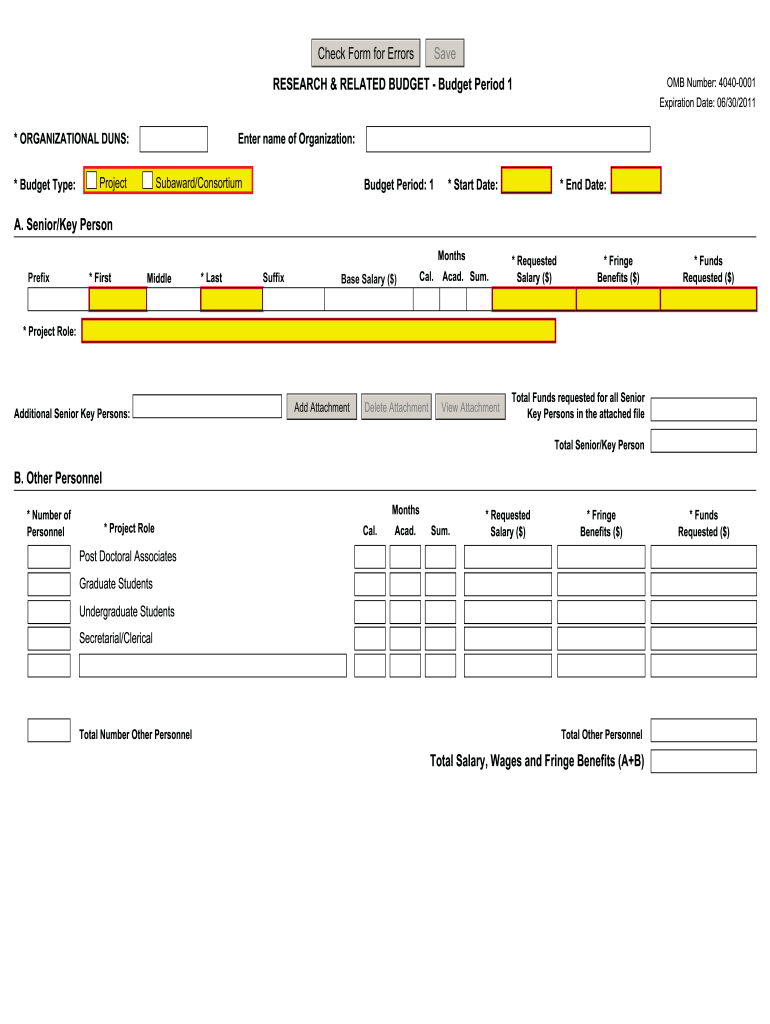
Art Date: * End Date: A. Senior/Key Person Months Prefix * First Middle * Last Suffix Base Salary ($) Cal. Acad. Sum. * Requested Salary ($) * Fringe Benefits ($) View Attachment Total Funds requested for all Senior Key Persons in the attached file * Funds Requested ($) * Project Role: Additional Senior Key Persons: Add Attachment Delete Attachment Total Senior/Key Person B. Other Personnel * Number of Personnel Months * Project Role Cal. Acad. Sum. * Requested Salary ($.
Loading

Open form follow the instructions

Easily sign the form with your finger

Send filled & signed form or save
How to fill out the Grants Research & Related Budget online
Successfully navigating the Grants Research & Related Budget form is essential for effective grant proposals. This guide provides step-by-step instructions to help users fill out the online form accurately and confidently.
Follow the steps to complete your budget submission
- Click 'Get Form' button to access the Grants Research & Related Budget form and open it in the editor.
- Begin by entering your organization's DUNS number and budget type in the respective fields at the top of the form.
- In the 'Project' section, clearly state the names of the project and any associated subawards or consortium details.
- For the budget period, specify the start and end dates clearly. Ensure these dates reflect the duration of the project.
- Proceed to section A, 'Senior/Key Person'. Here, input each individual's details including their name, role, base salary, requested salary, and fringe benefits.
- Add additional senior/key persons as needed and include an attachment for total funds requested in this section.
- In section B, 'Other Personnel', enter the total number of personnel involved, their roles, requested salaries, and fringe benefits.
- Detail the specific categories of personnel including post-doctoral associates and graduate students, ensuring accurate totals.
- Move to section C for 'Equipment Description'. List any equipment items costing over $5,000, along with the requested funds for each item.
- In section D, provide information on travel costs, including domestic and foreign travel, ensuring all anticipated travel expenses are included.
- For section E, 'Participant/Trainee Support Costs', breakdown costs related to tuition, stipends, travel, and subsistence.
- Transition to section F to input any other direct costs such as materials, publication costs, and contractual agreements.
- In section G, sum all direct costs collected from previous sections to present the total direct costs.
- Proceed to section H for indirect costs. Detail the type, rate, and base for the indirect costs requested.
- Make sure to combine the totals of direct and indirect costs in section I to indicate the total institutional costs.
- Conclude with section J for any fees being requested and outline the budget justification in section K, attaching any necessary files.
- Once all sections are completed, review the information for accuracy and clarity. Save changes and download or print the document as needed.
Start completing your Grants Research & Related Budget online today to ensure your project funding needs are met.
Experience a faster way to fill out and sign forms on the web. Access the most extensive library of templates available.
Related content
Research & Related Budget (Total Fed + Non-Fed), PDF · Schema · FID · Instructions...
RESEARCH & RELATED BUDGET - Budget Period 1. Budget Type: Enter name of Organization:...
Maximum budget depends on regional funding budgets. Contents. 1 How to apply; 2 What we...
Get answers to your most pressing questions about US Legal Forms API.
Does an R21 have to be a modular budget?
An R21 grant does not have to be a modular budget; however, it can be a useful option depending on the project's funding needs and complexity. R21 grants often focus on exploratory research, and using a modular budget can simplify the application process. Make sure to align your chosen budget type with the guidelines outlined in the Grants Research & Related Budget for the best chance of success.
When to use NIH modular budget?
You should use an NIH modular budget when you are applying for grants that allow this simpler budgeting format, particularly if your project's total budget is under a specific threshold. Modular budgets streamline the application process, making it easier for researchers to estimate funding needs without extensive breakdowns. Understanding when to use this option will enhance your efficiency in managing the Grants Research & Related Budget.
Should I use R&R or modular budget?
Choosing between an R&R budget and a modular budget depends on your project's needs and the funding agency's requirements. If your proposal involves more complex expenses and detailed justifications, an R&R budget may be the better option. However, for straightforward projects, a modular budget simplifies the process. Consider what aligns best with the Grants Research & Related Budget needs for your application.
What is the difference between modular and non-modular R01?
The primary difference between modular and non-modular R01 budgets lies in their structure. A modular budget offers a simplified approach, allowing you to request specific modular amounts, while a non-modular budget requires a detailed itemization of costs. Depending on your project's complexity, choosing the right format in the context of the Grants Research & Related Budget can affect your funding success.
What is the budget of a grant program?
The budget of a grant program outlines the financial resources allocated for various activities within a specific timeframe. This budget covers all eligible expenses related to the project's goals and objectives, allowing oversight of funds. It's vital to align your budget with the Grants Research & Related Budget to ensure compliance and update financial records accurately.
How do you write a research grant budget?
To write a research grant budget, you should begin by identifying all the costs associated with your project, including personnel, equipment, travel, and supplies. Next, itemize each expense clearly and provide justifications for why these costs are essential. This approach ensures that you present a strong proposal within the framework of the Grants Research & Related Budget, enhancing your chances of securing funding.
What does R&R mean in budget?
R&R stands for Research and Related budget. This budget format is specifically designed for grant applications, helping you outline the funding needed for research activities and related expenses. Understanding R&R is crucial for anyone looking to secure grants and manage funds effectively through Grants Research & Related Budget.
What should the budget of a grant proposal include?
The budget of a grant proposal should include all direct and indirect costs, a budget narrative justifying the expenses, and any expected income from other sources. Clarity and detail are essential to show how funds will support the project. A comprehensive budget is central to securing approval and leveraging your Grants Research & Related Budget effectively.
What are the 5 R's of grant writing?
The 5 R's of grant writing refer to Relevance, Results, Relationships, Resources, and Reporting. Each component helps outline a successful grant application that effectively communicates your project's need and impact. Paying attention to these elements ensures clarity and strengthens your narrative around Grants Research & Related Budget.
What is research grant budget justification?
Research grant budget justification explains why your requested funds are necessary and how you will use them. It should clearly correlate your expenses with the research objectives outlined in your proposal. This justification plays a crucial role in strengthening your application and demonstrating the effective use of your Grants Research & Related Budget.
Use professional pre-built templates to fill in and sign documents online faster. Get access to thousands of forms.
If you believe that this page should be taken down, please follow our DMCA take down process here.