Loading
Get Fotokem Laboratory Purchase Order
How it works
-

Open form follow the instructions
-

Easily sign the form with your finger
-

Send filled & signed form or save
How to fill out the FotoKem Laboratory Purchase Order online
This guide provides clear, step-by-step instructions for filling out the FotoKem Laboratory Purchase Order online. By following these steps, users can ensure a smooth and efficient process.
Follow the steps to complete your purchase order accurately.
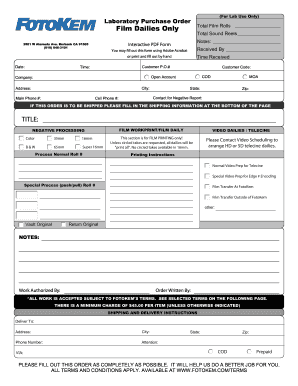
- Click ‘Get Form’ button to obtain the form and open it in the editor.
- Begin by entering the date of the request in the designated field. This should be the current date when the order is being placed.
- Fill in the total number of film rolls and sound reels you are ordering. Ensure accuracy to avoid issues with quantity.
- In the 'Notes' section, provide any additional information or specific instructions related to your order.
- In the 'Customer P.O.#' field, enter your purchase order number, if applicable. This helps in identifying the order.
- Complete the customer code section and specify whether this is a cash on delivery (COD) order or an open account.
- Enter the company name, city, address, and main phone number in the respective fields.
- Provide your contact information for negative reports, including your cell phone number for timely communication.
- If the order is to be shipped, complete the shipping information at the bottom of the page, ensuring all fields are accurately filled.
- Indicate the title of your order and select the type of processing required (e.g., color, black and white, etc.).
- Specify any printing instructions, including normal video prep or special video preparation if needed.
- Designate whether the film transfer will occur at FotoKem or if it will be done elsewhere, indicating additional details if necessary.
- Complete the shipping and delivery instructions, including the delivery address and the person to whom the order should be directed.
- Finally, ensure any additional notes are captured, authorize the work by providing your name, and include the name of the person writing the order.
- Once all fields are filled accurately, you may save your changes, download, print, or share the completed form as necessary.
Complete your documents online today for efficient processing.