Loading
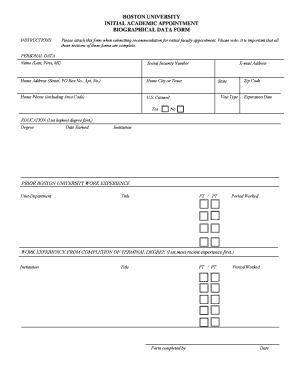
Get Biographical Data Form (pdf) - Boston University - Bu
How it works
-

Open form follow the instructions
-

Easily sign the form with your finger
-

Send filled & signed form or save
How to fill out the Biographical Data Form (PDF) - Boston University - Bu online
Filling out the Biographical Data Form is a crucial step in applying for an initial academic appointment at Boston University. This guide will walk you through the process of completing the PDF form accurately and efficiently.
Follow the steps to complete the form effectively.
- Click the ‘Get Form’ button to obtain the form and open it in your PDF editor.
- Begin by filling out the personal data section. Enter your name in the format of Last, First, and Middle Initial. Include your Social Security number, home address (including street, PO Box, and apartment number), home city or town, and home phone number with area code.
- Indicate your U.S. citizenship status by selecting 'Yes' or 'No.' If applicable, provide your visa type and expiration date.
- Move on to the education section. List your highest degree first, followed by the date earned and the institution from which you graduated.
- In the prior Boston University work experience section, detail your past roles at the university by stating the unit or department, your title, whether your employment was full-time or part-time, and the period you worked.
- Next, document your work experience following the completion of your terminal degree. List the most recent experience first, including the institution, your title, employment status (full-time or part-time), and the time period worked.
- Finally, ensure the form is completed by adding the name of the person filling it out and the date of completion. Save the form by clicking the save icon in the toolbar.
- Once the form is complete, you can download it to your computer using Adobe Acrobat to open, complete, and save the form for future reference. It is also advisable to print the completed form and obtain the required signatures on the printed copy before submission.
- Forward the signed copy of the form, along with any relevant supporting materials, to the Office of the Provost.
Take the next step in your academic journey by filling out and submitting your Biographical Data Form online today.
Industry-leading security and compliance
US Legal Forms protects your data by complying with industry-specific security standards.
-
In businnes since 199725+ years providing professional legal documents.
-
Accredited businessGuarantees that a business meets BBB accreditation standards in the US and Canada.
-
Secured by BraintreeValidated Level 1 PCI DSS compliant payment gateway that accepts most major credit and debit card brands from across the globe.