Loading
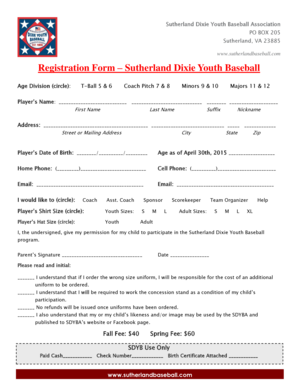
Get Registration Form Sutherland Dixie Youth Baseball
How it works
-

Open form follow the instructions
-

Easily sign the form with your finger
-

Send filled & signed form or save
How to fill out the Registration Form Sutherland Dixie Youth Baseball online
Filling out the Registration Form Sutherland Dixie Youth Baseball online is a straightforward process that requires careful attention to detail. This guide will walk you through each step to ensure that your registration is completed accurately and efficiently.
Follow the steps to complete your registration form online.
- Click ‘Get Form’ button to obtain the form and open it in a user-friendly format.
- Select the appropriate age division for the player by circling one of the options: T-Ball (5 & 6), Coach Pitch (7 & 8), Minors (9 & 10), or Majors (11 & 12).
- Enter the player's name in the designated fields, including first name, last name, suffix, and nickname.
- Complete the address section by filling in the street or mailing address, city, state, and zip code.
- Provide the player’s date of birth and calculate their age as of April 30th, 2015.
- Enter both the home phone and cell phone numbers where requested.
- Fill in the email address fields with your contact information, ensuring accuracy.
- Indicate your preference to coach, assist, or participate in another capacity by circling the appropriate option.
- Select the player's shirt size and hat size from the available youth and adult options.
- Sign and date the permission statement to allow your child to participate in the program.
- Initial next to each statement to confirm your understanding of the uniform requirements, concession stand duties, and photo release policy.
- Review the registration fees and ensure any payment details are filled in for SDYB use only before submission.
- Once all fields are completed, save the changes, download, print, or share the form as required.
Complete your Registration Form Sutherland Dixie Youth Baseball online today for a smooth registration process!
Related links form
To combine first and last names, use the CONCATENATE function or the ampersand (&) operator. Important: In Excel 2016, Excel Mobile, and Excel for the web, this function has been replaced with the CONCAT function.