Loading
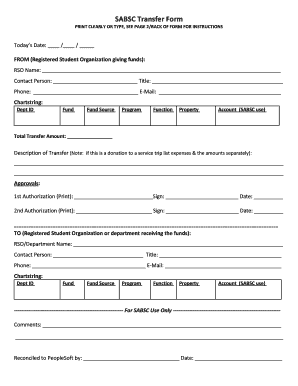
Get Sabsc Transfer Form Print Clearly Or Type, See Page 2/back Of Form For Instructions Today's Date: /
How it works
-

Open form follow the instructions
-

Easily sign the form with your finger
-

Send filled & signed form or save
How to fill out the SABSC Transfer Form PRINT CLEARLY OR TYPE, SEE PAGE 2/BACK OF FORM FOR INSTRUCTIONS online
The SABSC Transfer Form is essential for transferring funds between Registered Student Organizations (RSOs) or departments. This guide provides detailed instructions to help users accurately complete the form online, ensuring a smooth transfer process.
Follow the steps to successfully fill out the SABSC Transfer Form.
- Click the ‘Get Form’ button to access the SABSC Transfer Form and open it in your preferred editor.
- Input today's date in the designated section, ensuring the format is MM/DD/YYYY.
- Fill in the details of the organization giving funds, including the RSO name and contact person's information such as title, phone number, and email.
- Complete the chartstring fields including Dept ID, Fund, Fund Source, Program, Function, Property, and Account (SABSC use).
- Enter the total transfer amount you wish to send.
- Provide a description of the transfer, making sure to detail any trip-related expenses if applicable, listing them separately.
- Gather the necessary authorizations by having the first and second authorizers print their names, sign, and enter the date.
- For the organization or department receiving the funds, fill in the RSO/Department name and contact person's details along with their chartstring information.
- Complete the SABSC use only section, including any comments if required.
- Once all fields are completed, save your changes, and then download, print, or share the form as needed.
Start filling out your SABSC Transfer Form online today!
Industry-leading security and compliance
US Legal Forms protects your data by complying with industry-specific security standards.
-
In businnes since 199725+ years providing professional legal documents.
-
Accredited businessGuarantees that a business meets BBB accreditation standards in the US and Canada.
-
Secured by BraintreeValidated Level 1 PCI DSS compliant payment gateway that accepts most major credit and debit card brands from across the globe.