Loading
Get Room Request Form - Isu
How it works
-

Open form follow the instructions
-

Easily sign the form with your finger
-

Send filled & signed form or save
How to fill out the Room Request Form - Isu online
This guide provides clear and supportive instructions for filling out the Room Request Form - Isu online. By following these steps, you will be able to successfully submit your room request for various activities.
Follow the steps to complete the Room Request Form effectively.
- Click the ‘Get Form’ button to obtain the form and open it in the editor.
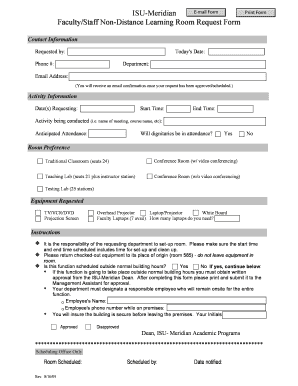
- In the 'Contact Information' section, enter your details: name, today's date, phone number, department, and email address. Ensure that your email address is correct, as you will receive a confirmation once your request is approved.
- Fill out the 'Activity Information' section. Specify the date(s) you are requesting, the start time, the end time, the name of the activity (e.g., meeting, class), and the anticipated attendance.
- Indicate whether dignitaries will be present during the activity by selecting 'Yes' or 'No.'
- In the 'Room Preference' section, choose your preferred type of room from the available options. Options include traditional classrooms, conference rooms, teaching labs, and testing labs.
- Provide details about any equipment you require for your event in the 'Equipment Requested' section. Select from the list and indicate the number of faculty laptops needed.
- Review the instructions carefully to ensure that your request complies with set-up and clean-up times, equipment return, and any special conditions for events outside normal building hours.
- If your event takes place outside normal hours, complete the additional requirements, including obtaining written approval from the ISU-Meridian Dean, designating a responsible employee to be on-site, and securing the building post-event.
- After filling out the form, check all entries for accuracy. Once confirmed, you can save your changes, download the form, print it, or share it as necessary.
Now that you have this guide, proceed to complete your Room Request Form online!
Industry-leading security and compliance
US Legal Forms protects your data by complying with industry-specific security standards.
-
In businnes since 199725+ years providing professional legal documents.
-
Accredited businessGuarantees that a business meets BBB accreditation standards in the US and Canada.
-
Secured by BraintreeValidated Level 1 PCI DSS compliant payment gateway that accepts most major credit and debit card brands from across the globe.