Loading
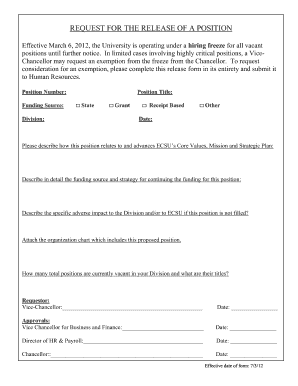
Get Request To Release Position Form 070312.docx - Ecsu
How it works
-

Open form follow the instructions
-

Easily sign the form with your finger
-

Send filled & signed form or save
How to fill out the Request To Release Position Form 070312.docx - Ecsu online
Filling out the Request To Release Position Form 070312.docx is essential for initiating a request for exemption from the hiring freeze at ECSU. This guide provides clear, step-by-step instructions to assist you in completing the form accurately and effectively.
Follow the steps to complete the form accurately.
- Locate and click the ‘Get Form’ button to download the Request To Release Position Form 070312.docx. Ensure you have access to your editing software to make modifications to the form.
- Begin by entering the position number in the designated field. This ensures that your request is linked to the specific vacancy in question.
- Select the appropriate funding source for the position from the options provided: 'State,' 'Grant,' 'Receipt Based,' or 'Other.' Provide a brief rationale if you select 'Other.'
- Identify the division responsible for the position by entering its name in the corresponding field. This clarifies where the position fits within the organizational structure.
- Complete the position title section. Make sure the title accurately reflects the role being requested and is recognizable within the context of ECSU.
- In the description area, elaborate on how this position aligns with and advances ECSU's Core Values, Mission, and Strategic Plan. This is crucial for justifying the need for the position.
- Provide a comprehensive description of the funding source and strategy for sustaining the funding for this position. Include any anticipated challenges or solutions.
- Detail the specific adverse impacts to the division and ECSU if the position remains unfilled. This information is vital for decision-makers reviewing your request.
- Attach an organizational chart that includes the proposed position. This visual aid helps to contextualize the role within the current team structure.
- List the total number of currently vacant positions in your division along with their titles. This information supports your request by demonstrating the current organizational needs.
- Complete the requestor section with your name and title, as well as the Vice-Chancellor's signature to indicate their support for the request.
- Ensure that all necessary approvals are gathered from the Vice Chancellor for Business and Finance, the Director of HR & Payroll, and the Chancellor, each confirming their support with their signatures and dates.
- Once all sections are completed and signed, save your changes. You can then choose to download, print, or share the completed form as required.
Take action now by completing the Request To Release Position Form online to ensure your position request is processed efficiently.
Grade symbols currently in use for all undergraduate courses are: A-Excellent, B-Good (above average), C-Average, D-Poor (passing but not satisfactory in some Departments), F-Failing (course must be repeated to earn credit), I- Incomplete, IP- Incomplete Passing, IF-Incomplete failing. ii.
Industry-leading security and compliance
US Legal Forms protects your data by complying with industry-specific security standards.
-
In businnes since 199725+ years providing professional legal documents.
-
Accredited businessGuarantees that a business meets BBB accreditation standards in the US and Canada.
-
Secured by BraintreeValidated Level 1 PCI DSS compliant payment gateway that accepts most major credit and debit card brands from across the globe.