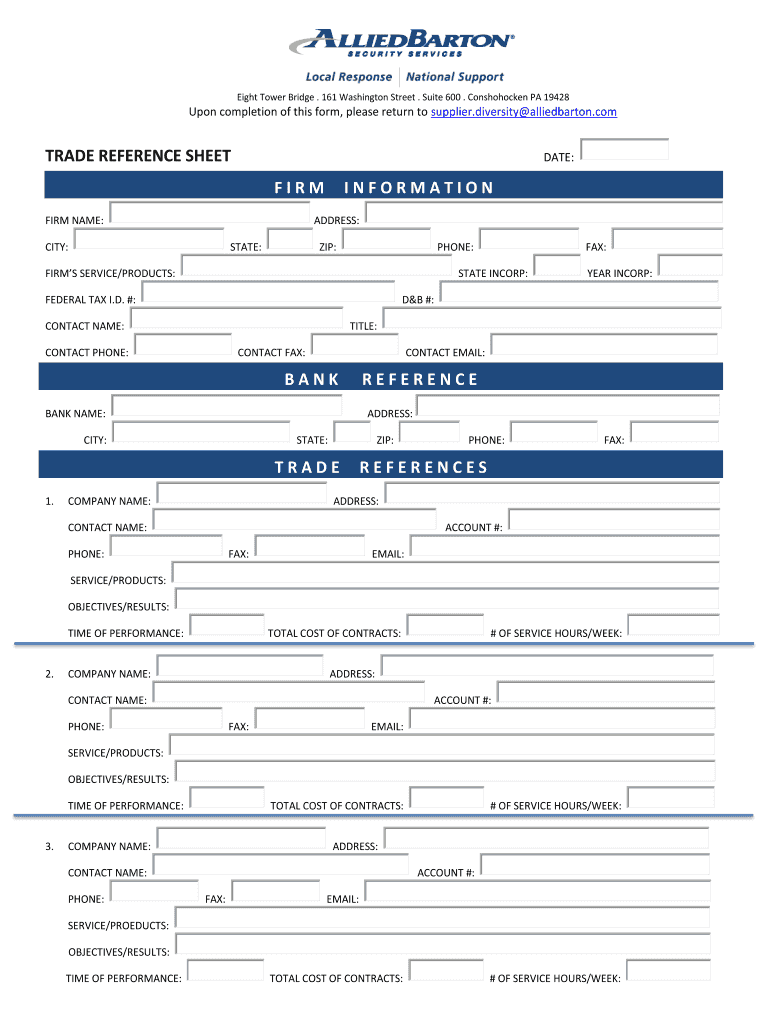
FIRM NAME: INFORMATION ADDRESS: CITY: STATE: ZIP: PHONE: FIRM’S SERVICE/PRODUCTS: STATE INCORP: FEDERAL TAX I.D. #: YEAR INCORP: D&B #: CONTACT NAME: TITLE: CONTACT PHONE: CONTACT FAX: CONTACT EMAIL: BANK BANK NAME: REFERENCE ADDRESS: CITY: STATE: ZIP: TRADE 1. FAX: COMPANY NAME: PHONE: FAX: REFERENCES ADDRESS: CONTACT NAME: ACCOUNT #: PHONE: FAX: EMAIL: SERVICE/PRODUCTS: OBJECTIVES/RESULTS: TIME OF PERFORMANCE: 2. TOTAL COST OF CONTRACTS: COMPANY NAME: # O.
Loading

Open form follow the instructions

Easily sign the form with your finger

Send filled & signed form or save
How to fill out the Allied Barton Trade Reference Sheet online
Filling out the Allied Barton Trade Reference Sheet online is a crucial step for establishing reliable business relationships. This guide will walk you through each section of the form to ensure you provide accurate and comprehensive information.
Follow the steps to complete your form successfully.
- Click ‘Get Form’ button to access the form and open it in the editing interface.
- In the 'Date' field, enter the date you are completing the form. This helps to document the timeline of your reference submission.
- Under 'Firm Information', begin by filling in the 'Firm Name' with the full legal name of your business.
- Provide the 'Address', 'City', 'State', and 'ZIP' code for your firm accurately to avoid any miscommunication.
- Enter the 'Phone' number where your firm can be reached for inquiries.
- Indicate the 'Firm’s Service/Products' offered to provide context on what your firm specializes in.
- Fill in the 'State Incorporation' and 'Year Incorporation' fields to establish your firm’s legal standing.
- Provide your 'Federal Tax I.D. #' for tax identification purposes.
- Enter your 'D&B #' for credit rating purposes if applicable.
- Complete the 'Contact Name', 'Title', 'Contact Phone', 'Contact Fax', and 'Contact Email' fields to ensure direct communication.
- In the 'Bank' section, input the 'Bank Name' to provide banking references.
- For each 'Trade Reference', ensure to fill out all relevant information including 'Company Name', 'Phone', 'Fax', 'Address', 'Contact Name', 'Account #', 'Email', 'Service/Products', 'Objectives/Results', 'Time of Performance', and 'Total Cost of Contracts'.
- Review all entries for accuracy and completeness before finalizing.
- Once completed, save the changes, and you may choose to download, print, or share the form as necessary to return it to the provided email address.
Complete your documents online to streamline your business processes.
Experience a faster way to fill out and sign forms on the web. Access the most extensive library of templates available.
Related content
Quality Control Inspection Check Lists used to conduct inspections which include, as a...
Each Barton College General Catalog takes effect at the opening of the fall semester. The...
The Archaeological Survey of Alberta Manuscript Series is intended as an expeditious...
Get answers to your most pressing questions about US Legal Forms API.
How do you write a trade reference?
Writing a trade reference involves outlining the relationship with the business and detailing payment history. Start by including your name, the contact details of your supplier, and specific payment behaviors. The Allied Barton Trade Reference Sheet helps you format this information clearly, enhancing its professionalism and impact for those reviewing it.
What is a trade reference sheet?
A trade reference sheet is a document that lists your trade references, representing your credibility and financial reliability to potential creditors. It typically includes contact information and a brief description of your relationship with each reference. The Allied Barton Trade Reference Sheet provides a structured format, making it easier for you to compile this crucial information effectively.
Where can I get trade references?
You can get trade references from various sources, including suppliers, vendors, and service providers you have engaged with. These references should be people who can vouch for your business integrity and payment history. For more effective tracking, consider using tools like the Allied Barton Trade Reference Sheet, which assists you in collecting and presenting this information from multiple sources.
What is a trade reference record?
A trade reference record documents your payment history and business relationships with suppliers. It often includes details such as payment terms, amounts, and timeliness of payments. The Allied Barton Trade Reference Sheet can help you understand how to compile and utilize this information to your advantage. A strong trade reference record can enhance your credibility with lenders or business partners.
How do I get a trade reference?
To obtain a trade reference, start by reaching out to suppliers or vendors you have worked with regularly. They should be willing to provide a reference if you have maintained a positive relationship with them. If you need assistance, the Allied Barton Trade Reference Sheet is a great resource. It offers guidance on what information to include and how to present your request.
What is a trade reference account number?
A trade reference account number is a unique identifier assigned to your account by the vendor or supplier providing the reference. This number helps lenders quickly identify and verify your credit history with that reference. Including this number on your Allied Barton Trade Reference Sheet can add legitimacy to your document.
How to fill out a trade reference?
To fill out a trade reference, you need to include accurate information about the business you are referencing. This typically includes their name, contact information, and your relationship with them. Additionally, ensure you indicate the payment terms you have adhered to. The Allied Barton Trade Reference Sheet is a great resource for structuring these details effectively.
What is an example of a trade reference?
A trade reference is usually a company or individual that can speak to your creditworthiness as a business. For example, if you have been purchasing supplies from a local vendor, they can act as your trade reference. Their positive feedback regarding your payment history enhances your credibility. Using the Allied Barton Trade Reference Sheet can help you document such valuable contacts.
Who should I use as a trade reference?
You should choose a trade reference that has a good understanding of your business conduct. This could be a supplier, vendor, or a client with whom you have done significant business. Make sure the chosen reference can provide insights into your payment behavior and reliability. The Allied Barton Trade Reference Sheet can guide you in selecting the best references.
Where do I get a trade reference?
You can obtain a trade reference from vendors, suppliers, or business partners with whom you have established payment agreements. Reach out to companies you regularly do business with and confirm their willingness to serve as a reference. By listing these references on the Allied Barton Trade Reference Sheet, you enhance your application’s credibility and appeal.
Use professional pre-built templates to fill in and sign documents online faster. Get access to thousands of forms.
If you believe that this page should be taken down, please follow our DMCA take down process here.