E Notarization/ Certification following month. State of___________ County of____________ Signed or attested before me on____________by_________________________________ Signature of motor vehicle wrecker (Seal or stamp) X _______________________________________ Signature _______________________________________ Printed or stamped name _____________________________________________________ and________________________________________ Title Dealer or county/off.
Loading

Open form follow the instructions

Easily sign the form with your finger

Send filled & signed form or save
How to fill out the WA DoL TD-420-538 online
Filling out the WA DoL TD-420-538 form is essential for reporting vehicle purchase activity as a wrecker. This guide provides step-by-step instructions to help users complete the form accurately and efficiently online.
Follow the steps to accurately complete the form online.
- Click ‘Get Form’ button to obtain the form and open it in the editor.
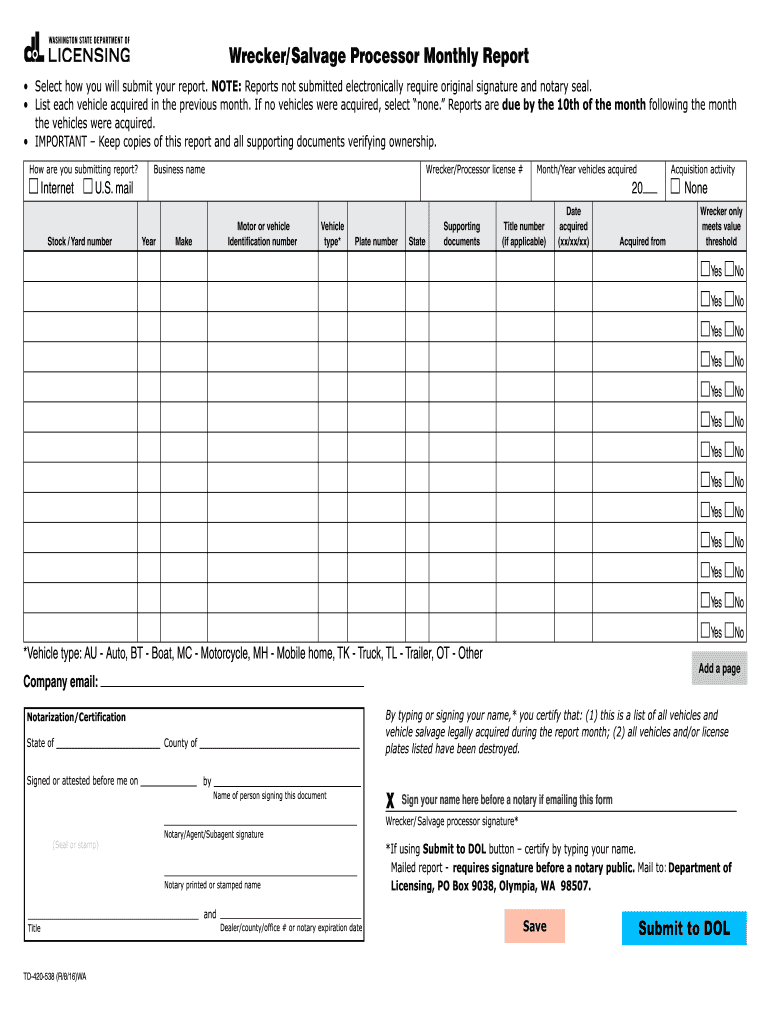
- In column A-D, enter the yard number and vehicle information for each vehicle you are reporting. Ensure you include accurate details, such as the year, make, and vehicle identification number.
- In column E, list all supporting documents that you are attaching to the report. This helps provide necessary validation for your report.
- In column F, include the license plate number of each vehicle and the state where it was titled. This is crucial for accurate record-keeping.
- In column G, document the date you purchased each vehicle and the name of the person from whom you purchased it. This information is key to your reporting.
- In the section regarding meets value threshold, respond with 'Yes' or 'No' based on the vehicle's eligibility as outlined by the salvage vehicle definition. Ensure you only select 'Yes' if the vehicle meets all specified criteria.
- If you did not receive any vehicles during the month, you must write 'NONE' in the appropriate place. Remember, the report still needs to be signed and submitted.
- Your signature must be notarized. Make sure to have a notary public sign and stamp the report to validate it.
- Once the form is completed, submit the report by the 10th of the following month along with all supporting documents to the designated address: Department of Licensing, ATT: Wrecker Desk, PO Box 9038, Olympia, WA 98507.
- Keep a copy of the completed report for your records. This will be useful for future reference.
Now that you have the steps, start completing your documents online with confidence.
Experience a faster way to fill out and sign forms on the web. Access the most extensive library of templates available.
Related content
TD-420-538 (R/9/19)W. By typing or signing your name,* you certify that: (1) this is a...
Aug 14, 2019 — I. Executive Summary. A. Purpose of the Regulatory Action. B. Legal...
The J & A Electronics Company has been a prospect for several years. We have generated...
Get answers to your most pressing questions about US Legal Forms API.
What does the employment security department do in Washington state?
The Washington Employment Security Department (ESD) plays a crucial role in managing unemployment benefits, labor market information, and workforce development. It provides support to job seekers and employers alike. For more detailed information, refer to the WA DoL TD-420-538 resources. Engaging with the ESD can offer significant benefits during your job search or business development.
How do I find my Washington employment security number?
Finding your Washington Employment Security Department number is straightforward. You can locate it on past tax documents or your previous unemployment benefit letters. If you can’t find these documents, visit the WA DoL TD-420-538 page for further instructions. Contacting the Washington ESD directly can also help retrieve your number quickly.
How to apply for a Washington ESD number?
To apply for a Washington Employment Security Department (ESD) number, visit the WA DoL TD-420-538 page for specific guidelines. You will need to complete the application form online or in person. Make sure to gather all necessary identification and business details. Once submitted, you will receive your ESD number, which is vital for managing unemployment insurance.
How to fill out a withholding exemption form?
Filling out a withholding exemption form involves providing essential details about your income and tax situation. Refer to the WA DoL TD-420-538 for specific guidance on what information to include and how to calculate your exemptions. This form helps ensure you are not over-withheld on your paycheck, aligning your withholding with your actual tax liability.
How should I fill out my tax withholding form?
To fill out your tax withholding form correctly, start by gathering all necessary information, such as your filing status and the number of exemptions you are claiming. The WA DoL TD-420-538 provides clear instructions and examples to help you complete the form accurately. Take your time to review your form before submission to ensure correctness.
How many exemptions should I withhold?
The number of exemptions you should claim largely depends on your personal financial situation. Using the WA DoL TD-420-538, you can accurately assess your withholding requirements based on factors such as income and family size. Make sure to review your tax situation regularly, especially if your circumstances change.
How to fill out vehicle title application WA?
Filling out the vehicle title application in Washington requires some key information, including your vehicle's details and your contact information. You can find a helpful guide on the WA DoL TD-420-538 for step-by-step instructions. Ensure all fields are completed to avoid delays in processing your application.
How do you answer are you exempt from withholding?
To determine if you are exempt from withholding, you must review the criteria outlined in the WA DoL TD-420-538. Generally, you may be exempt if you had no tax liability last year and expect none this year. It's crucial to complete the WA DoL TD-420-538 form accurately to ensure your exemption status is correct.
Use professional pre-built templates to fill in and sign documents online faster. Get access to thousands of forms.
If you believe that this page should be taken down, please follow our DMCA take down process here.
This form is available in several versions. Select the version you need from the drop-down list below.