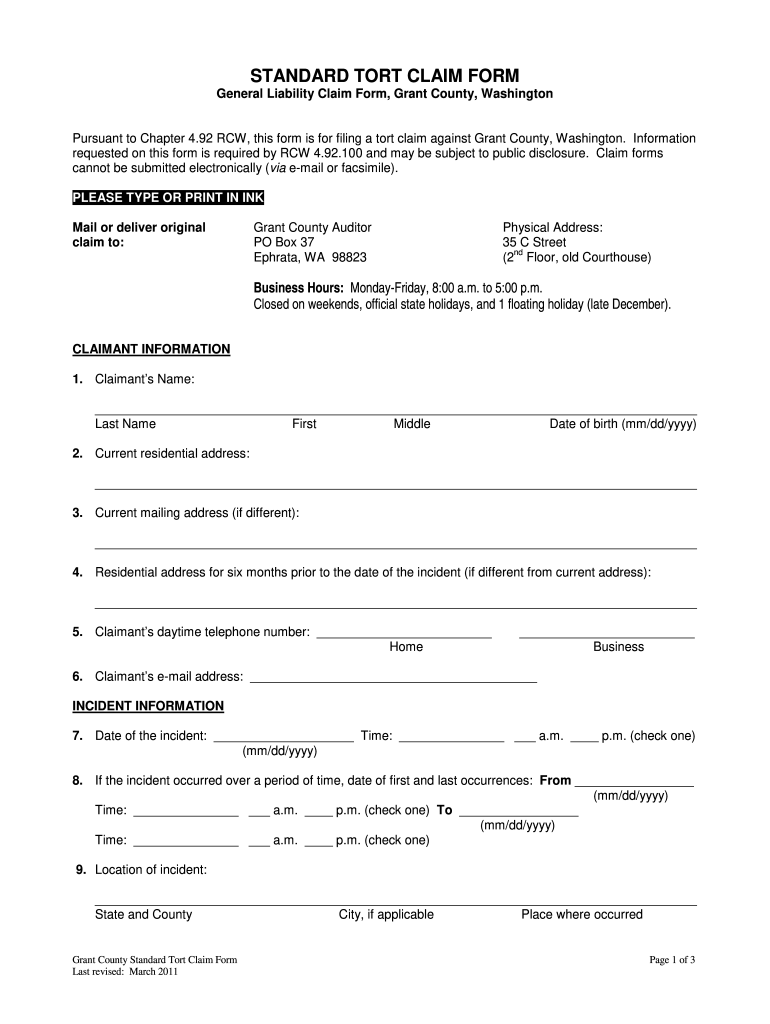
D on this form is required by RCW 4.92.100 and may be subject to public disclosure. Claim forms cannot be submitted electronically (via e-mail or facsimile). PLEASE TYPE OR PRINT IN INK Mail or deliver original claim to: Grant County Auditor PO Box 37 Ephrata, WA 98823 Physical Address: 35 C Street nd (2 Floor, old Courthouse) Business Hours: Monday-Friday, 8:00 a.m. to 5:00 p.m. Closed on weekends, official state holidays, and 1 floating holiday (late December). CLAIMANT INFORMATION 1. Claim.
Loading

Open form follow the instructions

Easily sign the form with your finger

Send filled & signed form or save
How to fill out the WA DES Sf 210 online
This guide provides a clear and supportive approach to filling out the WA DES Sf 210 form, designed for filing a tort claim against Grant County, Washington. Follow the instructions carefully to ensure that all necessary information is correctly submitted.
Follow the steps to efficiently complete the WA DES Sf 210 form online.
- Click ‘Get Form’ button to acquire the form and open it in the editor.
- Begin by entering the claimant's name in the designated fields. Include last name, first name, and middle name. Make sure to also provide the date of birth in the required format (mm/dd/yyyy).
- Provide your current residential address in the specified section. If your mailing address differs from your residential address, fill in that information as well.
- For the six months preceding the incident, indicate your previous residential address if it differs from your current address.
- Enter your daytime telephone number for both home and business contacts.
- Include your email address to facilitate communication.
- Record the date and time of the incident. Ensure to check whether it was in the a.m. or p.m.
- If the incident occurred over a period of time, provide the date of the first occurrence and the last occurrence, along with their respective times.
- Describe the location where the incident took place, including state, county, city, and any specific landmarks.
- If applicable, detail the street or highway where the incident occurred, including milepost numbers and intersecting streets.
- Indicate the Grant County agency or department that is alleged to be responsible for the incident.
- List the names, addresses, and phone numbers of all individuals involved in or who witnessed the incident.
- Provide the names and contact details of any Grant County employees who may have knowledge regarding the incident.
- Identify any additional individuals with knowledge of the liability issues or damages involved. Include a brief description of their insight.
- Thoroughly describe the cause of injury or damages, detailing any property loss or medical, physical, or mental injuries.
- Note if the incident has been reported to law enforcement or security personnel, along with the details of the report.
- List the names and contacts of all medical providers who treated the injuries and attach relevant medical reports.
- Attach all documents needed to support your claims.
- Finally, specify the total damages you are claiming from Grant County and ensure the form is signed by the claimant or appropriate representative.
Complete the WA DES Sf 210 form online to ensure your claim is filed correctly and promptly.
Experience a faster way to fill out and sign forms on the web. Access the most extensive library of templates available.
Related content
... SF 210: 1) Smith, Karen Michelle – 02/20/1965. 2) #809234 (for use by Department of...
The design of this code allows space heating equipment efficiencies to offset or...
Mar 2, 2006 — SF: Displays the minimum SF value of a location obtained from one of the...
Get answers to your most pressing questions about US Legal Forms API.
How to file a tort claim in Washington state?
To file a tort claim in Washington State, start by collecting all necessary information, including using the WA DES Sf 210 as your primary form. Complete the required forms and ensure all supporting documents are ready for submission. Then, submit your forms to the appropriate agency while adhering to any deadlines. Use USLegalForms to simplify the process and ensure you have the right resources.
What must be proven to support a tort claim?
To support a tort claim, you must demonstrate that the other party acted negligently or intentionally caused harm. Additionally, you must show that you suffered damages as a result of their actions. The WA DES Sf 210 provides a structured way to present this information. Thorough documentation, supported by evidence, will strengthen your claim.
What are the requirements for a tort claim?
To successfully file a tort claim, you must meet specific requirements, such as establishing that the claim meets the definition of a tort and complying with any time limits. You'll need documentation proving your case, which can include medical records or invoices. The WA DES Sf 210 outlines the required information. Consider using platforms like USLegalForms for guidance on required documentation.
How do I file a tort claim in Washington state?
Filing a tort claim in Washington State involves completing the necessary paperwork, including the WA DES Sf 210. Ensure you follow the guidelines for submission, as they may vary depending on the agency involved. Make sure to provide all required evidence to support your claim, including photographs and witness statements. Use legal resources, like USLegalForms, to access the correct forms easily.
How can I file a tort claim?
To file a tort claim, gather all necessary documents related to your case. You will need to fill out the appropriate forms, including the WA DES Sf 210, which streamlines this process. After completing the forms, submit them to the relevant government agency. It's wise to keep copies of everything for your records.
What is an ESD number in Washington state?
An ESD number in Washington state is your unique identifier with the Employment Security Department. This number is crucial for managing your unemployment benefits and dealing with state taxes. For a deeper understanding and specific inquiries surrounding your ESD number, the WA DES Sf 210 guides users through the essential information and resources available.
How to get Washington Employment Security reference number?
To obtain your Washington Employment Security reference number, start by logging into your ESD account where personal details and support offers reside. This number is often included in correspondence regarding your unemployment benefits. Should you still face difficulties, WA DES Sf 210 offers tools and tips that can streamline finding your reference number.
How do I find my Washington L&I account number?
To find your Washington Labor & Industries (L&I) account number, check any communication you received from L&I or visit their official website. Your account number may also be listed on insurance-related documents or payment notices. Furthermore, utilizing the resources available through WA DES Sf 210 can simplify your navigation through L&I inquiries.
How do I find my Washington employment security number?
Your Washington employment security number can be found on official documents regarding your unemployment benefits or your tax forms. You can also log into your Washington ESD account to view this number directly. If you need detailed assistance, referencing the WA DES Sf 210 can help clarify any uncertainties during your search.
How do I find my WA pac code?
To find your WA PAC code, you will need to access your Washington Employment Security Department (ESD) records. Typically, this code is located on your account statement or can be found in your online account. If you are having trouble locating it, the WA DES Sf 210 resources can guide you through the process of retrieving this information efficiently.
Use professional pre-built templates to fill in and sign documents online faster. Get access to thousands of forms.
If you believe that this page should be taken down, please follow our DMCA take down process here.
This form is available in several versions. Select the version you need from the drop-down list below.