Loading
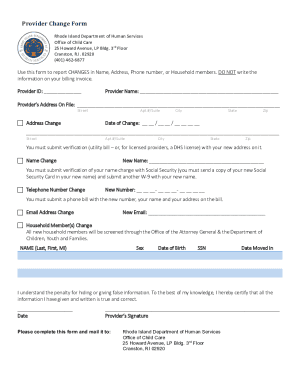
Get Ri Provider Change Form 2020-2026
How it works
-

Open form follow the instructions
-

Easily sign the form with your finger
-

Send filled & signed form or save
How to fill out the RI Provider Change Form online
The RI Provider Change Form is essential for reporting changes in your name, address, phone number, or household members. This guide will walk you through each section of the form to ensure you complete it accurately and efficiently online.
Follow the steps to complete the RI Provider Change Form correctly.
- Click ‘Get Form’ button to obtain the form and open it in the editor.
- Begin by entering your Provider ID in the designated field at the top of the form.
- Next, fill in your Provider Name along with the Provider’s Address On File. Please ensure that you provide details including the street, apartment number or suite, city, state, and zip code.
- Select the appropriate checkbox for the type of change you are reporting. If you need to report an address change, complete the fields for the new address, including street, apartment number or suite, city, state, and zip code, along with the date of change.
- For a name change, write your new name and make sure to prepare the necessary verification documents, such as a copy of your new Social Security card along with another W-9 form reflecting your updated name.
- If you are changing your phone number, enter the new number and attach a phone bill that includes your name and new address for verification.
- To report a change of email address, simply enter your new email in the relevant field.
- If there are changes in household members, provide their names, sex, date of birth, social security number, and the date they moved in. Be aware that new household members will be screened through the relevant authorities.
- Finally, certify that the information you provided is true and correct by signing and dating the form.
- Once you have completed the form, you can save your changes, download, print, or share the completed form as needed before mailing it to the provided address.
Take action now and complete your RI Provider Change Form online for a smooth transition.