Loading
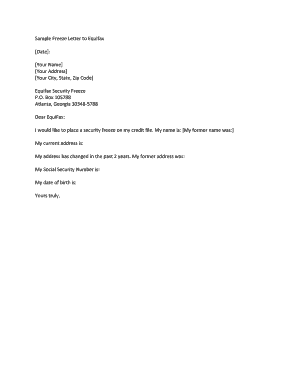
Get Ga Sample Freeze Letter To Equifax 2018-2026
How it works
-

Open form follow the instructions
-

Easily sign the form with your finger
-

Send filled & signed form or save
How to fill out the GA Sample Freeze Letter To Equifax online
This guide will assist you in completing the GA Sample Freeze Letter To Equifax online. By following the steps outlined below, you can accurately fill out the necessary information to request a security freeze on your credit file.
Follow the steps to complete your freeze letter effectively.
- Click the ‘Get Form’ button to access the letter and open it in your preferred document editor.
- Begin by entering the date at the top of the letter. This is important for record-keeping and establishing when your request is being made.
- In the next section, write your full name as it appears on your identification documents.
- Provide your current address, including street address, city, state, and zip code, to ensure that Equifax can contact you if needed.
- If you have moved in the past two years, include your former address as well. This helps to confirm your identity and track your address history.
- Enter your Social Security Number in the designated field. This is essential for verifying your identity.
- Fill in your date of birth to further authenticate your identity.
- Conclude the letter with a respectful closing, and sign your name above the typewritten version to signify your consent.
- Once you have filled out all sections, review the letter for accuracy. After confirming all details are correct, save your changes, and download the document for your records.
- Finally, print the document for mailing or electronic submission, and follow up as needed to ensure Equifax processes your request.
Start filling out your GA Sample Freeze Letter To Equifax online today to protect your credit.
By mail to: Equifax Disclosure Department, P.O. Box 740241, Atlanta, GA 30374.