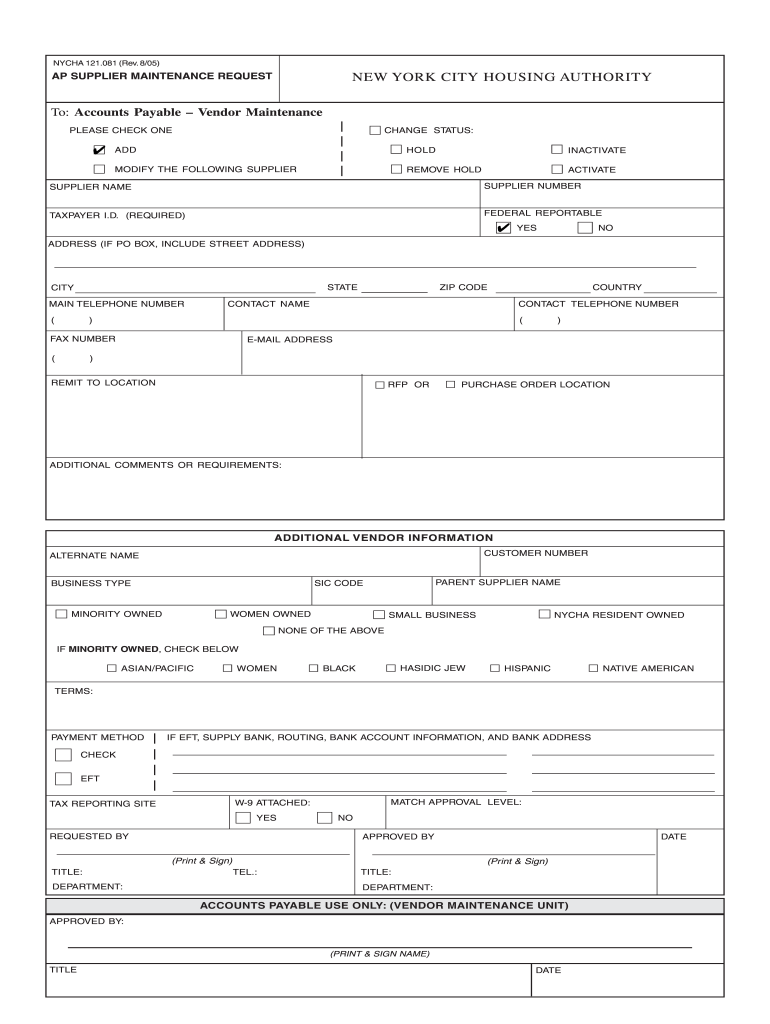
IVATE MODIFY THE FOLLOWING SUPPLIER REMOVE HOLD ACTIVATE SUPPLIER NAME SUPPLIER NUMBER TAXPAYER I.D. (REQUIRED) FEDERAL REPORTABLE ✔ YES NO ADDRESS (IF PO BOX, INCLUDE STREET ADDRESS) STATE CITY MAIN TELEPHONE NUMBER ( ZIP CODE CONTACT TELEPHONE NUMBER CONTACT NAME ) ( FAX NUMBER ( COUNTRY ) E-MAIL ADDRESS ) REMIT TO LOCATION RFP OR PURCHASE ORDER LOCATION ADDITIONAL COMMENTS OR REQUIREMENTS: ADDITIONAL VENDOR INFORMATION CUSTOMER NUMBER ALTERNATE NAME PARENT SUPP.
Loading

Open form follow the instructions

Easily sign the form with your finger

Send filled & signed form or save
How to fill out the NY NYCHA 121.081 online
Filling out the NY NYCHA 121.081 form is an essential process for managing vendor information with the New York City Housing Authority. This guide will walk you through each section of the form to ensure accurate and complete submissions.
Follow the steps to complete the form accurately
- Press the ‘Get Form’ button to access the NY NYCHA 121.081 form and open it for editing.
- Indicate your desired change status by selecting one of the options: ‘Add’, ‘Hold’, ‘Inactivate’, ‘Modify the following supplier’, ‘Remove Hold’, or ‘Activate’. Make sure to check the box next to your selection.
- Provide the supplier's name, supplier number, and taxpayer identification number. Ensure that the taxpayer ID field is completed, as it is required.
- Indicate whether the account is federally reportable by selecting 'Yes' or 'No'.
- Fill in the supplier's address, including street address if a PO Box is used. Include the city, state, and ZIP code.
- Enter the main telephone number, contact telephone number, and contact name of the supplier.
- Provide the fax number, email address, and the remit to location for payment.
- Specify the RFP or purchase order location as needed.
- Include any additional comments or requirements in the designated section.
- Fill out the additional vendor information, including customer number, alternate name, parent supplier name, SIC code, and business type.
- Indicate ownership status, selecting from ‘Minority Owned’, ‘Women Owned’, ‘Small Business’, ‘NYCHA Resident Owned’, or ‘None of the Above’.
- If applicable, specify minority owned designation by checking the relevant category.
- Select the payment method, either ‘Check’ or ‘EFT’, and supply bank information if EFT is selected.
- Complete the requested by and approved by sections, printing and signing as necessary. Include titles, departments, and dates.
- Save your changes, download, print, or share the completed form as needed.
Complete your documents online for efficient processing and management.
Experience a faster way to fill out and sign forms on the web. Access the most extensive library of templates available.
Related content
NYCHA 121.081 (Rev. 9/13/2017)v1. AP SUPPLIER. MAINTENANCE REQUEST. NEW YORK CITY HOUSING...
Get answers to your most pressing questions about US Legal Forms API.
How do I update my income on NYCHA?
To update your income on NYCHA, log in to your NYCHA account online. Find the income update section and provide the required information regarding your current earnings. Keeping your income updated is vital for maintaining accurate assistance levels in accordance with NY NYCHA 121.081.
What is the 40 percent rule for NYCHA?
The 40 percent rule for NYCHA refers to the guideline that limits the amount of your income that can be spent on housing costs. Typically, households should not spend more than 40 percent of their monthly income on rent. Understanding this rule is crucial for planning your housing budget effectively.
How long does it take to get approved for NYCHA?
The approval timeframe for NYCHA applications can vary based on several factors, including application volume and completeness. Generally, it may take several weeks to a few months for processing. To expedite the process, ensure that your application is complete and accurate when submitting to NY NYCHA 121.081.
How do I renew my NYCHA application?
To renew your NYCHA application, visit the NYCHA website and access your account. Follow the steps for application renewal, providing any necessary updates regarding your current situation. Completing your renewal on time is essential to continue receiving housing assistance.
How to renew NYCHA application online?
Renewing your NYCHA application online is straightforward. First, log in to your NYCHA account on their official website. Find the renewal section, fill in the required details, and submit your application to keep your assistance active under NY NYCHA 121.081.
How do I check the status of my NYCHA application?
To determine the status of your NYCHA application, go to the NYCHA website and navigate to the application status portal. Input your details to retrieve real-time information on your application progress. Regularly checking your status ensures you are aware of any actions needed on your part.
How to check status of NYCHA application?
You can easily check the status of your NYCHA application by visiting the official NYCHA website. Enter your application details in the designated section to receive the latest updates. Staying informed about your application status can help you plan accordingly.
How do you do annual recertification on NYCHA?
To complete annual recertification on NYCHA, start by logging into your NYCHA account online. Follow the prompts to provide necessary information regarding your income and household composition. It is crucial to review all details for accuracy before submitting, which helps maintain your benefits with NY NYCHA 121.081.
How do I fill out a NYCHA annual recertification?
Filling out the NYCHA annual recertification requires you to gather necessary documents, such as income verification and other relevant paperwork. Then, you can complete the process online through the NYCHA website or by visiting your local NYCHA office. Make sure to submit your recertification on time to ensure continued eligibility for assistance.
How do I check the status of my Section 8 application?
To check the status of your Section 8 application with NY NYCHA 121.081, visit the NYCHA website and navigate to the Section 8 application section. You will need your application number or personal details to access your status. Checking your application status regularly helps in understanding where you stand in the process.
Use professional pre-built templates to fill in and sign documents online faster. Get access to thousands of forms.
If you believe that this page should be taken down, please follow our DMCA take down process here.