Loading
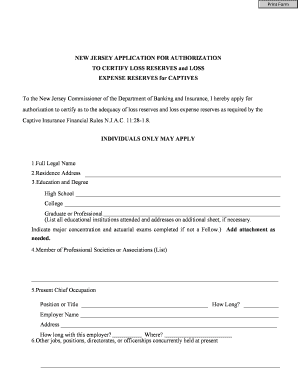
Get Captive Corner - State Of New Jersey
How it works
-

Open form follow the instructions
-

Easily sign the form with your finger
-

Send filled & signed form or save
How to fill out the Captive Corner - State Of New Jersey online
Completing the Captive Corner application for New Jersey is an important step for individuals seeking authorization to certify loss reserves and loss expense reserves for captives. This guide provides a clear, step-by-step process to ensure that you can navigate the form effectively and accurately.
Follow the steps to successfully complete your application
- Click 'Get Form' button to obtain the form and open it in the editor.
- Enter your full legal name in the designated field. Ensure that the name provided matches your official legal documents.
- Provide your residence address, including street number, street name, city, state, and zip code.
- Fill in your education details including the names of institutions attended and degrees earned. List your high school, college, and any graduate or professional education. If further space is needed, attach an additional document.
- Indicate your membership in any professional societies or associations. This is an important part of your professional qualifications.
- State your present chief occupation, including your position or title, and the length of time you have held this position.
- Provide the name and address of your current employer, along with how long you have been with them and where they are located.
- List any additional jobs, positions, directorates, or officerships you currently hold concurrently.
- Prepare an employment record for the past 20 years. Attach a detailed document listing your past employers and roles.
- Summarize your experience with property and casualty loss reserves and loss expense reserves in the specified area.
- Specify the New Jersey captive account(s) you will be certifying by listing them in the provided section.
- Indicate your qualifications by marking an 'X' in the appropriate boxes relating to loss and loss adjustment reserves.
- Choose whether you allow the Department to publish your contact information on its website by selecting 'Yes' or 'No.'
- Certify the accuracy of your responses by signing and dating the form in the designated areas.
- Arrange for the notarization of your application by a Notary Public, who must sign and date where indicated.
- After completing all steps, save your changes, and ensure you download, print, or prepare to share the completed form as needed.
Begin your application online today to ensure your compliance with New Jersey's requirements.
Industry-leading security and compliance
US Legal Forms protects your data by complying with industry-specific security standards.
-
In businnes since 199725+ years providing professional legal documents.
-
Accredited businessGuarantees that a business meets BBB accreditation standards in the US and Canada.
-
Secured by BraintreeValidated Level 1 PCI DSS compliant payment gateway that accepts most major credit and debit card brands from across the globe.