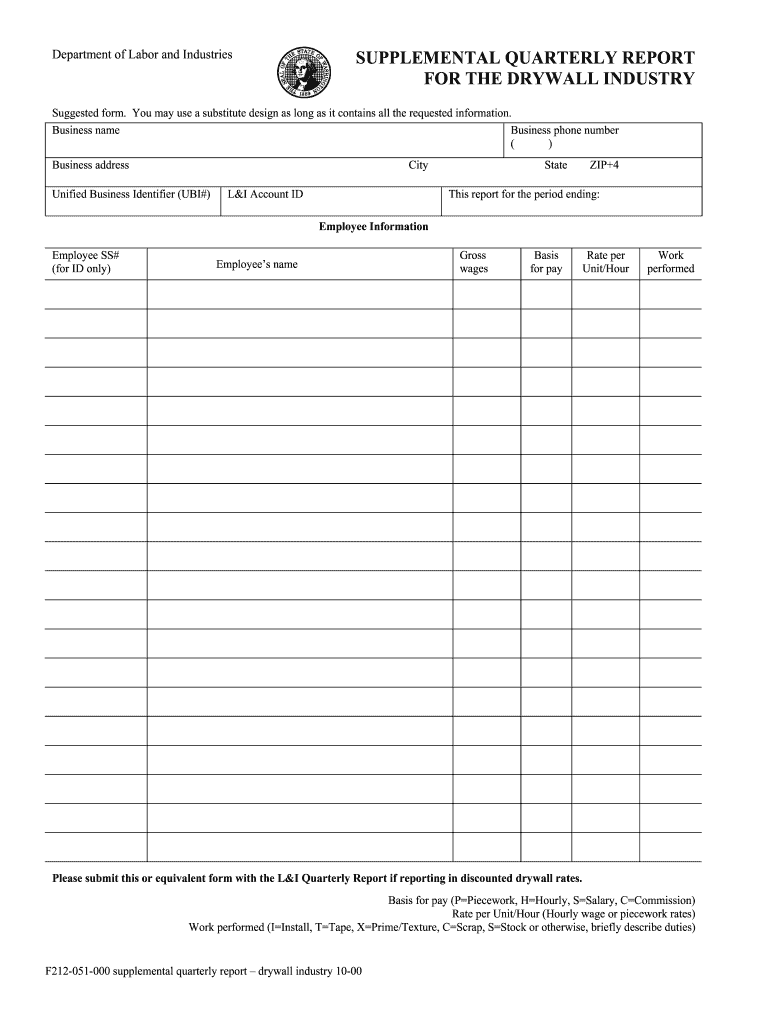
Ss name Business phone number ( ) Business address City Unified Business Identifier (UBI#) L&I Account ID State ZIP+4 This report for the period ending: Employee Information Employee SS# (for ID only) Employee’s name Gross wages Basis for pay Rate per Unit/Hour Work performed Please submit this or equivalent form with the L&I Quarterly Report if reporting in discounted drywall rates. Basis for pay (P=Piecework, H=Hourly, S=Salary, C=Commission) Rate per Unit/Hour (Hourly wage or p.
Loading

Open form follow the instructions

Easily sign the form with your finger

Send filled & signed form or save
How to fill out the WA F212-051-000 online
Filling out the WA F212-051-000 form is a crucial step for businesses in the drywall industry to report their employee information and wages accurately. This guide will provide you with clear, step-by-step instructions on how to complete and submit this form online.
Follow the steps to complete your WA F212-051-000 form.
- Click ‘Get Form’ button to access the form and open it in the designated editor.
- Enter your business name accurately in the designated field. Ensure that it matches what is registered with relevant authorities.
- Indicate the reporting period by specifying the end date. This is crucial for ensuring the correct quarterly report.
- Review all entries for accuracy and completeness. This ensures that your report complies with the necessary requirements.
Complete your WA F212-051-000 form online today to ensure timely and accurate reporting.
Experience a faster way to fill out and sign forms on the web. Access the most extensive library of templates available.
Related content
F212-051-000 supplemental quarterly report – drywall industry 10-00. Department of Labor...
by EH Weybright · Cited by 16 — One promising approach engages teens as teachers to...
GROUNDING INSTRUCTIONS. This product must be grounded. If it should malfunction or break...
Get answers to your most pressing questions about US Legal Forms API.
What is the 7 minute rule in Washington State?
The 7-minute rule in Washington State refers to a guideline that requires employers to provide a meal or rest period for employees working shifts longer than a specified duration. This rule ensures that employees receive adequate breaks, promoting safety and productivity in the workplace. If you have questions or concerns about how this applies to your situation, consider referencing the WA F212-051-000 as a resource.
How do I file a complaint with Labor and Industries Washington State?
To file a complaint with Labor and Industries in Washington State, you should collect all pertinent details about your issue. The next step is completing the WA F212-051-000 form, which is specifically designed to help you detail your complaint effectively. After you've filled out the form, you can submit it through their website, via mail, or in person for further action.
Can you sue L&I in Washington State?
In Washington State, suing L&I directly is generally not possible since it is a state agency that provides workers' compensation. However, if you believe their decision was unjust, you can appeal that decision. Utilizing the WA F212-051-000 form can help you navigate through the appeals process more efficiently.
How do I file a L&I in Washington State?
Filing an L&I claim in Washington State involves reporting an injury or illness to the Department of Labor and Industries. You will need to complete the WA F212-051-000 form, which provides all the necessary details about your situation. Make sure to submit your form as soon as possible following your injury to ensure timely processing of your claim.
How do I file a complaint against L&I Washington State?
To file a complaint against L&I in Washington State, you should first gather all relevant information and documents related to your case. Then, visit the official L&I website to find the appropriate forms, including the WA F212-051-000, which can guide you through the filing process. Once you complete the necessary paperwork, you can submit your complaint online, by mail, or in-person at a local L&I office.
What is WA F212 055 000 worksheet?
The WA F212 055 000 worksheet is related to Washington L&I reporting and helps you organize information about wages and hours worked. This worksheet ensures that you have all necessary data before filling out the WA F212-051-000 form. Utilizing this worksheet can streamline your reporting process and enhance accuracy. It's a valuable tool in ensuring compliance with state regulations.
How do you write a quarterly report for work?
Writing a quarterly report for work involves summarizing your team’s accomplishments and challenges over the past three months. Start with an overview of your goals, track your progress, and highlight significant achievements. Use the WA F212-051-000 template for precise payroll and hours data, which complements your narrative. A well-organized report keeps stakeholders informed and engaged.
How to do quarterly reporting?
Quarterly reporting involves compiling your business's financial data for every three-month period. Start by collecting records of your employee hours and wages, then fill out the necessary forms, like the WA F212-051-000. By consistently tracking your numbers, you can simplify this process and ensure accuracy each quarter. Staying organized will ultimately save you time and effort down the road.
How do I file a Washington L&I quarterly report?
To file a Washington L&I quarterly report, you need to gather your payroll information and ensure its accuracy. Use the WA F212-051-000 form to report wages and hours worked for your employees. You can submit this form online through the L&I portal, or you can mail a paper version if that is more convenient for you. Completing this process on time helps you stay compliant with state regulations.
How do I file for workers comp in Washington state?
Filing for workers' compensation in Washington State starts with reporting the injury to your employer immediately. Your employer will provide you with the necessary paperwork to complete the claim. If you have questions, the USLegalForms platform has informative tools that can help you navigate the filing process with ease.
Use professional pre-built templates to fill in and sign documents online faster. Get access to thousands of forms.
If you believe that this page should be taken down, please follow our DMCA take down process here.