Loading
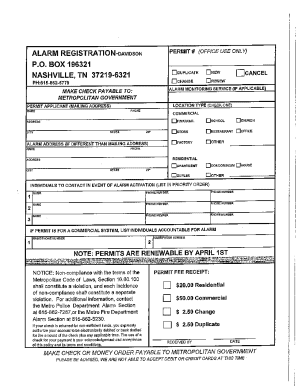
Get Tn Alarm Registration - Nashville 2017-2026
How it works
-

Open form follow the instructions
-

Easily sign the form with your finger
-

Send filled & signed form or save
How to fill out the TN Alarm Registration - Nashville online
Filling out the TN Alarm Registration - Nashville online is a straightforward process that ensures compliance with local regulations. This guide provides clear, step-by-step instructions to help users navigate the registration form seamlessly.
Follow the steps to successfully complete the TN Alarm Registration - Nashville online.
- Press the ‘Get Form’ button to access the TN Alarm Registration form and load it in the online editor.
- Begin by entering your contact information in the designated fields, including your full name, address, and phone number. Ensure all information is accurate to avoid any processing delays.
- Provide details about the alarm system you are registering. This typically includes the type of alarm system, its purpose, and any specific features or monitoring services associated with it.
- Complete the emergency contact information section. Include names and phone numbers of individuals who can be reached in case of an alarm activation.
- Review the declaration section carefully, making sure you understand and agree to the terms provided. This section often outlines your responsibilities as the alarm system owner.
- After filling in all necessary sections, double-check your form for accuracy and completeness.
- Finally, save your changes. You may choose to download, print, or share the form as needed.
Complete your TN Alarm Registration online today to ensure compliance and enhance your security.