Loading
Get An Application Is Available Here (pdf, 67 Kb - Maine.gov - Maine
How it works
-

Open form follow the instructions
-

Easily sign the form with your finger
-

Send filled & signed form or save
How to fill out the An Application Is Available Here (PDF, 67 Kb - Maine.gov - Maine online
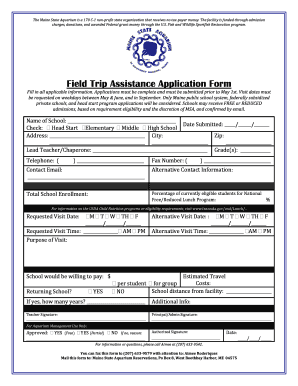
This guide provides a step-by-step approach to completing the Field Trip Assistance Application Form for the Maine State Aquarium. Follow these instructions to ensure your application is filled out correctly and submitted on time.
Follow the steps to complete your application form.
- Press the ‘Get Form’ button to obtain the application form and open it in your preferred PDF editor.
- Fill in the name of your school in the designated field.
- Enter the date you are submitting the application using the format MM/DD/YYYY.
- Check the appropriate box to indicate the type of educational institution: Head Start, Elementary, Middle, or High School.
- Provide the school's address, including city and zip code.
- Enter the lead teacher or chaperone's name in the specified area along with the grade level(s) involved.
- Input the lead teacher's or chaperone's telephone number and fax number, if applicable.
- Fill out the contact email for correspondence related to the application.
- For additional communication, provide alternative contact information as necessary.
- State the total school enrollment in the provided field.
- Indicate the percentage of students currently eligible for the National Free/Reduced Lunch Program.
- Request a visit date by filling in the date, ensuring it falls on a weekday in May, June, or September.
- Specify the requested visit time, indicating whether it is in the AM or PM.
- Describe the purpose of your visit in the designated field.
- Indicate how much the school is willing to pay for the visit, if applicable.
- If your school has previously visited, respond to the returning school question and indicate how many years if applicable.
- Provide details for an alternative visit date and time, should it be needed.
- Estimate travel costs per student and note the distance from your school to the aquarium.
- Include any additional information that may be relevant to your application.
- Collect signatures from the lead teacher and the principal/admin, which are required to finalize the application.
- Ensure you have completed the form before submitting it.
- Upon finalizing the application, you can save changes, download the form, print it, or share it as necessary.
Submit your completed application form online to ensure timely processing.
The Find an Arborist tool is one of the most popular portions of the ISA Web site. This tool provides a way for consumers to find arborists in their local areas. The Find an Arborist is a tool that is available to all ISA Credential holders.
Industry-leading security and compliance
US Legal Forms protects your data by complying with industry-specific security standards.
-
In businnes since 199725+ years providing professional legal documents.
-
Accredited businessGuarantees that a business meets BBB accreditation standards in the US and Canada.
-
Secured by BraintreeValidated Level 1 PCI DSS compliant payment gateway that accepts most major credit and debit card brands from across the globe.