Loading
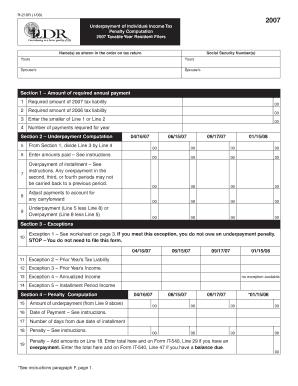
Get R-210r (1/08) 2007 Underpayment Of Individual Income Tax Penalty Computation 2007 Taxable Year
How it works
-

Open form follow the instructions
-

Easily sign the form with your finger
-

Send filled & signed form or save
How to fill out the R-210R (1/08) 2007 Underpayment Of Individual Income Tax Penalty Computation 2007 Taxable Year online
Filling out the R-210R form is essential for accurately reporting any underpayment of individual income tax for the 2007 taxable year. This guide provides clear, step-by-step instructions to assist users in completing this form online, ensuring they understand each component thoroughly.
Follow the steps to complete the form online effectively.
- Press the ‘Get Form’ button to obtain the form and open it in your preferred editor.
- Enter your name and Social Security number as they appear on your tax return. If applicable, include your spouse’s details.
- In Section 1, provide the required amount of your 2007 tax liability in Line 1 and your 2006 tax liability in Line 2. Then, enter the smaller amount of Lines 1 or 2 on Line 3.
- Indicate the number of payments required for the year in Line 4.
- In Section 2, divide the amount from Line 3 by the number indicated in Line 4 and enter the result on Line 5.
- Enter the total amounts paid in Line 6, based on the instructions provided.
- Calculate any overpayment of installments and enter the amount on Line 7; note that overpayment from the second, third, or fourth periods cannot be carried back.
- Adjust your payments to account for any carryforward and enter this amount on Line 8.
- Calculate the underpayment or overpayment by subtracting Line 8 from Line 5 and record this on Line 9.
- Proceed to Section 3 and check for exceptions. If you meet Exception 1, you do not need to file this form.
- If applicable, review and check other exceptions such as prior year’s tax liability, income, annualized income, and installment period income. Fill in details as needed.
- In Section 4, list the amount of underpayment from Line 9 on Line 15.
- Provide the date of payment in Line 16 and count the number of days from the due date of the installment, entering it on Line 17.
- Calculate the penalty according to the instructions and enter this on Line 18.
- Add the penalties listed on Line 18 and enter the total on Line 19. Make sure to include this total in the relevant section of Form IT-540 if you have an overpayment or balance due.
- After completing the form, save your changes, and download or print a copy for your records.
Complete your document filings online to ensure accuracy and compliance.
To verify your tax liability for individual income tax, call LDR at (225) 219-0102. To verify your tax liability for business taxes, you can review your liabilities online using the Louisiana Taxpayer Access Point (LaTAP) system.
Industry-leading security and compliance
US Legal Forms protects your data by complying with industry-specific security standards.
-
In businnes since 199725+ years providing professional legal documents.
-
Accredited businessGuarantees that a business meets BBB accreditation standards in the US and Canada.
-
Secured by BraintreeValidated Level 1 PCI DSS compliant payment gateway that accepts most major credit and debit card brands from across the globe.