Loading
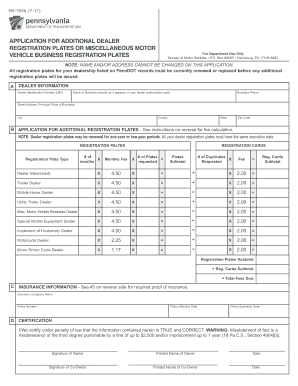
Get Pa Mv-350a 2015
How it works
-

Open form follow the instructions
-

Easily sign the form with your finger
-

Send filled & signed form or save
How to fill out the PA MV-350A online
Filling out the PA MV-350A form online is an essential step for individuals and businesses seeking additional dealer registration plates or miscellaneous motor vehicle business registration plates in Pennsylvania. This comprehensive guide provides you with clear, step-by-step instructions to ensure accurate completion of the form.
Follow the steps to successfully complete the PA MV-350A form.
- Press the ‘Get Form’ button to obtain the form and open it in the online editor.
- Begin by entering your dealer identification number (DIN) in the designated field.
- Navigate to the application section for additional registration plates. Be sure to review the fee calculation instructions provided.
- Proceed to the registration cards section, entering the number of duplicate registration cards you require.
- In the insurance information section, input your insurance company name, policy number, effective and expiration dates.
- Sign and print your name as the owner. If there is a co-owner, ensure they also complete their signature and printed name.
- Once you are satisfied with the information provided, you can choose to save changes, download the form, print it, or share it as needed.
Complete your documents online today to streamline your application process.
Get form
Experience a faster way to fill out and sign forms on the web. Access the most extensive library of templates available.
Transporter registration plate, please complete and attach Form MV-904C, "Application for Personalized Commercial Registration Plate," to this application. NOTE: There is an additional $128 fee required with each personalization request. Visit us at .dmv.pa.gov or call us at 717-412-5300.
Get This Form Now!
Use professional pre-built templates to fill in and sign documents online faster. Get access to thousands of forms.