Loading
Get Wi Mv3757 2010
How it works
-

Open form follow the instructions
-

Easily sign the form with your finger
-

Send filled & signed form or save
How to fill out the WI MV3757 online
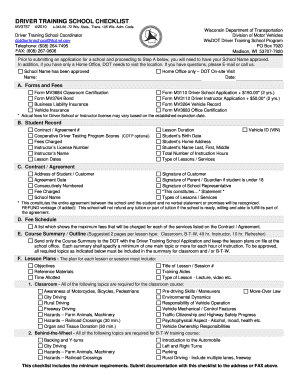
The WI MV3757 is an essential checklist for driver training schools in Wisconsin. This guide provides clear, step-by-step instructions to help you complete the form online effectively.
Follow the steps to fill out the WI MV3757 form online.
- Click ‘Get Form’ button to access and open the WI MV3757 form in your browser.
- Begin by entering the approved School Name in the designated field. Ensure that your school name has been approved by the Wisconsin Department of Transportation (DOT).
- Indicate if your school operates from a Home Office. If so, note that a DOT On-site Visit is required. Provide the date of the visit in the appropriate field.
- In the Forms and Fees section, fill out the required forms including the MV3684 Classroom Certification, MV3764 Bond, and business liability insurance info. Additionally, specify the Form M3110 Driver School Application fee and the Form MV3112 Driver Instructor Application fee.
- Complete the Student Record section with information such as the contract/agreement number, instructor's name and license number, lesson dates and duration, and the student's details including their name, birth date, and home address.
- Under the Contract/Agreement section, enter the address of the student or customer, the agreement date, the fee charged, and school name. Ensure all required signatures are collected, including the student, their parent or guardian if they are under 18, and a school representative.
- Fill in the Fee Schedule with maximum fees associated with services listed in the contract/agreement.
- Provide a Course Summary/Outline, summarizing topics to be covered in each lesson. This should include a minimum of one main topic for each hour of instruction.
- Outline the Lesson Plans for each lesson or session, including objectives, reference materials, time allocated, and the format of the lesson.
- Review all filled sections for accuracy. Once completed, you can save changes, download, print, or share the form as needed.
Complete your documents online for a smooth submission process.
Get form
Experience a faster way to fill out and sign forms on the web. Access the most extensive library of templates available.
The values satisfying the equation are 5 and −2.
Get This Form Now!
Use professional pre-built templates to fill in and sign documents online faster. Get access to thousands of forms.