Loading
Form preview
  • US Legal Forms
  • Form Library
  • More Forms
  • More Uncategorized Forms
  • December 2014 S-220a Schedule P

Get December 2014 S-220a Schedule P

Which they are claiming a refund of sales tax from the Department of Revenue. ... Attach to Form BCR, Buyer's Claim for Refund of Wisconsin State, County and .

How it works

  1. Open form

    Open form follow the instructions

  2. Easily sign form

    Easily sign the form with your finger

  3. Share form

    Send filled & signed form or save

How to fill out the December 2014 S-220a Schedule P online

Filling out the December 2014 S-220a Schedule P online is essential for claiming a refund of Wisconsin state, county, and stadium sales taxes. This guide provides clear, step-by-step instructions to ensure you complete the form accurately and efficiently.

Follow the steps to complete the December 2014 S-220a Schedule P online.

  1. Click ‘Get Form’ button to obtain the form and open it in the editor.
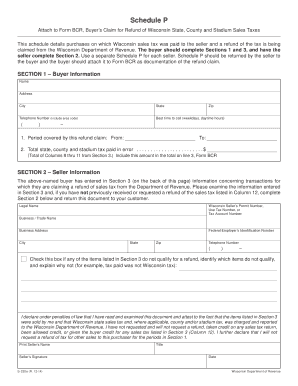
  2. In Section 1, provide your information as the buyer. Fill in your name, address, city, state, telephone number, and the best time to call you. Remember to indicate the period covered by the refund claim and enter the total state, county, and stadium tax paid in error based on the information from Section 3.
  3. Move to Section 2 for seller information. The seller must fill in their legal name, Wisconsin seller’s permit number, business name, federal employer identification number, address, and contact information. If necessary, indicate any items in Section 3 that do not qualify for a refund and provide explanations.
  4. Conclude Section 2 with the seller's declaration. The seller must print their name, provide a signature, indicate their title, and the date. It's crucial that this section is accurately completed as it verifies the seller's compliance with the sales tax regulations.
  5. Proceed to Section 3, where you will list the purchases for which you are claiming a refund. For each purchase, include a description of goods or services, reasons for exemption, purchase date, invoice numbers, purchase prices, and the relevant taxes paid. Ensure you tally the total tax amounts accurately.
  6. After completing all sections, review the form for accuracy. Make any necessary corrections before finalizing your submission.
  7. Finally, save your changes, download, print, or share the form as needed for your records and to submit to the appropriate authorities.

Complete your documents online now to ensure a smooth refund process.

Get form

Experience a faster way to fill out and sign forms on the web. Access the most extensive library of templates available.
Get form

Related content

December 2014 S-220 Form BCR - Buyer's Claim for...
Attach a separate Schedule P to this form for each seller to whom you paid Wisconsin sales...
Learn more
Schedule of Classes - UCI University Registrar
Registration for term begins on Monday, May 19, 2014 ... DROP: The deadline to drop...
Learn more
Plumbing Code - IDPH
plumbing system that has been installed prior to January 1, 2014. "Extracted Mechanical...
Learn more

Related links form

Sample Certificate Of Acceptance By Candidates Form DOWNTIME DAILY NURSING ASSESSMENT & CARE PLAN Fibrin Glue Price In Pakistan Complaint Form Pdf

Questions & Answers

Get answers to your most pressing questions about US Legal Forms API.

Contact support

Some customers are exempt from paying sales tax under Wisconsin law. Examples include government agencies, some nonprofit organizations, and merchants purchasing goods for resale. Sellers are required to collect a valid exemption or resale certificate from buyers to validate each exempt transaction.

The Wisconsin sales tax is a 5% tax imposed on the sales price of retailers who sell, license, lease, or rent tangible personal property, certain coins and stamps, certain leased property affixed to realty, or certain digital goods, or sell, license, perform, or furnish taxable services in Wisconsin.

Only certain services sold, performed, or furnished in Wisconsin are subject to Wisconsin sales or use tax. Taxable services include: Admission and access privileges to amusement, athletic, entertainment, or recreational places or events. Access or use of amusement devices.

SCHEDULE P This schedule details purchases on which Wisconsin sales tax was paid to the seller and a refund of the tax is being claimed from the Wisconsin Department of Revenue. The buyer should complete Sections 1 and 3, and have the seller complete Section 2. Use a separate Schedule P for each seller.

Wisconsin Statute 77.59(3) defines the statute of limitations as 4 years from the return filing date.

A clearance certificate may be requested by either the seller or the purchaser of a business or their representative after the sale is complete to ensure that the seller has filed all sales and use tax returns and paid all sales and use taxes due.

Sellers may claim a refund by amending a return previously filed electronically through My Tax Account, or by using Form ST-12 or sending a letter to the Department of Revenue indicating the claimant's name and address, seller's tax account number, amount of the claim, reporting period for which the overpayment was ...

What is the use tax rate? The state use tax rate is 5% and if the item purchased is used, stored or consumed in a county that imposes county tax, you must also pay an additional 0.5% county tax.

Get This Form Now!

Use professional pre-built templates to fill in and sign documents online faster. Get access to thousands of forms.
Get form
If you believe that this page should be taken down, please follow our DMCA take down processhere.
Get December 2014 S-220a Schedule P
Get form
  • Adoption
  • Bankruptcy
  • Contractors
  • Divorce
  • Home Sales
  • Employment
  • Identity Theft
  • Incorporation
  • Landlord Tenant
  • Living Trust
  • Name Change
  • Personal Planning
  • Small Business
  • Wills & Estates
  • Packages A-Z
  • Affidavits
  • Bankruptcy
  • Bill of Sale
  • Corporate - LLC
  • Divorce
  • Employment
  • Identity Theft
  • Internet Technology
  • Landlord Tenant
  • Living Wills
  • Name Change
  • Power of Attorney
  • Real Estate
  • Small Estates
  • Wills
  • All Forms
  • Forms A-Z
  • Form Library
  • Legal Hub
  • About Us
  • Help Portal
  • Legal Resources
  • Blog
  • Affiliates
  • Contact Us
  • Delete My Account
  • Site Map
  • Industries
  • Forms in Spanish
  • Localized Forms
  • State-specific Forms
  • Forms Kit
  • Real Estate Handbook
  • All Guides
  • Notarize
  • Incorporation services
  • For Consumers
  • For Small Business
  • For Attorneys
  • USLegal
  • FormsPass
  • pdfFiller
  • signNow
  • altaFlow
  • DocHub
  • Instapage
Form Packages
  • Adoption
  • Bankruptcy
  • Contractors
  • Divorce
  • Home Sales
  • Employment
  • Identity Theft
  • Incorporation
  • Landlord Tenant
  • Living Trust
  • Name Change
  • Personal Planning
  • Small Business
  • Wills & Estates
  • Packages A-Z
Form Categories
  • Affidavits
  • Bankruptcy
  • Bill of Sale
  • Corporate - LLC
  • Divorce
  • Employment
  • Identity Theft
  • Internet Technology
  • Landlord Tenant
  • Living Wills
  • Name Change
  • Power of Attorney
  • Real Estate
  • Small Estates
  • Wills
  • All Forms
  • Forms A-Z
  • Form Library
Customer Service
  • Legal Hub
  • About Us
  • Help Portal
  • Legal Resources
  • Blog
  • Affiliates
  • Contact Us
  • Delete My Account
  • Site Map
  • Industries
  • Forms in Spanish
  • Localized Forms
  • State-specific Forms
  • Forms Kit
Legal Guides
  • Real Estate Handbook
  • All Guides
Prepared for you
  • Notarize
  • Incorporation services
Our Customers
  • For Consumers
  • For Small Business
  • For Attorneys
Our Sites
  • USLegal
  • FormsPass
  • pdfFiller
  • signNow
  • altaFlow
  • DocHub
  • Instapage
Social Media
Call us now toll free:
+1 833 426 79 33
As seen in:
© Copyright 1999-2026 airSlate Legal Forms, Inc. 17 Station Street, Suite 303, Brookline, MA 02445
  • Your Privacy Choices
  • Terms of Service
  • Privacy Notice
  • Content Takedown Policy
  • Bug Bounty Program