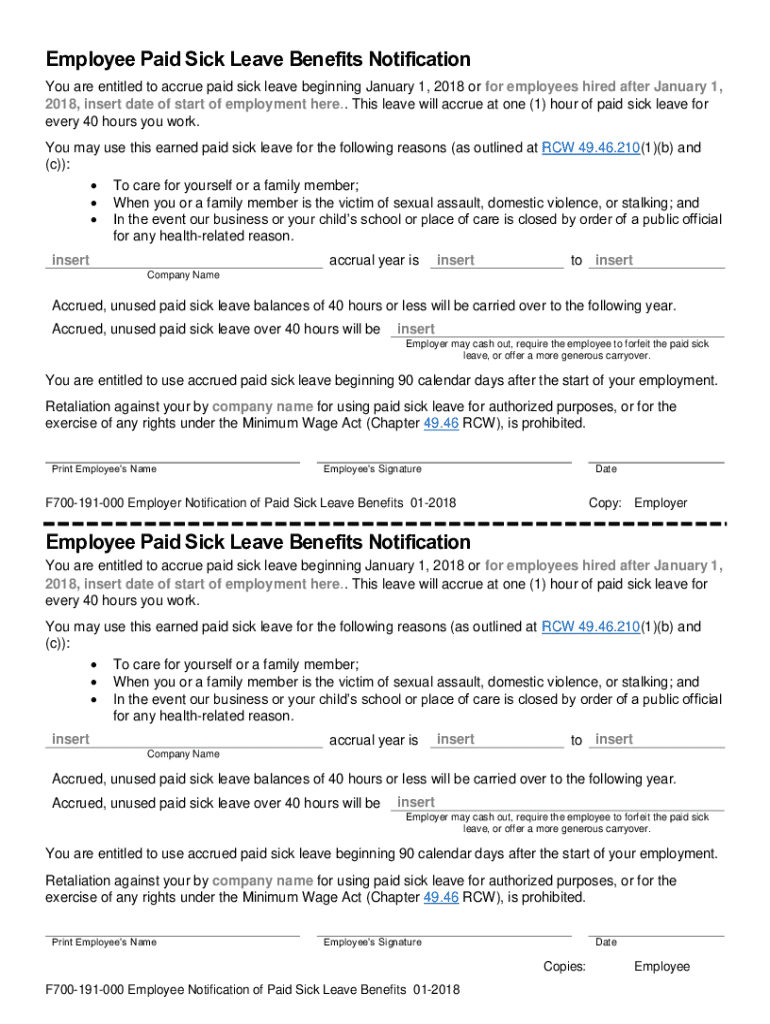
Employee Paid Sick Leave Benefits Notification You are entitled to accrue paid sick leave beginning January 1, 2018 or for employees hired after January 1, 2018, insert date of start of employment.

Open form follow the instructions

Easily sign the form with your finger

Send filled & signed form or save
How to fill out the WA F700-191-000 online
This guide provides clear instructions to help you effectively fill out the WA F700-191-000 form, also known as the Employee Paid Sick Leave Benefits Notification. By following these steps, you can ensure proper submission and awareness of your rights regarding paid sick leave.
Follow the steps to complete the form accurately.
- Press the 'Get Form' button to access the document online and open it in your browser.
- Locate the section that requires your start date of employment. If you were hired after January 1, 2018, ensure you enter your specific start date in the designated field.
- Fill in the name of your company where it says 'Company Name' to indicate the employer associated with your sick leave benefits.
- Identify the 'Accrual Year.' Enter the relevant year to accurately report your sick leave benefits acquisition.
- In the section regarding accrued paid sick leave over 40 hours, specify your company’s policy whether it is to cash out, forfeit, or allow for carryover of earned leave.
- Complete the fields for employee details, including printing your name and providing your signature, along with the date of signing.
- After filling out the required fields, review all your entries for accuracy. Once confirmed, save your completed document, and choose to download, print, or share it as needed.
Complete your WA F700-191-000 form online today to ensure your rights are protected.
Experience a faster way to fill out and sign forms on the web. Access the most extensive library of templates available.
Use professional pre-built templates to fill in and sign documents online faster. Get access to thousands of forms.
If you believe that this page should be taken down, please follow our DMCA take down process here.