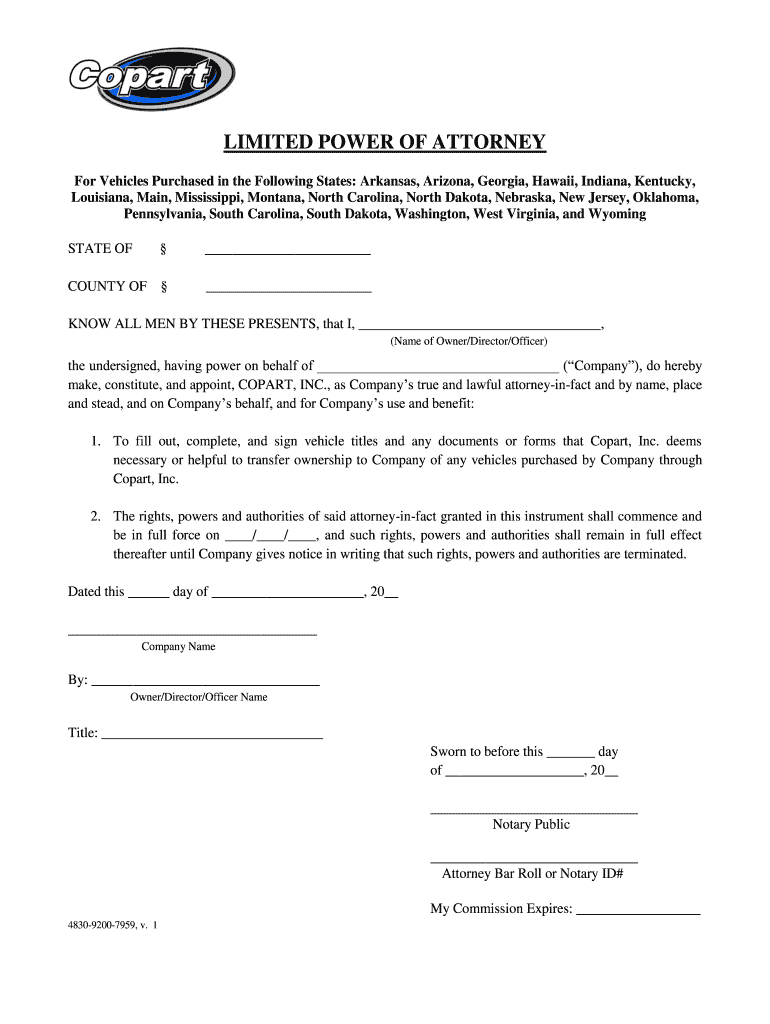
LIMITED POWER OF ATTORNEY For Vehicles Purchased in the Following States Arkansas Arizona Georgia Hawaii Indiana Kentucky Louisiana Main Mississippi Montana North Carolina North Dakota Nebraska New Jersey Oklahoma Pennsylvania South Carolina South Dakota Washington West Virginia and Wyoming STATE OF COUNTY OF KNOW ALL MEN BY THESE PRESENTS that I Name of Owner/Director/Officer the undersigned having power on behalf of Company do hereby make constitute and appoint COPART INC. as Company s true an.
Loading

Open form follow the instructions

Easily sign the form with your finger

Send filled & signed form or save
How to fill out the Copart 4830-9200-7959 online
Filling out the Copart 4830-9200-7959 form can seem complex, but with clear guidance, it can be completed efficiently. This guide will provide step-by-step instructions to help you navigate the process smoothly, ensuring all required information is properly entered.
Follow the steps to complete the Copart 4830-9200-7959 form online.
- Click ‘Get Form’ button to obtain the form and open it in the editor.
- Identify the sections requiring your attention. Begin by entering the name of the owner or authorized representative who will act on behalf of the company in the designated field.
- Fill in the company name that you are representing in the corresponding space. Ensure accuracy to prevent any processing issues.
- Specify the state and county where the document is being executed. This is crucial for jurisdictional purposes.
- Indicate the commencement date of the rights and powers granted to the attorney-in-fact by filling in the date format ____/____/____.
- Sign and date the form in the specified areas to validate the document.
- Ensure that the name and title of the owner, director, or officer who is signing the document are correctly entered.
- If required, a notary public must witness the signing of the document. Make sure to leave the notarization section empty for the notary to complete.
- After filling out the form, review all entries for accuracy. Make any necessary adjustments.
- Finally, save your changes, download the completed form, print it for your records, or share it as needed.
Complete your documents online to streamline your process.
Experience a faster way to fill out and sign forms on the web. Access the most extensive library of templates available.
Related content
Form #. CMS 849. Form Title. Certificate of Medical Necessity - Seat Lift Mechanisms - DME...
Jul 13, 2023 — Information about Form 8850, Pre-Screening Notice and Certification...
Jan 10, 2023 — Form 8936 is used to figure credits for qualified plug-in electric drive...
Get answers to your most pressing questions about US Legal Forms API.
What three decisions cannot be made by a legal power of attorney?
A legal power of attorney cannot make decisions regarding the principal's will, vote on behalf of the principal, or change beneficiaries of insurance policies. It is crucial to understand these limitations, particularly when considering arrangements related to Copart 4830-9200-7959. By knowing what your power of attorney cannot do, you can better prepare for decision-making scenarios.
How do I upload documents on Copart?
Uploading documents on Copart is quite straightforward. Sign in to your Copart account, navigate to the uploads section, and follow the instructions to select and upload the necessary files. You might be dealing with important documentation related to Copart 4830-9200-7959, so ensure your documents are clear and in the required format.
How do I get my $400 deposit back from Copart?
To retrieve your $400 deposit from Copart, start by reviewing their specific refund policy to understand the requirements. Often, you need to submit a request along with any necessary documentation to verify your identity and the deposit transaction. If clarification is needed, consider reaching out to Copart customer service directly.
Who is the best person to be a power of attorney?
The best person for power of attorney is someone you trust fully, as they will handle sensitive affairs on your behalf. Ideally, choose an individual who is knowledgeable about your wishes and can manage responsibilities such as those related to Copart 4830-9200-7959. Sometimes, a family member or close friend can be suitable for this role.
How to fill out a limited power of attorney form?
When filling out a limited power of attorney form, specify the scope of authority you are granting to your agent. Be sure to write down the tasks they can perform on your behalf, such as representing you in a Copart 4830-9200-7959 auction. Finally, ensure all parties sign and date the document to authenticate it before submitting it.
How to fill out a power of attorney form?
To fill out a power of attorney form, start by providing your name and the agent’s name along with their contact information. Next, clearly outline the powers you wish to grant, as well as any limitations, if applicable. It's advisable to include dates and signatures where required for legality and ensure it complies with your state’s requirements, especially for processes connected to Copart 4830-9200-7959.
What is the lawsuit against Copart?
The lawsuit against Copart concerns allegations related to business practices that some customers perceive as unfair or misleading. Customers have raised concerns about the auction process and vehicle condition disclosures linked to Copart 4830-9200-7959. If you want to keep updated on legal matters regarding Copart, following news or legal bulletins may provide valuable insights.
What is the difference between limited and specific power of attorney?
A limited power of attorney grants an agent authority to act on your behalf only in specific situations, while a specific power of attorney allows your agent to make decisions as outlined in the document. With Copart 4830-9200-7959, it is important to understand which type suits your needs. Depending on your requirements, you can select the appropriate power of attorney to ensure your affairs are handled correctly.
Can regular people buy from Copart?
Yes, regular people can buy from Copart 4830-9200-7959. The platform allows public access to a wide variety of vehicles. Just ensure you comply with the registration and bidding requirements to participate effectively. USLegalForms has information available that can assist you with the buying process and clarify any concerns.
Do you need a driver's license to buy from Copart?
You do not necessarily need a driver's license to buy from Copart 4830-9200-7959, but having one can simplify the process. A driver's license may be required for verification purposes or when registering for an account. Always check the specific requirements for the vehicle you are interested in. For additional details or documentation assistance, USLegalForms can be a reliable resource.
Use professional pre-built templates to fill in and sign documents online faster. Get access to thousands of forms.
If you believe that this page should be taken down, please follow our DMCA take down process here.