Loading
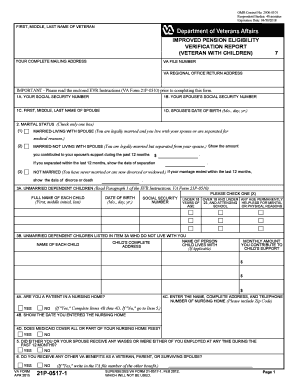
Get Va 21p-0517-1 2015
How it works
-

Open form follow the instructions
-

Easily sign the form with your finger
-

Send filled & signed form or save
How to fill out the VA 21P-0517-1 online
This guide provides a detailed overview of how to accurately complete the VA 21P-0517-1 form online. The form is essential for veterans seeking to verify their eligibility for improved pension benefits, especially those with dependent children.
Follow the steps to effectively complete your VA 21P-0517-1 form.
- Press the ‘Get Form’ button to access the VA 21P-0517-1 form and open it in your editor.
- Begin filling out the personal information section. Enter the full name of the veteran, including first, middle, and last name, along with the current mailing address.
- Input the VA file number associated with the veteran and the return address for the VA regional office.
- Provide the veteran's social security number, followed by their spouse's social security number, full name, and date of birth.
- Indicate your marital status by checking the appropriate box. If married, provide details regarding contributions to your spouse's support if applicable.
- List the names and details of any unmarried dependent children, including their dates of birth and social security numbers, and specify their living arrangements.
- Answer the question regarding nursing home residency if applicable, and provide the necessary details if you are a patient in a nursing home.
- Complete the income section by detailing your gross monthly income from various sources as specified, such as social security and civil service.
- Report any other VA benefits you or your spouse receive, providing the corresponding VA file numbers if necessary.
- Finish by signing and dating the form. Include daytime and evening phone numbers for further contact.
- Once all sections are accurately completed, review your responses for accuracy and clarity before saving changes. You can then choose to download, print, or share the form as needed.
Complete your VA 21P-0517-1 form online for improved pension benefits today.
Get form
Experience a faster way to fill out and sign forms on the web. Access the most extensive library of templates available.
Use VA Form 21P-601 to apply for accrued benefits due the beneficiary but not paid prior to death. Each person claiming a share of accrued benefits must complete a separate VA Form 21P-601. Any available accrued benefits are payable to the first living person listed below.
Get This Form Now!
Use professional pre-built templates to fill in and sign documents online faster. Get access to thousands of forms.