Loading
Get Ap01 - Company Formation Agent
How it works
-

Open form follow the instructions
-

Easily sign the form with your finger
-

Send filled & signed form or save
How to fill out the AP01 - Company Formation Agent online
Filling out the AP01 form is a crucial step in appointing a new director for your company. This guide provides clear and supportive instructions to help users navigate each section of the form with confidence.
Follow the steps to complete your AP01 form online.
- Click the ‘Get Form’ button to access the AP01 form and open it in your browser.
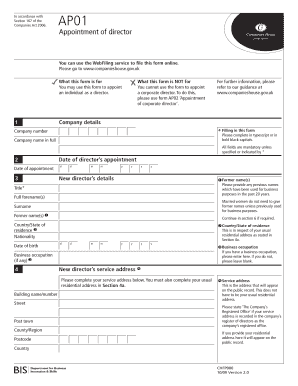
- Begin by entering your company details. Fill in the company number and the full company name. Ensure all fields marked as mandatory are completed.
- Provide the date of the director's appointment in the specified format (dd/mm/yyyy).
- In the 'New director's details' section, enter the title, full forename(s), surname, and any former names (if previously used for business purposes).
- Complete the country/state of residence and nationality fields. Always provide the director's date of birth in the correct format (dd/mm/yyyy).
- If the new director has a business occupation, specify it here. If not, you can leave this field blank.
- Fill out the service address, which is the address that will be publicly available. This can differ from the usual residential address.
- Provide the complete usual residential address, ensuring it is not a PO Box or similar. This information may appear on public records.
- If you are applying for a section 243 exemption regarding address disclosure, check the relevant box. Additionally, submit the entire form to the specified postal address.
- Both the new director and the authorizing individual must sign the form, ensuring compliance with Company Act requirements.
- Review the completed form against the checklist to ensure all information is accurate and included.
- Finally, save your changes, download, print, or share the completed AP01 form as needed.
Start completing your AP01 form online to ensure a smooth appointment process for your new director.
When you appoint a director during or after company formation, you will be asked to provide their business occupation. You can list the occupation of a company director as a specific profession (if the director has one) that is relevant to their appointment, or you can simply state Director .