Loading
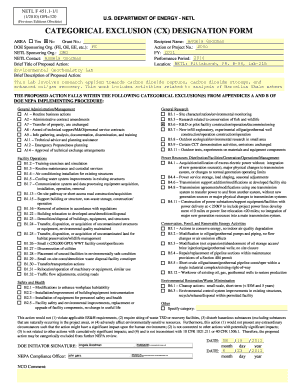
Get ) Fe - Energy
How it works
-

Open form follow the instructions
-

Easily sign the form with your finger
-

Send filled & signed form or save
How to fill out the ) FE - Energy online
Filling out the ) FE - Energy form is an essential step in the categorical exclusion designation process for energy-related projects. This guide provides a comprehensive overview of each section of the form to ensure you complete it correctly and efficiently.
Follow the steps to successfully complete the ) FE - Energy form.
- Click ‘Get Form’ button to obtain the form and open it in the editor.
- Fill in the 'Grant No.' section accurately with the designated grant number related to your project.
- Select the appropriate DOE Sponsoring Organization from the options provided, such as FE, OE, or EE.
- In the 'NETL Sponsoring Org.' field, input ORD, ensuring that the identification is correct.
- Provide the name of the NETL contact person in the relevant field, for instance, Angela Goodman.
- Enter a brief title for the proposed action that summarizes the key focus of your project.
- Compose a brief description of the proposed action, including essential details about the project scope and objectives.
- Complete the 'Recipient Name' field with the name of the individual responsible for the project, typically the principal investigator.
- Fill in the 'Action or Project No.' with the related project identification number to ensure proper tracking.
- Specify the Fiscal Year (FY) relevant to your project, ensuring it aligns with your funding timeline.
- Indicate the Performance Period for your project to clarify the duration of the anticipated activities.
- Input the location of the project including specific details such as city and address to facilitate identification.
- Check the corresponding boxes for the applicable categorical exclusions from Appendices A and B as relevant to your project activities.
- Affirm that the proposed action does not violate any environmental, safety, and health requirements by reviewing the provided statements.
- Proceed to the signature section for the DOE Initiator by entering the name and signing digitally, if required.
- Finally, ensure all changes are saved, and then download, print, or share the completed form as necessary.
Complete your submission of the ) FE - Energy form online for efficient processing.
Industry-leading security and compliance
US Legal Forms protects your data by complying with industry-specific security standards.
-
In businnes since 199725+ years providing professional legal documents.
-
Accredited businessGuarantees that a business meets BBB accreditation standards in the US and Canada.
-
Secured by BraintreeValidated Level 1 PCI DSS compliant payment gateway that accepts most major credit and debit card brands from across the globe.