Loading
Form preview
  • US Legal Forms
  • Form Library
  • Other Forms
  • Tennessee Other Forms
  • Tn Ag-0647

Get Tn Ag-0647

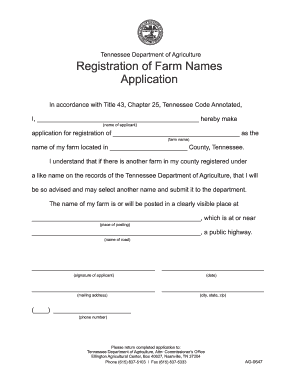
(name of applicant) application for registration of ____________________________________ as the (farm name) name of my farm located in ______________________ County, Tennessee. I understand that if there is another farm in my county registered under a like name on the records of the Tennessee Department of Agriculture, that I will be so advised and may select another name and submit it to the department. The name of my farm is or will be posted in a clearly visible place at ___________________.

How it works

  1. Open form

    Open form follow the instructions

  2. Easily sign form

    Easily sign the form with your finger

  3. Share form

    Send filled & signed form or save

How to fill out the TN AG-0647 online

Filling out the TN AG-0647 form is a straightforward process for registering your farm name with the Tennessee Department of Agriculture. This guide will lead you step-by-step through each section of the form to ensure your application is completed accurately and efficiently.

Follow the steps to successfully complete the TN AG-0647 form.

  1. Press the ‘Get Form’ button to access the TN AG-0647 form and open it in the document editor.
  2. In the first section, fill in your name as the applicant in the space provided. This information is essential for identifying who is making the application.
  3. Next, enter the desired farm name in the corresponding field. Ensure that the name is unique within your county to avoid any registration conflicts.
  4. Indicate the county in Tennessee where your farm is located. This information helps the Tennessee Department of Agriculture to process your application.
  5. In the following section, provide the address where the name of your farm will be posted visibly. This ensures that the registration is public and recognizable.
  6. Enter the name of the public highway near your farm where the farm name will be posted.
  7. Sign the application in the designated area to validate your submission. Ensure your signature matches your name as listed in the earlier section.
  8. Include the date you are completing the application to ensure all information is timely.
  9. Fill in your mailing address, ensuring that the city, state, and zip code are correct for any correspondence that may be needed.
  10. Provide a contact phone number for the department to reach you regarding your application.
  11. Once all sections are completed, review your information for any errors before proceeding to submit the form.
  12. After confirming your details are accurate, you can save any changes, download a copy for your records, print the completed application, or share it as necessary.

Start filling out your TN AG-0647 form online today!

Get form

Experience a faster way to fill out and sign forms on the web. Access the most extensive library of templates available.
Get form

Related content

house joint resolution 647
A RESOLUTION to honor and recognize Kevin Hensley upon being chosen to represent the...
Learn more
Account Code Listing
Account Code Explanations, Salary/Wage Expenses | Other Expenses | Detailed account code...
Learn more
2009 Infiniti G37 Convertible Owner's Manual
Your INFINITI represents a new way of thinking about vehicle design. It integrates...
Learn more

Related links form

FI LV 415 2020 TWG Insurance General Liability Claim Form UC Davis Gallagher Hall Business Card Information CSUSM Procurement Operations Business Card Order Form

Questions & Answers

Get answers to your most pressing questions about US Legal Forms API.

Contact support

To register with the Tennessee Department of Revenue, access their website and complete the online registration form. Be sure to provide all necessary information accurately to avoid delays. The TN AG-0647 feature simplifies this process by guiding you through each step, ensuring that your registration is completed without a hitch.

Registering with the TN Department of Revenue is a simple process. You can complete the registration online via their site, providing necessary business information and selecting the appropriate tax classifications. The TN AG-0647 feature offers guidance throughout this process to ensure you fulfill all requirements efficiently.

To obtain a Tennessee sales tax ID number, you should visit the Department of Revenue's website. You can fill out the application online, ensuring you gather all required documentation beforehand. With the TN AG-0647 feature, you’ll find helpful resources that make the process straightforward and user-friendly.

Yes, you can register your vehicle online in Tennessee through the official Department of Revenue website. By utilizing the TN AG-0647 feature, you can easily complete your registration without visiting a physical location. This online process streamlines your experience and gets your vehicle registration done efficiently.

To achieve property tax exemption in Tennessee, you need to understand the criteria for various exemptions—such as those outlined in TN AG-0647. Completing the necessary documentation and providing proof of eligibility are crucial steps. Consulting resources from uslegalforms can simplify your application process and enhance your chances for success.

Renewing your Tennessee agricultural tax exemption typically involves reapplying using the TN AG-0647 form and demonstrating that your property still meets agricultural use criteria. It's advisable to stay updated with local guidelines, as they can vary by county. Regular checks with local tax officials can ensure you remain compliant.

In Tennessee, several groups may be exempt from property taxes, including disabled veterans, certain nonprofits, and farmers who meet the stipulations in TN AG-0647. These exemptions often require validation through documentation and local applications. Checking with county tax offices can provide clarity and assistance.

Typically, property tax exemptions apply to non-profit organizations, certain agricultural activities, and specific government properties in Tennessee. Notably, individuals who meet income or age criteria, like described in the TN AG-0647, can also qualify. Understanding your unique situation is key to taking advantage of available exemptions.

To become tax exempt in Tennessee, you must apply through the appropriate channels, often needing to fill out the TN AG-0647 form. Your application should provide evidence of qualifying status, whether for agriculture, nonprofit activities, or other exemptions. Familiarizing yourself with state requirements can streamline this process.

Applying for a farm tax-exempt number in Tennessee requires you to complete specific forms, such as the TN AG-0647. This process involves proving your status as a farmer and demonstrating the agricultural use of your property. You can usually find the necessary forms and guidelines on the Tennessee Department of Revenue's website.

Get This Form Now!

Use professional pre-built templates to fill in and sign documents online faster. Get access to thousands of forms.
Get form
If you believe that this page should be taken down, please follow our DMCA take down processhere.

Industry-leading security and compliance

US Legal Forms protects your data by complying with industry-specific security standards.
  • In businnes since 1997
    25+ years providing professional legal documents.
  • Accredited business
    Guarantees that a business meets BBB accreditation standards in the US and Canada.
  • Secured by Braintree
    Validated Level 1 PCI DSS compliant payment gateway that accepts most major credit and debit card brands from across the globe.
Get TN AG-0647
Get form
  • Adoption
  • Bankruptcy
  • Contractors
  • Divorce
  • Home Sales
  • Employment
  • Identity Theft
  • Incorporation
  • Landlord Tenant
  • Living Trust
  • Name Change
  • Personal Planning
  • Small Business
  • Wills & Estates
  • Packages A-Z
  • Affidavits
  • Bankruptcy
  • Bill of Sale
  • Corporate - LLC
  • Divorce
  • Employment
  • Identity Theft
  • Internet Technology
  • Landlord Tenant
  • Living Wills
  • Name Change
  • Power of Attorney
  • Real Estate
  • Small Estates
  • Wills
  • All Forms
  • Forms A-Z
  • Form Library
  • Legal Hub
  • About Us
  • Help Portal
  • Legal Resources
  • Blog
  • Affiliates
  • Contact Us
  • Delete My Account
  • Site Map
  • Industries
  • Forms in Spanish
  • Localized Forms
  • State-specific Forms
  • Forms Kit
  • Real Estate Handbook
  • All Guides
  • Notarize
  • Incorporation services
  • For Consumers
  • For Small Business
  • For Attorneys
  • USLegal
  • FormsPass
  • pdfFiller
  • signNow
  • altaFlow
  • DocHub
  • Instapage
Form Packages
  • Adoption
  • Bankruptcy
  • Contractors
  • Divorce
  • Home Sales
  • Employment
  • Identity Theft
  • Incorporation
  • Landlord Tenant
  • Living Trust
  • Name Change
  • Personal Planning
  • Small Business
  • Wills & Estates
  • Packages A-Z
Form Categories
  • Affidavits
  • Bankruptcy
  • Bill of Sale
  • Corporate - LLC
  • Divorce
  • Employment
  • Identity Theft
  • Internet Technology
  • Landlord Tenant
  • Living Wills
  • Name Change
  • Power of Attorney
  • Real Estate
  • Small Estates
  • Wills
  • All Forms
  • Forms A-Z
  • Form Library
Customer Service
  • Legal Hub
  • About Us
  • Help Portal
  • Legal Resources
  • Blog
  • Affiliates
  • Contact Us
  • Delete My Account
  • Site Map
  • Industries
  • Forms in Spanish
  • Localized Forms
  • State-specific Forms
  • Forms Kit
Legal Guides
  • Real Estate Handbook
  • All Guides
Prepared for you
  • Notarize
  • Incorporation services
Our Customers
  • For Consumers
  • For Small Business
  • For Attorneys
Our Sites
  • USLegal
  • FormsPass
  • pdfFiller
  • signNow
  • altaFlow
  • DocHub
  • Instapage
Social Media
Call us now toll free:
+1 833 426 79 33
As seen in:
© Copyright 1999-2026 airSlate Legal Forms, Inc. 3720 Flowood Dr, Flowood, Mississippi 39232
  • Your Privacy Choices
  • Terms of Service
  • Privacy Notice
  • Content Takedown Policy
  • Bug Bounty Program