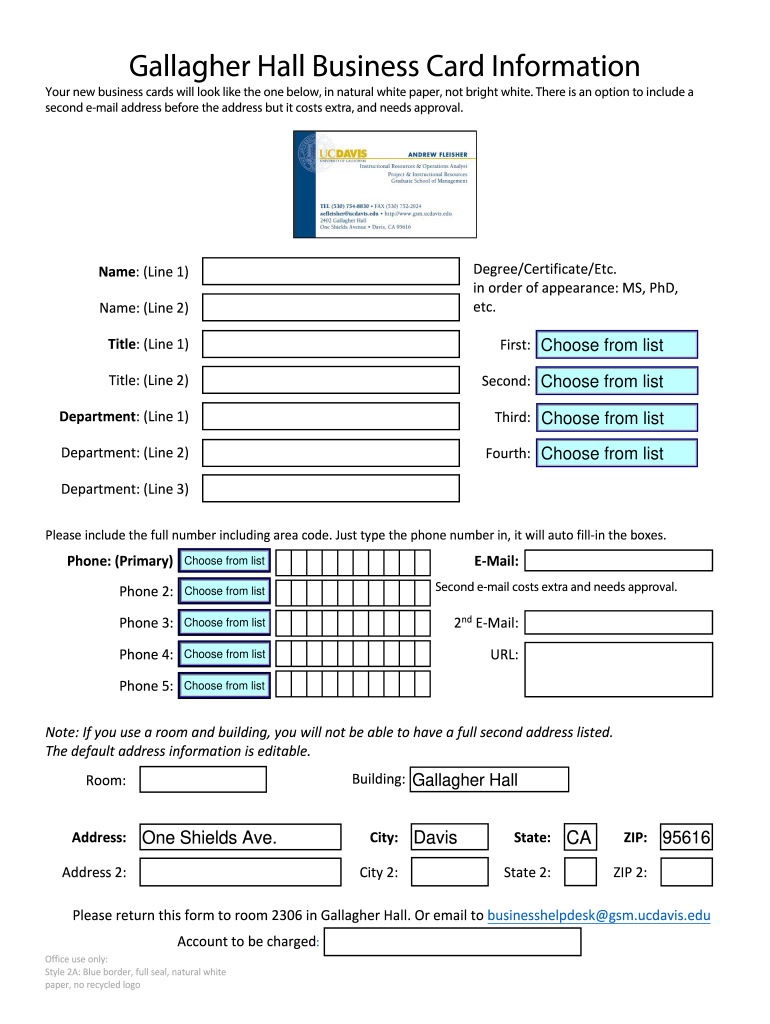
Ore the address but it costs extra, and needs approval. Degree/Certificate/Etc. in order of appearance: MS, PhD, etc. Name: (Line 1) Name: (Line 2) Title: (Line 1) First: Choose from list Title: (Line 2) Second: Choose from list Department: (Line 1) Third: Choose from list Department: (Line 2) Fourth: Choose from list Department: (Line 3) Please include the full number including area code. Just type the phone number in, it will auto fill-in the boxes. Phone: (Primary) Choose from lis.
Loading

Open form follow the instructions

Easily sign the form with your finger

Send filled & signed form or save
How to fill out the UC Davis Gallagher Hall Business Card Information online
Filling out the UC Davis Gallagher Hall Business Card Information form online is an essential process for obtaining your personalized business cards. This guide will walk you through each section of the form to ensure you provide accurate and complete information.
Follow the steps to fill out your business card information effectively.
- Click ‘Get Form’ button to obtain the form and open it in the editor.
- In the first section, enter your name. You will find fields labeled 'Name: (Line 1)' and 'Name: (Line 2)' for this purpose. Ensure you enter your full name as you wish it to appear on the business card.
- Next, input your title in the 'Title: (Line 1)' and 'Title: (Line 2)' fields. If you hold multiple titles, select from the provided list or type them as necessary.
- For the department section, you will see 'Department: (Line 1)', 'Department: (Line 2)', and 'Department: (Line 3)'. Fill in your department information accordingly, selecting the options from the available lists.
- Input your primary phone number in the 'Phone: (Primary)' field. Be sure to include the area code. The form will auto-fill the necessary boxes as you type.
- If applicable, add your email address in the 'E-Mail:' field. You may also provide additional phone numbers in the subsequent 'Phone 2:', 'Phone 3:', 'Phone 4:', and 'Phone 5:' fields, selecting each from the lists provided.
- Should you choose to include a second email address, fill in the '2nd E-Mail:' field. Note that this option incurs an additional cost and requires approval.
- Proceed to enter your address details. The fields include 'Building,' 'Room,' 'Address,' 'Address 2,' 'City,' 'State,' and 'ZIP.' For the address, ensure you input the correct building and room if applicable.
- Finally, review all the information entered to confirm its accuracy. You will have the option to save changes, download, print, or share the completed form.
Complete your business card information online today to ensure a professional representation.
Experience a faster way to fill out and sign forms on the web. Access the most extensive library of templates available.
Related content
Jun 21, 2021 — ... University of California, Davis. (UC Davis), are protective of human...
Please return this form to room 2306 in Gallagher Hall, or email to...
Feb 16, 2024 — *Anne M. Walling, MD/Chair £. UCLA Jonsson Comprehensive Cancer Center...
Get answers to your most pressing questions about US Legal Forms API.
Do and don'ts of business cards?
When creating a business card, do keep it simple, legible, and professional. Utilize UC Davis Gallagher Hall Business Card Information to include only essential elements and refrain from using overly crowded designs and flashy graphics. Remember to proofread your card before printing to avoid any errors while ensuring you maintain a consistent brand image.
How do I set up a UC Davis account?
Setting up a UC Davis account typically involves visiting their official website and completing the registration process. With UC Davis Gallagher Hall Business Card Information, gather necessary details like your student or employee identification number. Following the prompts on the site will guide you through to ensure you can access all relevant resources.
Should I have my name on my business card?
Yes, your name should absolutely feature prominently on your business card. This is the most direct way to establish your professional identity, especially detailed through UC Davis Gallagher Hall Business Card Information. A clearly displayed name allows individuals to remember and identify you quickly during networking events.
What information do you have on a business card?
On a business card, you should provide core information that defines your professional identity. For UC Davis Gallagher Hall Business Card Information, this typically includes your name, job title, phone number, email, and company affiliation. Including social media handles can also enhance your visibility and networking opportunities.
Should I put my phone number on my business card?
Including your phone number on a business card is often recommended, as it allows for quick and direct communication. When utilizing UC Davis Gallagher Hall Business Card Information, ensure your phone number is accurate and accessible. This addition makes it easier for others to reach out to you, strengthening your networking potential.
How do I fill out a business card?
Filling out a business card involves carefully selecting and entering your pertinent information. With UC Davis Gallagher Hall Business Card Information, aim for clarity and professionalism in your details. Make sure to review your layout to ensure it is pleasing to the eye and easy to read, enhancing the card's effectiveness.
What information should a business card contain?
crafted business card should include your name, position, company name, phone number, email address, and campus address. For those utilizing UC Davis Gallagher Hall Business Card Information, consider adding your LinkedIn profile or website for additional engagement. Having these details ensures individuals can easily contact you after an introduction.
What is your business card?
A business card is a small card that features your business information. Specifically, for UC Davis Gallagher Hall, a business card provides essential details like your name, title, and contact information. This card acts as a convenient way to share your professional identity and initiate business connections.
What information to add on a business card?
When adding information on your business card, consider including your full name, job title, company name, and multiple contact methods like a phone number and email address. Specific to UC Davis Gallagher Hall, make sure you also add any relevant URLs, such as your professional profile or department page. This detail can facilitate further engagement and connection with potential contacts.
How to fill a business card?
Filling out a business card requires careful consideration of the information you wish to include. For UC Davis Gallagher Hall, it is recommended to prioritize your name, title, and contact details. Always ensure the design remains clean and uncluttered, as simplicity helps your information stand out and be easily digestible.
Use professional pre-built templates to fill in and sign documents online faster. Get access to thousands of forms.
If you believe that this page should be taken down, please follow our DMCA take down process here.