Loading
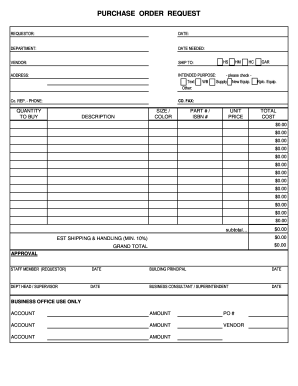
Get Pa Northwest Area School District Purchase Order Request
How it works
-

Open form follow the instructions
-

Easily sign the form with your finger
-

Send filled & signed form or save
How to fill out the PA Northwest Area School District Purchase Order Request online
This guide provides a detailed overview of how to complete the PA Northwest Area School District Purchase Order Request form online. Following these steps will help ensure a smooth and efficient purchasing process.
Follow the steps to accurately complete your purchase order request.
- Click ‘Get Form’ button to obtain the form and open it for completion.
- Fill in the 'Requestor' field with your full name to identify yourself as the person making the request.
- Enter the 'Date' on which you are completing the form to establish a timeline for the request.
- Specify the 'Department' you are representing to clarify which area the order relates to.
- Indicate the 'Date Needed' to communicate urgency and assist in processing the order timely.
- Fill in the 'Vendor' name from whom you are purchasing the items to ensure correct sourcing.
- Complete the 'Ship To' field with a designated location for delivery to facilitate proper shipping.
- Input the 'Address' for delivery, ensuring it is accurate for successful order fulfillment.
- Select the 'Intended Purpose' by checking the relevant box such as Supply or New Equipment to clarify the order's objective.
- Provide the 'Co. Rep' name and 'Phone' for vendor communication if clarification or issues arise.
- List the quantity of items to buy in the 'Quantity' field, ensuring an accurate count of requested products.
- Fill in the 'Description' with the name of the item for clarity on what is being purchased.
- Specify the 'Size / Color' as applicable to ensure the correct item specification.
- Add the 'Part #' or 'ISBN #' to the field for better identification of the required product.
- Input the 'Unit Price' for each item, which will be used to calculate total costs.
- Verify and record the 'Total Cost' by multiplying the unit price by the quantity to ensure accuracy.
- Check the subtotal, estimated shipping, and handling fees to ascertain the 'Grand Total' before final approval.
- Ensure that all required approvals are obtained by having the requestor, building principal, department head, and business consultant or superintendent sign and date the form.
- Once completed, save your changes, and choose to download, print, or share the form as needed.
Complete your purchase order request online efficiently and ensure your supplies are ordered promptly.
The Northwest Area School District app by SchoolInfoApp enables parents, students, teachers and administrators to quickly access the resources, tools, news and information to stay connected and informed!