Loading
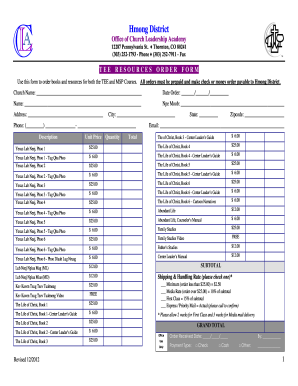
Get Hmong District Tee Resources Order Form 2012-2026
How it works
-

Open form follow the instructions
-

Easily sign the form with your finger
-

Send filled & signed form or save
How to fill out the Hmong District Tee Resources Order Form online
This guide provides clear instructions for users on how to complete the Hmong District Tee Resources Order Form online. Whether you are ordering resources for the TEE or MSP courses, you will find helpful guidance for each section of the form.
Follow the steps to fill out the Hmong District Tee Resources Order Form correctly.
- Click the 'Get Form' button to access the order form and open it in your preferred online format.
- Enter your church name in the designated field to identify the ordering group.
- Input the order date in the format of day/month/year to document when the order is placed.
- Provide your name in the space allocated for clarity on the order's applicant.
- Fill out 'Npe Moob' to specify your role or title associated with your church to ensure proper identification.
- Complete your address in the required fields, including city, state, and zip code, to confirm delivery details.
- Insert your phone number in the appropriate format for communication regarding your order.
- List the resources you wish to order by providing the quantity for each item and calculating the total for each line based on the unit price.
- Check the relevant shipping and handling rate option that corresponds to your order total for accurate shipping costs.
- Review the subtotal and calculate the grand total, ensuring that all entries are accurate before submission.
- At the end of the form, confirm your payment type by selecting one of the options provided.
- Once you have completed all fields and reviewed your order, save changes, download, print, or share the form as needed.
Begin filling out your Hmong District Tee Resources Order Form online today!