Loading
Get Az Ub-105-ff 2023-2026
How it works
-

Open form follow the instructions
-

Easily sign the form with your finger
-

Send filled & signed form or save
How to fill out the AZ UB-105-FF online
The AZ UB-105-FF is an important form for individuals seeking unemployment insurance in Arizona. This guide will provide clear and supportive instructions on how to complete the form online, ensuring a smooth filing process.
Follow the steps to successfully complete the AZ UB-105-FF.
- Click the ‘Get Form’ button to obtain the form and open it in your preferred editor.
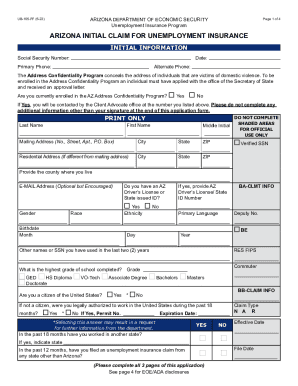
- Begin with the initial information section. Enter your social security number, date, primary phone number, and alternate phone number.
- Indicate if you are enrolled in the AZ Address Confidentiality Program by selecting 'Yes' or 'No'. If 'Yes', only add your signature at the end of the application.
- Fill in your personal details, including your last name, first name, middle initial, mailing address, residential address (if different), city, state, and ZIP code.
- Complete the optional fields such as your email address. Provide demographic information like gender, race, ethnicity, and primary language.
- Answer the questions regarding your legal authorization to work, previous employment in other states, and any gaps in employment.
- Provide information regarding your last employer, including the company's name, contact information, and last day worked.
- In the identification section, upload a clear photo of a valid government-issued ID.
- Review your entries for accuracy. Sign the form manually as electronic signatures are not accepted.
- Once completed, you can save changes, download the document, print it, or share it as necessary. Finally, submit the form via fax, mail, or email as specified.
Start the process of filing your AZ UB-105-FF online today to ensure timely access to unemployment benefits.
Online: 24 hours a day using Unemployment Benefits Services at ui.texasworkforce.org. Select Request a Payment. You will need a User ID and password. ... Phone: Tele-Serv, our automated telephone system, at 800-558-8321. Select Option 1.